Adding a payment method to Shopify takes five steps: open an account with a provider such as iyzico or PayTR, get your API keys, select a third-party provider under Settings > Payments, enter the keys, and run a test payment. Shopify Payments, Stripe and PayPal are not available in Turkey, so stores rely on local providers and bank virtual POS.
Shopify Payment Methods: Which Options Work in Turkey?
Shopify payment methods cover all the infrastructure an ecommerce store can use to take payments from customers, and different options apply in each country. Because of local regulations, a seller running a Shopify store in Turkey cannot use global providers such as PayPal or Stripe; instead, they have to turn to payment service providers licensed by the CBRT (Central Bank of the Republic of Turkey). As of 2026, the most common approved solutions for Shopify stores in Turkey are iyzico, PayTR and bank virtual POS terminals.

Adding a payment method in the Shopify admin requires no technical knowledge; however, choosing the right provider, optimizing commission rates and ensuring legal compliance is a critical decision process. Choosing the wrong provider both increases commission costs and lowers customer conversion.
Payment Method Options for Shopify in Turkey
The payment methods available to a Shopify store in Turkey fall into three main categories: payment service providers (iyzico, PayTR), bank virtual POS terminals and alternative payment methods. Shopify Payments isn't available in Turkey yet. Each category differs in its commission structure, how hard it is to integrate and its effect on the customer experience.
Critical Note: PayPal suspended its operations in Turkey in June 2016 after BDDK (the Banking Regulation and Supervision Agency) did not approve its license application; Stripe has never supported Turkey. (Licensing of payment institutions has been with the CBRT since 2020.) Trying to integrate these providers into your Shopify store is both pointless and legally risky.
Payment Service Providers: iyzico and PayTR
iyzico and PayTR are the most widely used payment service providers in Turkey and integrate directly with Shopify. Both hold a CBRT license and offer comprehensive infrastructure for 3D Secure, installment options and customer security.
iyzico is a payment service provider founded in 2013 that became part of PayU in 2019. Popular especially with small and medium-sized ecommerce businesses, iyzico stands out for its easy setup process and wide bank compatibility. For a detailed setup guide to the iyzico integration, see: Shopify iyzico Integration
PayTR, founded in 2009, is one of the longest-established payment infrastructures in Turkey and is known especially for high-volume transactions and competitive commission rates. For PayTR's Shopify setup guide, see: How to Connect PayTR to Shopify
Bank Virtual POS Terminals
A bank virtual POS is a system obtained directly from a bank, with payments processed through the bank's own infrastructure. Commission rates can sometimes be more favorable than those of payment service providers; however, a bank virtual POS doesn't connect to Shopify directly. Your agreement with the bank is set up on a payment orchestration platform such as Craftgate or Lidio, which then connects to Shopify, so the setup process takes longer. For every step of setting up a virtual POS, see: Shopify Virtual POS Setup
Shopify Payments
Shopify Payments is Shopify's own payment infrastructure and, as of 2026, it is not officially available in Turkey. Shopify has made no official announcement that it is open for use at this time. For the status of Shopify Payments in Turkey and the latest developments, see: The status of Shop Pay and Shopify Payments in Turkey
Shopify Payment Methods Comparison Table
Important: Commission rates vary according to contract terms, transaction volume and bank agreements. The iyzico and PayTR rates are taken from the providers' official pages in October 2026; banks don't publish virtual POS rates and give each business its own quote. Contact the providers directly for exact rates.
Adding a Payment Method to Shopify: Step by Step
Adding a payment method in the Shopify admin involves five basic steps.
Step 1: Open an Account with the Provider
Apply on the iyzico or PayTR website. The required documents are:
- Tax certificate
- Signature circular (authorized signatory list)
- Company bank account details
- IBAN
- Trade Registry Gazette
The documents required for individual sellers differ from those for a company application; iyzico and PayTR offer separate application processes for both profiles.
Step 2: Get Your API Credentials
Once your application is approved, your provider sends you an API key and a secret key. Store these credentials securely.
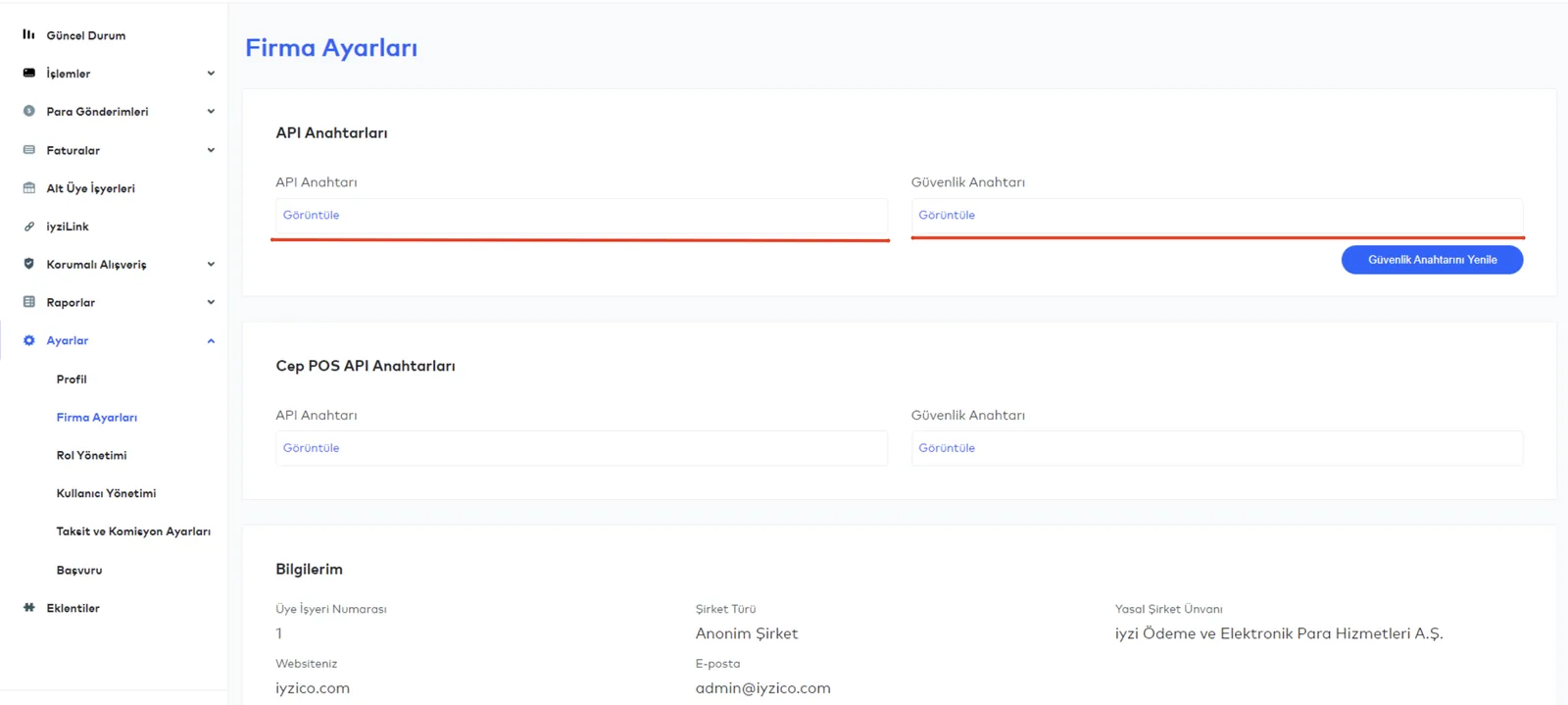
Step 3: Go to the Payment Settings in the Shopify Admin
Log in to the Shopify admin. From the left-hand menu, select Settings, then go to the Payments section.
Step 4: Add a Third-Party Provider
On the Payments page, click "Add payment methods", search for iyzico or PayTR on the "Search by provider" tab, select it and click "Activate".

Step 5: Enter Your API Keys and Test
Enter the API credentials you received from your provider in the relevant fields. First, make a payment in test mode. If the test succeeds, switch to live mode.
Tip: Use the developer documentation of iyzico or PayTR for test card details. No real money changes hands in test mode.
Using More Than One Payment Method on Shopify
On Shopify, only one credit card provider can be active at a time; additional payment methods can run alongside it. However, you can define different payment methods for different markets. You can manage this setup with the HidePay app.

HidePay hides or shows payment methods based on specific countries or customer profiles. For example, cash on delivery and bank transfer can be shown only to customers in Turkey and hidden from customers abroad. For details, see: Market-Based Payment Management on Shopify: HidePay
Legal Compliance and CBRT Requirements in Turkey
To accept payments on your Shopify store, the provider you use must be licensed: since 1 January 2020, payment institutions have operated under a license from the CBRT (Central Bank of the Republic of Turkey), while banks operate under a license from BDDK (the Banking Regulation and Supervision Agency). Accepting payments through unlicensed providers can lead to legal sanctions.
In addition, ecommerce businesses in Turkey have the following legal obligations:
- ETBIS registration: Registration with the E-Commerce Information System is mandatory. For details, see: What Is ETBIS?
- Distance sales contract: Must be presented to the customer before every order. To add the contract and KVKK consent to your store, you can use CompliTR.
- KVKK compliance: Processing customer data, including payment details, falls under KVKK (Turkey's data protection law).
Settings That Increase Conversion at Checkout
Adding a payment method is only the start; increasing conversion requires a separate optimization process.

Enable installment options. According to Baymard Institute's list, which averages 50 studies, 70.22% of online shopping carts are abandoned, and in Baymard's survey of US shoppers, 9% of those who abandoned a cart cited not having enough payment methods. Offering installments can reduce cart abandonment, especially for high-value carts. Both iyzico and PayTR support installments for multiple banks.
Customize the checkout page. Shopify's default checkout page contains some labels in English. Checkout texts are translated through the language settings and the checkout editor (Checkout Extensibility). On standard plans, enable the Turkish option in the language settings.
Make 3D Secure mandatory. With some providers, 3D Secure is optional. In high-risk product categories (electronics, digital products), making 3D Secure mandatory lowers the chargeback rate.
Common Mistakes
Using the wrong API environment: Going live with test API keys prevents you from accepting payments. Always check that your live and test keys are different.
Not accounting for Shopify's transaction fee: When you use a provider other than Shopify's own payment infrastructure, Shopify charges an extra fee on every transaction (2% on the Basic plan, 1% on the Grow plan, 0.6% on the Advanced plan, 0.2% on the Plus plan). This cost should be included in your commission calculations.
Not verifying the customer's address: Some banks decline transactions where the billing address does not match the card address. Make the address fields mandatory on the checkout page.
Contents: Your Shopify Turkey Payments Cluster
This guide is the central page of our cluster on Shopify payment systems in Turkey. For detailed setup guides, see:
- Shopify iyzico Integration: Step-by-Step Setup
- How to Connect PayTR to Shopify
- Shopify Virtual POS Setup
- Market-Based Payment Management on Shopify: HidePay
- Shopify Turkey: The Complete Guide
FAQ: Shopify Payment Methods
Which payment methods can I use on Shopify? Shopify stores in Turkey can use iyzico, PayTR and bank virtual POS terminals. PayPal suspended its operations in Turkey in 2016 after BDDK did not approve its license application; Stripe has never supported Turkey. Shopify Payments is not yet available in Turkey as of 2026.
Is iyzico or PayTR better? Both providers are reliable. iyzico stands out for its easy setup and customer support, while PayTR offers more competitive commission rates for high-volume transactions. Which one is more cost-effective depends on your monthly transaction volume, so get a quote from both providers for your volume and compare the total cost.
Can I offer installments on Shopify? Yes. Through iyzico and PayTR, you can set up installments for credit cards from all major banks in Turkey. The number of installments and the participating banks are configured in the provider's dashboard.
Do I need to set up a company to add a payment method to Shopify? No, it is not required. Both iyzico and PayTR also accept applications from individuals (sole traders). However, opening a company account brings advantages such as higher transaction limits and the ability to issue corporate invoices.
How long does payment integration take? iyzico officially approves a complete application within 24 hours; with document and compliance checks, opening the account often takes 5 business days in practice. PayTR reviews applications within 2 hours at most during business hours; opening the account, including the quote, documents and contract, is usually completed within 1-5 business days. The Shopify integration steps themselves take 15-30 minutes. Bank virtual POS applications can take 1-2 weeks, depending on the bank's approval process.
How do you accept international payments on Shopify? Shopify stores in Turkey can accept payments from foreign cards through iyzico and PayTR. You can manage currencies in your Shopify Markets settings and control which payment methods appear in each market with the HidePay app.
Which payment infrastructure should Shopify stores in Turkey use? Shopify stores in Turkey should use iyzico or PayTR, which are CBRT-licensed providers. Both are added as payment providers under Settings > Payments in the Shopify admin and allow you to accept installment payments with Turkish credit cards.
How do you set up iyzico on Shopify? To add iyzico to Shopify, you first open an account at iyzico.com and get your API keys. Then, in the Shopify admin, you go to Settings, Payments, Third-party providers, select iyzico and enter your API credentials. If the test transaction succeeds, you switch to live mode.
Can Shopify Payments be used in Turkey? As of 2026, Shopify Payments is not officially available in Turkey. Sellers in Turkey need to use local payment providers such as iyzico, PayTR or a bank virtual POS.
Adding Shopify payment methods is one of the most critical steps in your ecommerce infrastructure in Turkey. iyzico and PayTR are CBRT-licensed providers with an official Shopify integration and wide compatibility with Turkish banks. A virtual POS, with its lower commission rates, can be the preferred option for high-volume transactions.
Nodus Works offers support to set up and test your payment integration or to optimize your commission structure. Explore our Shopify integration services or contact our team directly.





