Shopify Store Setup

The easiest and most professional way to bring your brand into the online world: building a modern, fast and sales-ready e-commerce store with Shopify.

With Shopify's powerful infrastructure, we build a modern, fast and sales-ready e-commerce store. We design a user-friendly experience where you manage your product, payment, shipping and inventory processes from a single hub.

200+
200+ active brands
grow on Shopify with Nodus Works
2-4 weeks
average setup time for a sales-ready store
30 days
free technical support after launch
100%
store, account and domain are entirely yours
Single panel
manage products, payments, shipping and inventory from a single hub
SEO-friendly setup
Brands growing with Nodus Works
SETUP OPTIONS

Which setup option fits your brand?

There is more than one way to open a Shopify store. You can launch on a ready-made theme within a few weeks, or design from scratch and build the theme from the ground up. The right option depends on catalog size, campaign intensity, how distinctive the brand needs to look and the size of your in-house team.

Setup optionWhat it meansWho it suitsTypical timeline
Ready-made theme
A theme is chosen from the Shopify Theme Store; colors, typography and sections are adjusted to the brand without touching the theme code.New brands with a simple catalog that want to go live quickly2-4 weeks
Customized theme
A ready-made theme is the starting point; brand-specific sections are written for areas such as the product page, filters and the cart drawer.Brands that want a distinctive presentation without the cost of a custom theme4-6 weeks
Custom theme
The design is drawn from scratch in Figma and the theme is written with only the code it needs; features you do not use are not carried along.Brands with a strong visual identity, a heavy campaign calendar or a large catalog6-10 weeks
Shopify Plus setup
A setup on the Plus plan with checkout extensions, built-in B2B, automation and a multi-store structure.Brands with high order volume, an ERP connection or several countries8-14 weeks
Headless (Hydrogen)
The storefront is built as a separate application on Shopify's Hydrogen framework; catalog, cart and checkout stay in Shopify.Brands that genuinely hit the limits of the theme architecture and have their own development teamDepends on scope; longer than a custom theme

Timelines assume product data and content arrive ready. You can see which theme a store you like is using with the Shopify theme finder and work out plan costs with the Shopify plan calculator. Details of a Plus setup are on our Shopify Plus solutions page.

SHOPIFY SETUP

Our Shopify Store Setup Process

From analysis to launch, we manage every step for you. We build a brand-specific, SEO-friendly and sales-ready Shopify store end to end; and once it's live, we stay by your side.

Analysis & Planning

We analyze your brand, your target audience and your product structure. With competitor analysis, SEO fundamentals and user experience strategies, we build a roadmap.

Theme Selection & Design Adaptation

We select the Shopify professional theme that best fits your brand and adapt its colors, typography and visuals.

Product & Category Configuration

We add your products in an SEO-friendly way and set up variants, collections and the filtering system.

Payment & Shipping & Tax Settings

We integrate payment systems such as Shopify Payments, İyzico, PayTR or Stripe. We connect with shipping carriers such as Yurtiçi, MNG, DHL and ShipEntegra.

Testing & Launch Preparation

We test the payment, inventory, shipping, cart and notification processes. Once all systems run smoothly, your store goes live.

SEO, Analytics & Training

We provide training on essentials such as using the Shopify panel, adding products, managing orders and creating campaigns. We provide 30 days of technical support after launch.

LAUNCH TIMELINE

A store that opens in six weeks, week by week

How long a Shopify store setup takes depends on running the work in parallel rather than in sequence. The plan below is a typical timeline for a store built on a customized theme. The payment provider application starts in week one, because approval time depends on the provider and this wait is what stretches the schedule most.

Work item
Week 1
Week 2
Week 3
Week 4
Week 5
Week 6
Discovery and catalog planVariant logic, collection tree, metafield list
Plan
Payment provider applicationiyzico, PayTR, Craftgate or Sipay
Awaiting approval
DesignHome, collection, product, cart; desktop and mobile
Figma
Theme developmentOnline Store 2.0 sections, filters, size chart
Development
Catalog uploadBulk products via CSV, image file names, alt text
Products
Payments, shipping, tax, legal pagesVAT-inclusive prices, shipping zones, agreements
Settings
TestingTest payment, then a live order and refund with a real card
Testing
Launch and team trainingDomain, password removal, sitemap
Launch


A standard setup on a ready-made theme takes 2-4 weeks; the design and theme development rows get shorter. With a custom theme, a multilingual structure or an ERP connection, the timeline extends to 6-10 weeks. Timely design approval and a complete product sheet are the two items that affect the schedule most.

SCOPE AND HANDOVER

What we set up in Shopify during the build

A Shopify store setup is more than a theme and products: payments, shipping, tax, legal texts and tracking are also made ready to sell. The tags under each card show what is configured in Shopify for that item.

Online Store 2.0 theme structure

Pages are built with JSON templates, sections and blocks; your team changes the home page and campaign areas in the theme editor without writing code. Apps are not hard-coded into the theme; they are added as app blocks.

ThemeSection list

Metafields and metaobjects

Size charts, ingredient lists, technical specs or care instructions are stored in metafields. The information is entered once; the product page, filters and comparisons all read from the same field.

Field definitions

Filters and on-site search

Collection filters are set up with the Shopify Search & Discovery app by price, size, color and metafield values; synonyms and product recommendations are managed in the same place.

FiltersSynonyms

Payments that work in Türkiye

Shopify Payments is not available to stores selling from Türkiye; card payments are taken through iyzico, PayTR, Craftgate or Sipay, and installments and 3D Secure run on the provider's screen. Bank transfer and cash on delivery are added as manual payment methods.

CardBank transferCash on delivery

Shipping, tax and delivery

Shipping zones, the free shipping threshold and weight-based rates are defined; tax settings are configured so prices show VAT included. Shipping labels and tracking notifications come out of the admin.

Shipping zonesVAT

Legal texts and consents

Pages for the distance sales agreement, the pre-information form, the KVKK notice (KVKK is Türkiye's data protection law), the cookie policy and return terms are prepared; the cookie banner is linked to Shopify's customer privacy settings.

AgreementsCookie banner

Tracking setup

GA4 and the Google & YouTube and Facebook & Instagram apps are installed; conversions are sent through Shopify's Customer Events. Search Console is verified and the sitemap is submitted.

GA4MetaSearch Console

Notification emails

Order confirmation, shipping confirmation, refund and account emails are rewritten in Turkish in the brand's voice. Welcome and abandoned cart flows are connected with Shopify Email or Klaviyo.

Notification templates

Training and handover document

Hands-on training covers adding products, processing orders and returns, creating discounts and editing the theme. Installed apps and staff accounts are shared in a single list.

TrainingApp list
Accounts in your name

The Shopify account, payment provider and the Google and Meta business accounts are opened in your brand's name. The agency works only through staff or collaborator access; when you leave, access is closed and the store stays with you as it is.

What the setup fee does not cover

The Shopify plan fee, app subscriptions and the payment provider's commission are not included in the setup fee; they are paid directly to Shopify and the provider concerned.

APPS IN THE SETUP

Which of our apps do we install during a store setup?

Three of our apps are part of every new Shopify store we set up: CompliTR handles the KVKK consent, the logo of ETBİS (Türkiye's e-commerce registry) and the distance sales agreement email required to sell in Türkiye, Wizard builds the collection tree from the menu, and Seodus takes care of breadcrumbs, schema markup and internal linking. Because we build these apps ourselves, we configure them on the same schedule as the theme and the catalog.

Bundle Works app iconWishalert app iconSortmax app iconBulkly app iconLoyalis app iconToptan app iconNodmob app iconPeakmerce app iconGoldus app iconSyncly app iconScheduly app iconSupport app iconSV
CompliTR app icon1Wizard app icon2Seodus app icon3Nodus Works
  1. 1CompliTR
  2. 2Wizard
  3. 3Seodus
15+ apps built by Nodus WorksUsed in this service
CompliTR app icon

CompliTR

Legal steps specific to Türkiye
01

It collects KVKK consent from the customer, displays the ETBİS registration logo on the store and sends the distance sales agreement to the customer by email. It verifies addresses with AI, so an incomplete or mistyped address is caught before the parcel ships.

Where it runs
Customer consent, address field, order email
Pre-launch check
Consent record and agreement email on a test order
View CompliTR
Wizard app icon

Wizard

Collection tree from the menu
02

It creates smart collections from the headings in the store menu, so the collection tree and the menu are built in one pass with the same structure. Because it imports and exports collections, the collection list planned in discovery week is uploaded from a single file.

Where it runs
Navigation, collections
Pre-launch check
Every menu heading links to a populated collection
View Wizard
Seodus app icon

Seodus

Breadcrumbs, schema, internal links
03

It adds breadcrumbs to pages and sets up schema markup and internal linking without touching the theme code. When Google crawls the new store for the first time, the page path and structured data are already in place.

Where it runs
Product, collection and blog pages
Pre-launch check
Rich Results Test and Search Console
View Seodus

The settings of all three apps are recorded in the app list handed over at the end of the setup. Our other apps are on the apps page.

ON THE SCREEN

The points we configure during setup on a product page

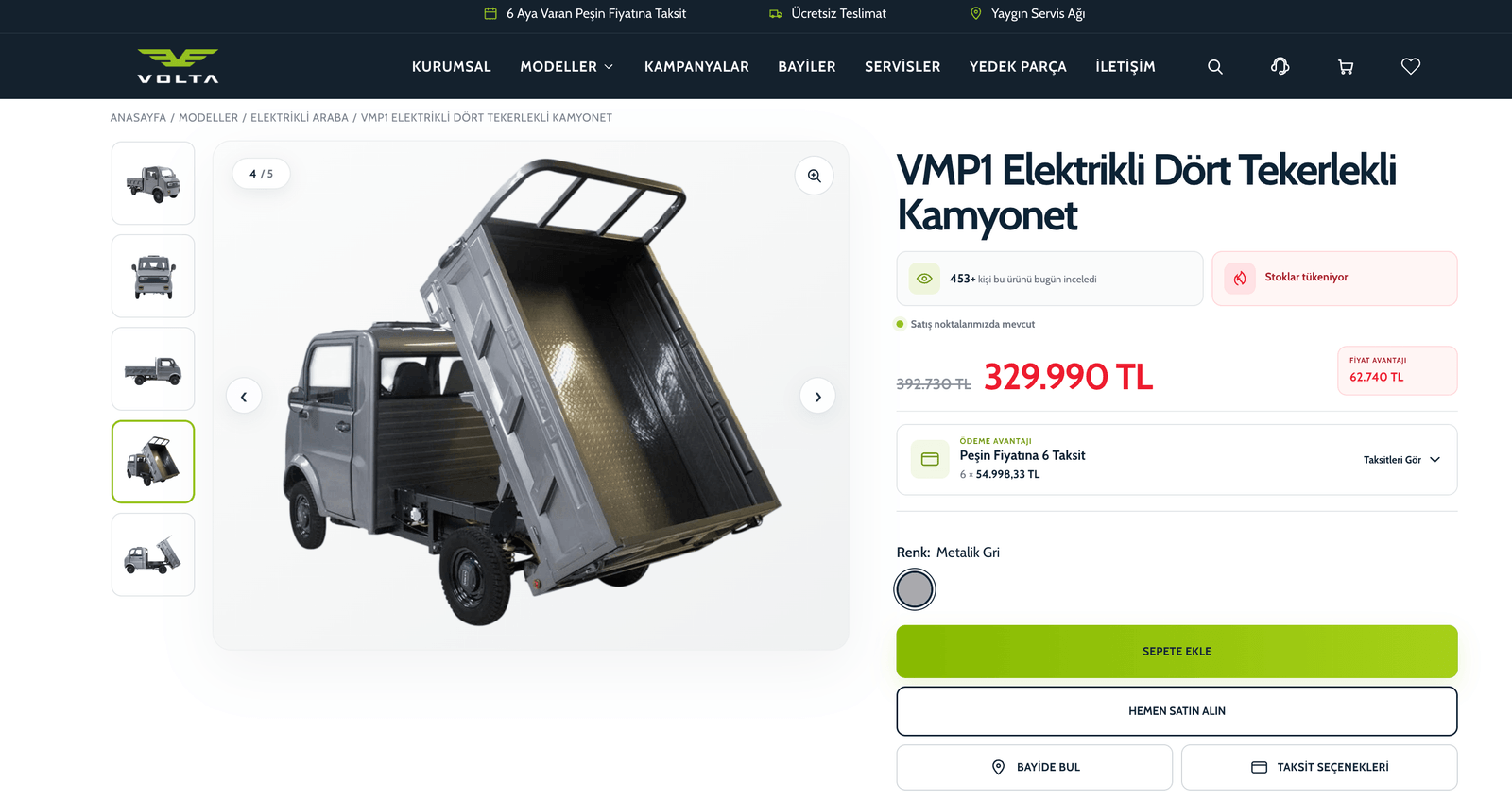
This is Volta Motor's product page on Shopify. Every line the visitor sees is backed by a setting in the admin; during the setup we define these settings before any products are added.

Volta Motor · product page
Volta Motor product page: electric pickup, discounted price, installment information, color selection and add to cart button
  1. Announcement barInstallments, free delivery and service network information are managed from the announcement section in the theme editor; no code is opened when the campaign changes.
  2. Menu and collectionsEvery heading under the Models menu is a collection. The collection tree is written in the first week of the setup and the menu is linked to it through Shopify navigation.
  3. BreadcrumbThe home, models and category steps are generated from the collection structure. They show both visitors and search engines where the page sits in the catalog.
  4. Compare-at priceThe struck-through price comes from the product's compare-at price field. The discount amount is calculated from these two prices, not typed by hand.
  5. Installment informationInstallment options are read from the payment provider's installment table. Since Shopify Payments is not available in Türkiye, this area is set up together with the provider.
  6. Variant selectionColor is a product option; each color is defined as a variant with its own SKU, inventory and image. A Shopify product can carry up to three options.
  7. Buy and dealer buttonsThe add to cart and buy it now buttons enable the quick purchase flow that takes the visitor straight to checkout. The find a dealer and installment options buttons are added to the theme as brand-specific sections.
Why Shopify?

Why Should You Use Shopify?

Shopify is a powerful and reliable e-commerce platform trusted by more than 2 million businesses worldwide. As a Shopify Partner agency, we set up this infrastructure in a way that's tailored to your brand, preparing you for success on both the technical and marketing sides.

Easy Admin Panel

Manage your products, orders and customers from a single panel with no coding knowledge required.

Fast & Mobile-Friendly Infrastructure

Shopify themes are responsive and run in line with Google's Core Web Vitals standards. There are over 1,000 themes available for you to use.

Strong Security Infrastructure

Protect your customers' data with an SSL certificate, PCI compliance and secure payment systems. Don't spend extra on security.

Multi-Language & Currency Support

With Shopify Markets, you can sell to different countries, in multiple languages and currencies.

Thousands of App Integrations

Easily integrate thousands of apps for email, CRM, advertising or inventory management.

Professional Partner Support

As a Shopify Partner agency, we don't just set up your store; we grow it strategically.

PREPARATION CHECKLIST

What to prepare before the setup starts

The most common reason a setup timeline slips is not design or code but missing information and documents. Tick what you already have; we plan the unticked items together in the first meeting.

If you ticked seven or more items, the setup timeline can run at full speed from week one. If you ticked fewer, we fill the gaps in discovery week; the payment provider application and the product sheet are the two items that take the longest.

Let's plan the gaps together
Contact
Let's Build Your Store Together

We're ready to build your Shopify store from scratch, professionally. Let's talk about your needs in a free meeting.

Book a Meeting
CASE STUDIES

Two stores we built from scratch

One is a traditional dessert maker selling online for the first time, the other is our own brand, where we test setups on our own orders first.

Gaziburma campaign image: pistachio baklava on a wooden tray with the logo
Baklava and desserts · Shopify store setup

From phone orders to sales across Türkiye

At Gaziburma, orders from outside the city were handled by phone and by hand, and some of them were lost. We built a fast, mobile-friendly Shopify store; product pages clearly show the type of dessert and the weight, and the order flow was cut to three steps.

37%share of total sales from online orders placed outside Gaziantep
  • Product pages showing dessert type and weight
  • Three-step order flow
  • Location-targeted Google Ads and Meta campaigns
  • A Google Maps business profile that turns into orders
Read the case study
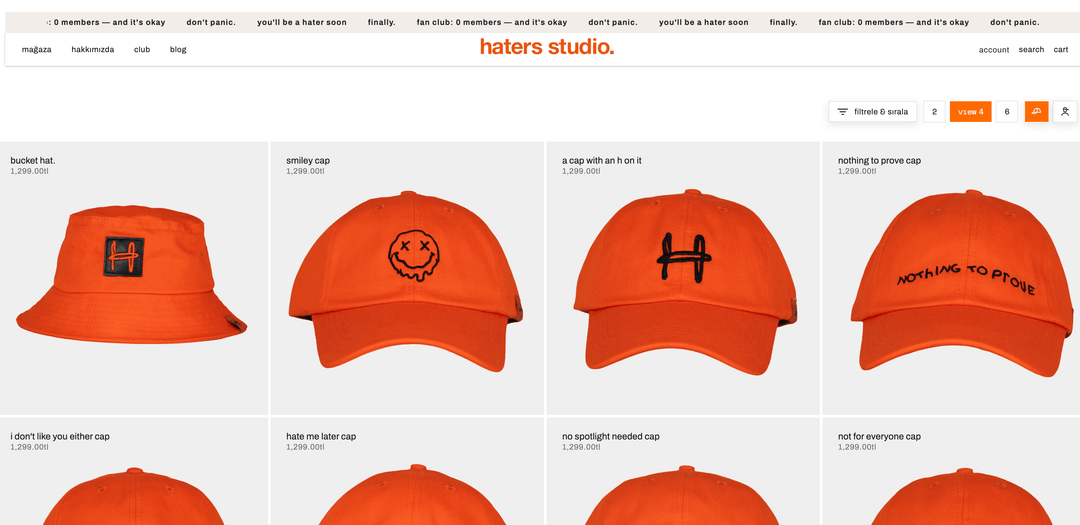
Caps and streetwear · our own brand

Where we test the integrations we recommend in a setup

Haters Studio is the Nodus Works team's own brand. In a small team, most time goes into what happens after the order; we connected the store to Paraşüt, so the invoice is created automatically when an order is completed. Shipments go out from a single flow without being entered into separate panels.

8carriers in a single flow: Yurtiçi, Aras, PTT, HepsiJET, Kargoist, Sürat, DHL and UPS
  • Automatic invoicing on order with Paraşüt
  • A shipping setup that can switch to another carrier when one is delayed
  • Every setup tested here becomes part of the integration packages we recommend to clients
Read the case study
FAQ

Frequently Asked Questions

How long does a Shopify store setup take?
The Shopify store setup time varies depending on the scope of the project. A standard setup is usually completed within 2-4 weeks.
Will the site belong to me after the Shopify setup?
Yes. The store is entirely yours; the Shopify account, domain and app licenses are opened in your name.
Does Shopify support Turkish?
Yes, Shopify offers Turkish language support.
Is Shopify a monthly subscription?
Shopify plans are billed monthly or yearly (Basic, Grow, Advanced, Plus); yearly billing lowers the monthly price.
What are Shopify's fees?
In addition to the monthly fee, Shopify charges different commission rates depending on the plan. This does not include the commission rates of the payment systems.
Can my Shopify store be multilingual?
Yes. With Shopify Markets, you can create different languages and pricing. We also help you go global while keeping SEO compatibility in mind.
Can I get support after the setup?
Yes. We offer 30 days of free support after launch. If you wish, you can join the “Shopify Maintenance & Support Service” plan.
What are the free alternatives to Shopify?
While no alternative fully replaces Shopify — a complete platform for e-commerce — there are options: Woocommerce, Opencart and Magento are the most common ones. If you want to create a free e-commerce site, the only thing that will cost you is acquiring hosting and a domain. There is one more option that, while not free, comes at a low fee: Wix.
Is Shopify suitable for dropshipping?
Yes, with Shopify you can get acquainted with the convenience of stock-free selling by doing dropshipping.
Does Shopify require coding knowledge?
One of Shopify's biggest advantages is that it doesn't require coding knowledge. It has a cloud-based system. This way, you can maintain the integrity of your store without dealing with technical details. You don't have to worry about needs like hosting and server setup.
Can Shopify be downloaded? Does it require installation / a server?
Shopify is a cloud-based platform; it does not require any download or server setup.
How can I get Shopify Türkiye support?
You can reach out to us to get support regarding Shopify Türkiye.

JOIN THOSE
WHO CHOOSE US...

We create Shopify solutions for everyone.

Do you want to set up a new Shopify store, improve your existing one, create custom integrations, or solve speed issues? We are expert Shopify partners who handle the technical work for you.

Dossha

#shopify

Les Benjamins

#shopify

Nocturne

#shopify

Fellas

#shopify

Mai

#shopify

Karaca

#shopify

Milagron

#shopify

Kiğılı

#shopifySeo

Şölen

#shopify

Adell

#shopifyB2B

Ohora

#shopify

Rendrea

#shopifyBooking

Babeskin

#shopify

The New Lab

#shopify

DTF Town

#shopify

Eczaclick

#shopifySeo

Thermos World

#shopify

Halı.net

#shopify

Blend-r

#shopify

Oioi

#shopifySeo

Nowshopfun

#shopify

Marie Claire

#shopify

Gaziburma

#shopify

Book in the World

#shopify

WHY WITH US
YOU NEED TO WORK
WE WOULD LIKE TO TELL YOU

We understand Shopify very well; we stand out against every segment in Turkey:)

Gülümseyen, siyah saçlı ve siyah kazak giymiş genç adam portresi.Koyu saçlı, koyu renk kazak giymiş düşünceli genç kadın, koyu renk arka planda.Gri kazak ve koyu gömlek giymiş, kısa saçlı gülümseyen erkek portresi.Kısa kıvırcık saçlı, sakallı genç adam siyah kazakla, koyu geometrik desenli arka planda.
Koyu gri arka plan önünde yeşil kazak giymiş, hafif dalgalı saçlı, gülen genç kadın.Düz siyah saçlı, gri kazak giymiş genç kadın, koyu arka planda kameraya bakıyor.Gözlüklü ve koyu kazak giymiş, karanlık desenli arka plan önünde ciddi ifadeli erkek portresi.

A team of only Shopify speakers

WE COMMUNICATE VERY QUICKLY - THANKS TO OUR TICKETED SYSTEM
Düz siyah saçlı, açık tenli ve nötr ifadeye sahip genç kadın portresi.

Yo!

My banners seem to be broken :(

Can you help me, I'm on the campaign trail.

Hi Elif!

We dissolve in 2 minutes.

Kısa kıvırcık saçlı, sakallı genç adam siyah kazakla, koyu geometrik desenli arka planda.

Transparent
contract model

Get Quote
Get Quote

Start your next project with Nodus Works

Scroll —
Scroll —
Scroll —