


Shopify Migration Project Process
With its advanced commerce features, flexible infrastructure and AI-supported tools, Shopify has become one of the platforms most preferred by both established brands and independent entrepreneurs. If you are planning to move your brand to Shopify as 2026 approaches, this guide covers the essentials you will need and the points to watch out for during a Shopify migration — whether you work with Nodus Works, run the project with your own team, or hand it to another agency.
This document does not quote Shopify pricing or current Shopify costs. Shopify simply has 3 plans and you pay monthly or annually. Apart from transaction fees, the plans do not differ dramatically in features. Shopify Plus, however, costs up to 50 times more than the others and in return opens up far more room for development, especially on the checkout page.



grow on Shopify with Nodus Works



Project Timeline and Core Phases
| Week | Nodus Works | Brand Side |
|---|---|---|
| Week 1 Discovery and Planning |
Clarifies project scope, checklist and team roles. Analyses the existing infrastructure, integrations and data flows. | Provides panel access, shares business rules and operational priorities. |
| Week 2 Structure Design and Mapping |
SEO URL mapping, metadata structure and content plan are created. Marketing tools and ad setup are finalised. | Approves content and category decisions. Flags edge cases in the existing data structure. |
| Week 3 Build and Test Preparation |
Integration connections and data flows go live. Analytics, pixel and feed structures are set up. | Checks the accuracy of content, imagery and product data. Takes part in stage testing. |
| Week 4 QA and Launch Readiness |
End-to-end tests are run. 301 redirects and technical SEO checks are completed. | Takes part in functional testing. Approves critical pages. Gives final pre-launch sign-off. |
| Task / Phase | Week 1 | Week 2 | Week 3 | Week 4 |
|---|---|---|---|---|
| Discovery and Planning | ||||
| Scope and checklist | ||||
| Infrastructure and integration analysis | ||||
| SEO: URL and redirect audit | ||||
| Structure Design and Mapping | ||||
| UI/UX design | ||||
| Data mapping (product / stock / order) | ||||
| SEO URL mapping and metadata plan | ||||
| Pixel and ad setup | ||||
| Build and Test Preparation | ||||
| Theme development | ||||
| Integration rollout | ||||
| Analytics / feed structure setup | ||||
| 301 redirect and canonical structure | ||||
| QA, Final Checks and Launch Readiness | ||||
| End-to-end order / payment test | ||||
| Legacy customer / order transfer | ||||
| Final technical SEO check | ||||
| Go-live and DNS | ||||
Getting the site live is not a success criterion in itself. The real goal of a migration is that the new Shopify setup works without technical faults, does not disrupt day-to-day operations, and causes no critical data loss or visible performance drop on the brand side.
The core success criteria are:
- Product, category, customer, order and content data transferred correctly
- No critical errors in stock, price, variant and media fields
- Payment, shipping, ERP, CRM, marketing and other integrations working as expected
- SEO-critical pages staying accessible and the necessary redirects set up correctly
- Pixel, event and conversion flows producing sound data
- Teams able to run daily operations in the new admin
- Pages loading at an acceptable speed and the purchase flow running smoothly
It pays to be realistic about migrations: everything being flawless on day one is not always possible. Small issues can surface later — a missing image on some products, a measurement gap in certain events, or a redirect left out on a handful of URLs. The healthiest approach is for both sides to spot risks early and stay open to solving them together.
| Area of Responsibility | Nodus Works | Brand |
|---|---|---|
| Project plan and checklist preparation | Accountable | Approver |
| Shopify setup and migration approach | Accountable | Approver |
| Coordination with technical teams | Accountable | Informed |
| Data transfer plan | Accountable | Approver |
| Steering the testing process | Accountable | Contributor |
| Go-live organisation | Accountable | Approver |
| SEO and measurement risk assessment | Accountable | Informed |
| Sharing existing infrastructure details | Supporting | Accountable |
| Providing panel and system access | Requester | Accountable |
| Business rules and operational priorities | Requester | Accountable |
| Content and data approvals | Reviewer | Accountable |
| Business-unit test checks | Supporting | Accountable |
| Fast feedback loop | Requester | Accountable |
| DNS and domain management | Advisor | Accountable |
What Gets Migrated to Shopify
Descriptions, images, videos, variants, barcodes, SKUs, prices and product details. SEO titles and descriptions are carried over to the new structure.
If options such as colour are spread across separate products, the plan is to preserve those links as far as possible in the new structure.
Category structures are rebuilt to fit Shopify's smart collection logic. Images, descriptions and SEO text fields are included in the transfer.
Passwords cannot be migrated; all other customer data is transferred. SMS and email consents are preserved. Extra fields such as gender and date of birth move into metafields.
Depending on your preference, either all orders or those within a given period can be transferred. Product, price, tax, discount, customer, address, shipment tracking and invoice details are included.
Live stock quantities are imported. Even if stock will be handed over to an ERP or integration after launch, the plan is to migrate the most current figures.
About, contact, delivery, returns and payment pages, along with distance selling, privacy, cookie and refund policies, are repositioned and transferred on the Shopify side.
Not every data field can always be migrated one to one. Scattered product relationships, missing media files or fields held through custom development in particular need to be reviewed before the migration. A Shopify migration is also a good opportunity for a thorough data clean-up.
We have carried out the move to Shopify safely, side by side with a large number of brands. 10+ different platforms, hundreds of different problem sets. Solved.
1 — Revenue volume generated by our Shopify stores in the first quarter of 2026, in US dollars
2 — Average traffic we manage (daily), excluding campaign periods
Shopify-Specific Considerations to Review Before Migrating
In Shopify migration projects, six technical topics specific to Turkey need to be settled up front:
Payment infrastructure
You cannot integrate your bank directly with Shopify. In Turkey you need to use iyzico, PayTR or Craftgate. Outside Turkey, alternatives such as Stripe, PayPal and Shopify Payments are available.
Shipping integration
You cannot connect your carrier directly to Shopify. Integration providers or shipping apps from the Shopify App Store are used instead. Otherwise you have to print labels manually.
Invoicing & ERP
E-invoices cannot be issued directly from Shopify. You need to work with an integration provider or an invoicing app from the App Store.
İYS
Shopify does not store İYS (Turkish commercial message consent registry) data natively. An İYS integration is mandatory. Moving İYS data into Shopify is technically straightforward, but keeping it in sync requires an integration.
Province / District / Neighbourhood
On projects that do not use Shopify Plus, the province–district–neighbourhood structure is not supported by default. Planning the address2 field for the district and telling your integration provider about it from the start is critical.
KVKK & ETBİS
KVKK (Turkish data protection law), distance selling, privacy policy and ETBİS obligations do not come built into Shopify. Legal texts, consent checkboxes and the ETBİS logo integration need to be set up with a solution such as CompliTR.
If nothing so far raises a red flag, there are three critical areas where the game has to be played Shopify's way. Once those are settled too, the migration can begin.
Province / District / Neighbourhood Selection
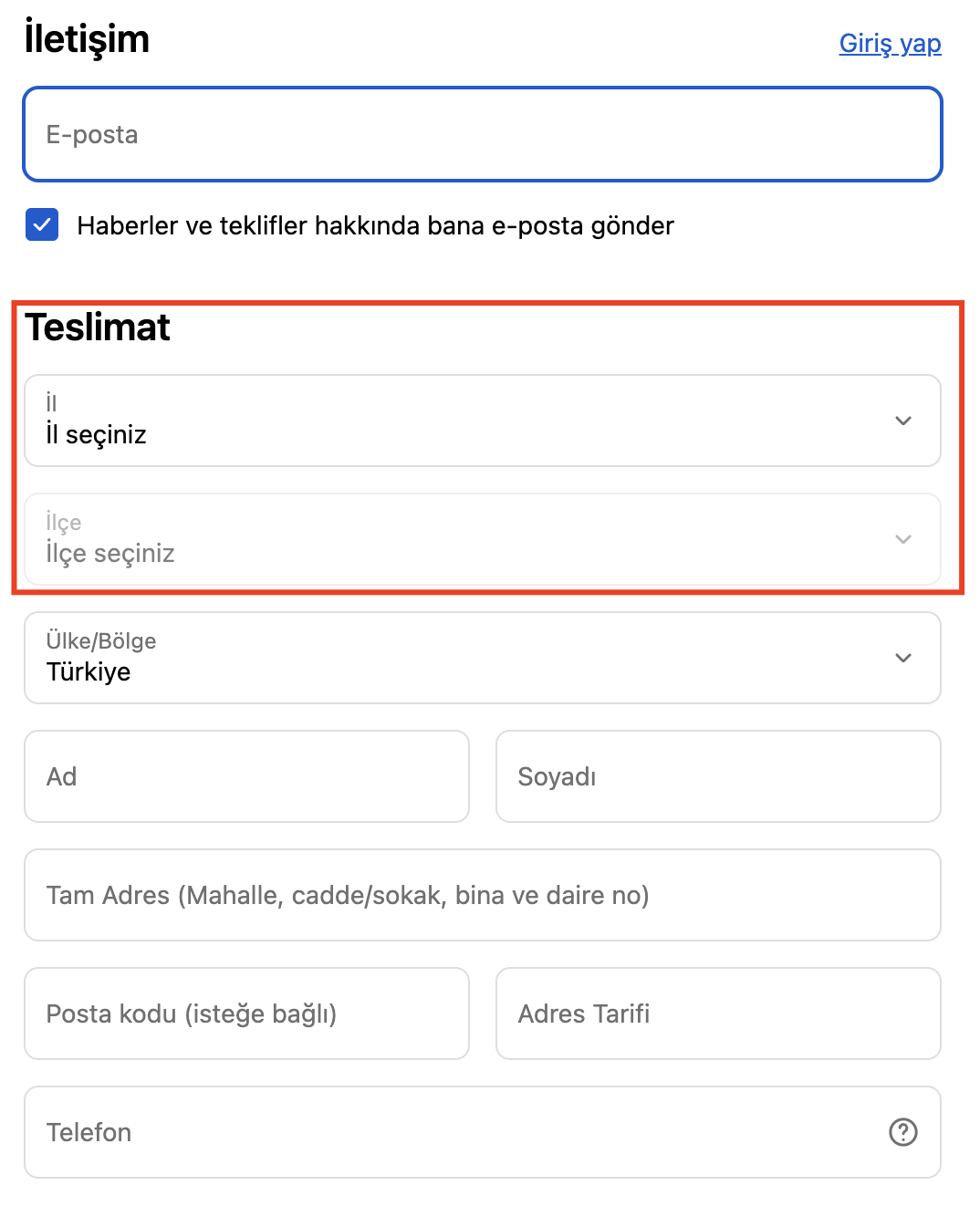
On projects that do not use Shopify Plus, the checkout and address fields do not support the province–district–neighbourhood structure commonly used in Turkey by default. The missing district field in particular, together with the lack of a dropdown, can lead customers into mistakes. The most common solution is to use the second address line (address2) for the district. If you are going to work with an integration provider, it is critical to state from the outset that address2 should be read as the district.
This is one of the most delicate parts of migrating address data: province, district and neighbourhood fields on the old platform may not map one to one onto Shopify's field structure. Mapping the wrong value into address2 during import can corrupt customers' saved addresses and push down order completion rates. If checkout extensibility, GeoNames-based apps or custom checkout fields are on the table, decide at the start of the project and pass the same field logic to the shipping and ERP side from day one. Before go-live, the address flow must be tested with real-world scenarios.
Corporate Invoice / Tax Office / Tax Number
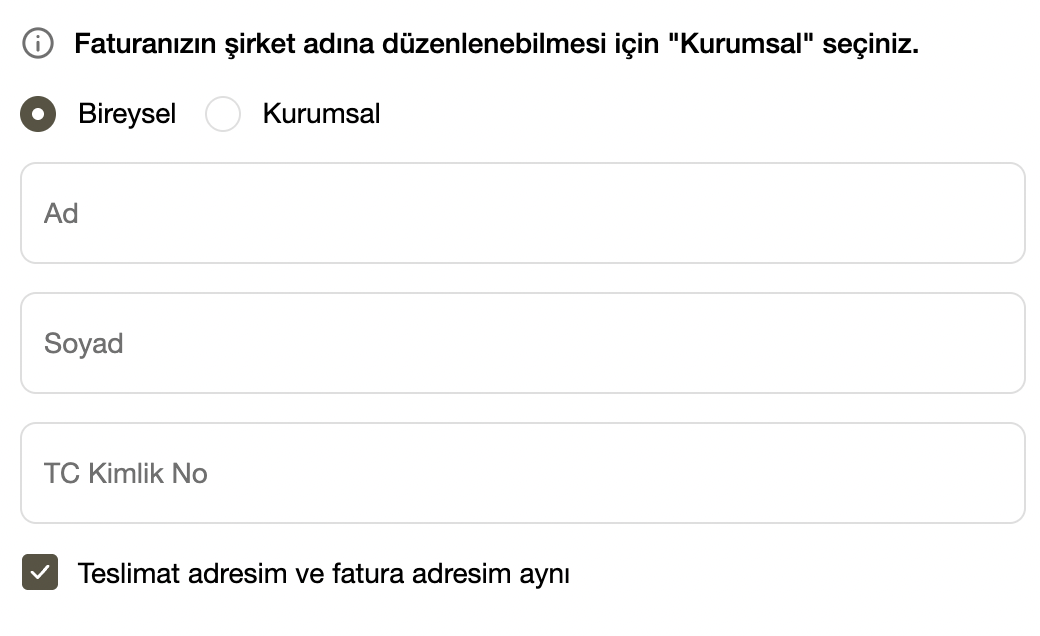
In the standard Shopify checkout flow, fields such as tax number, tax office and company name are not present by default in the form Turkey requires. Where and how you collect this information from customers who request a corporate invoice should be settled at the start of the project.
The common approach is to gather corporate details through extra fields, custom forms or checkboxes added on the cart page.
KVKK, Distance Selling Agreement and ETBİS

Shopify's standard setup does not ship with a KVKK flow built for Turkey. At minimum, the store needs to publish the following texts: KVKK / privacy notice, privacy policy, distance selling agreement, pre-information form, and returns and delivery policies. Publishing the texts is not enough on its own; the data collection points need to be set up as well.
The newsletter, contact form, cart drawer and cart page all need the relevant consent checkboxes and disclosure flows. The CompliTR app brings the ETBİS logo integration, legal text management and automatic post-order email delivery together under one roof for exactly this need.
For a fuller picture of Shopify compliance in Turkey, see our Shopify Turkey legal requirements guide .
Adapting the Product and Variant Data Model to Shopify
One of the most critical parts of a migration is adapting the product and variant logic of the old site correctly to the way Shopify works. If colours were set up as variants under a single product in the old structure, the healthier approach on most Shopify projects is to open those colours as separate products and link them to one another through a metafield.
The main reason is that this structure works more flexibly for both administration and marketing. Each colour gets its own URL, which gives you a more controlled setup for SEO. Separate imagery, separate descriptions, separate media and, where needed, separate campaign management per colour all become easier. Stock tracking also becomes clearer.
Beyond that, the separate-product model usually gives cleaner results on collection pages, in filtering, in product feeds on the advertising side and in third-party integrations. Being able to process each colour as its own product is a significant advantage in Meta, Google, XML and similar feed structures. On the customer experience side the products stay linked to each other, so shoppers can still switch between colours while the underlying structure is far tidier.
As you make this change, map stock, SKU, barcode, imagery, variants and product relationships carefully. Otherwise product links can break as the colours are split out, filtering can fall apart, or products can end up mismatched. The goal is not simply to move the data, but to make the product structure more sustainable and flexible on Shopify. Treat a Shopify migration as an upgrade in every sense, not a like-for-like move.
Customer Accounts and Order History Management
Managing customer accounts and order history deserves careful attention during a Shopify migration, especially for stores that are actively selling. If you have a solid ERP in place, importing thousands of historical orders into Shopify is not always operationally worthwhile. But since customers who bought recently still need returns, exchanges, delivery checks or access to their order history, we recommend migrating at least the last month of orders into Shopify, kept current right up to the moment of cutover.
- You do not always need to migrate the entire order history. If an active ERP is in place, moving thousands of historical orders into Shopify may make no operational sense. But letting customers who ordered recently see their past orders matters a great deal for trust. Migrate at least the last month of orders, kept current up to the moment of cutover.
- Make sure no automatic emails go out to customers while orders are being pulled in. If notification settings are not handled correctly during API or import processes, thousands of customers can receive an email in one go. That creates chaos and makes the migration look amateurish.
- Match the product data inside orders carefully. Products need to be pulled through correctly against fields such as price, discount, tax, quantity, SKU and barcode. If an integration is already live, mismatched products can disrupt marketplace and stock operations. So where possible, do this work before the integration is switched on.
- Migrate address data without duplicating it. Do not needlessly duplicate a customer's existing address records while transferring orders. If the project holds the district in the address2 field, historical order addresses should follow the same logic.
- Do not overlook supporting order data. Fields such as invoice URLs and agreement links may look unimportant at first, but they prove useful later in support and operations.
- Mark the status of historical orders correctly. If you will use the Fulfillment API, make sure delivered orders do not still appear as "preparing" or "in transit" in the system. Transfer tracking IDs and tracking URLs correctly as well.
- Check Shopify notifications before the migration. Temporarily switch off the notifications under Settings > Notifications > Staff notifications in particular. Otherwise dozens of unnecessary alerts land in your team's inboxes. Remember to switch them back on once the process is complete.
- Migrate the core customer account data in full. Email, phone, country/area code, address details and consent data all need to transfer in the correct format.
- İYS and communication consents are critical data. Move the commercial message consents from your current system with the right columns or the right API structure. Losing this data damages your marketing and communication processes.
- Consider any extra customer fields too. Custom fields used for gender, date of birth or segmentation also generate long-term value for marketing and CRM if you bring them across.
- Passwords do not migrate; that is normal. Shopify removed the password structure in 2026.
Legal Texts and KVKK / Distance Selling Compliance
At minimum, the store needs to publish the following texts: KVKK / privacy notice, privacy policy, distance selling agreement, pre-information form, and returns and delivery/shipping policies.
On the KVKK side, publishing the texts alone is not enough; set up the data collection points as well. The newsletter, contact form, cart drawer, cart page and similar areas need consent checkboxes and disclosure flows wherever they apply. Since Shopify's standard setup has no built-in KVKK flow for Turkey, you achieve compliance through the cookie notice, policy pages and form-level checkbox structures. Apps such as CompliTR can be used for this.
İYS and commercial message consents must be part of the data migration. As you migrate customer data, transfer email/SMS consents, the relevant columns and the data processing logic correctly. Managing those consents sustainably on Shopify generally requires an İYS partner or a suitable integration, so settle this at the start of the project.
Review your ETBİS obligation separately. For businesses selling online in Turkey, ETBİS registration and notification obligations matter. If the migration brings a new domain, new company details or a structural change, review the ETBİS side too.
Go-Live Risk Assessment and Mitigation Plan
In Shopify migration projects, operational risks do not appear only on go-live day. The genuinely critical risks usually build up during the preparation period before the migration, in data mapping, in the integration design and while the marketing infrastructure is being rebuilt. A small mistake at this stage can push down ad performance, break the order flow, damage SEO visibility, halt marketplace sales or erode the customer experience.
Do not treat a Shopify migration as a change to the front end and the visible world alone. A migration requires data architecture, integrations, marketing continuity, customer experience, legal, SEO and operations to be handled together.
Integrations that do not work, arrive late or break the live setup: One of the biggest risks in a migration is the integration side not being ready, or actively damaging the live system. If a Trendyol, marketplace, shipping, e-invoice or ERP integration is not ready in time, operations can stall. In more critical scenarios an integration can deactivate existing products, corrupt stock levels or content, mismatch products, and cause direct revenue loss because the damaged records are never restored.
Marketing accounts not ready for the migration: Even if the Shopify migration is technically complete, you can lose significant performance data if Meta, Google Ads, GA4, Search Console, GMC, TikTok, Criteo, Klaviyo and similar marketing tools have not been prepared for the new setup. Check ad accounts, catalogues, domain verifications, pixel connections and event structures before the migration.
Broken event and conversion tracking: Events such as add to cart, begin checkout, purchase, view item and sign up failing during a migration is one of the most critical risks. Events disappearing entirely, firing twice or sending the wrong value damages both ad optimisation and analytics accuracy.
Going live before product matching is done: If products do not match correctly in the new structure against the old SKU, barcode, handle, variant logic or category structure, ad catalogues, remarketing flows, marketplace connections and ERP processes can break. If the product ID logic changes in particular, you get product matching problems in Meta catalogues and on Google Merchant.
An incomplete or faulty 301 redirect plan: Failing to redirect old URLs correctly to the new Shopify URL structure can cause serious losses in SEO visibility, ad quality score and customer experience. Prepare the redirect map in advance, especially for product, category, brand, blog and campaign pages.
301 redirects that work in theory but not in practice: Even with a redirect list drawn up, leaving it untested in production leads to redirect chains, 404s, wrong destination pages or lost parameters. Test the redirects you have prepared with sample URLs to confirm they actually work.
A broken or incompletely migrated GTM setup: The Google Tag Manager setup on the old site has usually grown and become tangled over the years. If the container is set up incompletely during the migration, triggers do not match the new DOM structure, or the dataLayer changes, many tracking systems can break at once.
Wrong data reaching GA4 and the ad platforms: Even when events appear to fire, reporting and optimisation break if fields such as currency, value, item_id, item_name, quantity, coupon, shipping and tax carry the wrong values. Data quality matters as much as the presence of the event.
A broken Merchant Center and product feed setup: After a Shopify migration the feed source, product URLs, stock information, variant logic or image links may change. That can lead to product disapprovals, matching problems or a drop in ad performance in Google Merchant Center.
Meta catalogues still tied to old product IDs: If catalogue products on the Meta side are bound to the ID structure of the old platform, pixel events and catalogue products may no longer recognise each other after the Shopify migration. Dynamic ads, remarketing and Advantage+ catalogue flows all suffer as a result.
Email and CRM automations falling flat: If automations running in Klaviyo, Omnisend, HubSpot or similar systems are not aligned to the new store, new domain, new event structure or new customer segments, abandoned cart, welcome, win-back and post-purchase flows can stop working.
Customer consents and marketing data not migrated correctly: Marketing operations suffer if email consent, SMS consent, KVKK/İYS status and segment data transfer incorrectly. Migrating without preserving the opted-in/opted-out distinction creates legal and operational problems later.
Assuming the old platform's integration logic will carry over exactly: Shipping, invoicing, marketplace, ERP, loyalty or dealer setups on Shopify may not work the same way as they did on the old system. If existing processes are not redesigned, operations can stall after the migration.
Marketplace and ERP connections corrupting products: If active integrations are switched on while products are being imported into Shopify, marketplace or ERP systems can rewrite products, change stock levels, break variants or overwrite descriptions. Plan the sequence of data flows from the outset for this reason.
Critical functions missed during theme development: Even with the design signed off, filtering, variant selection, bundle structures, campaign setups, delivery messaging, stock indicators, popups and custom landing flows can end up incomplete. Walk through every page one by one, and do it as a team.
Search, filtering and collection logic left incompatible with the old setup: Conversion rates drop if customers cannot find products the way they did on the old site. Rework collection rules, tags, filter structures, menus and the on-site search experience before the migration.
Assuming SEO is nothing more than redirects: SEO performance falls if titles, meta descriptions, canonical structures, schema, indexability, robots, sitemaps, internal links and collection content are ignored. Redirects matter, but on their own they are not enough.
Forgetting content and campaign pages: Migration projects usually focus on product and category pages, while blog posts, special campaign landing pages, influencer pages, SEO landing pages and micro-pages that receive paid traffic get overlooked. Losing them means losing traffic and sales directly. Make sure you have pulled every page across and reworked their designs too.
Testing payment and shipping only at the technical connection level: Even with an integration in place, operational problems surface late if real scenarios — instalments, bank redirects, failed payments, bank transfer, cash on delivery, free shipping thresholds, regional shipping rules — are not tested.
In-house teams not ready for the new admin: If you migrate before operations, customer service, content, marketing and warehouse teams have got used to the Shopify admin, even a technically well-built store creates inefficiency internally. Teach permission roles, order management and daily operational flows in advance.
Not being able to run the old and new systems in parallel for a while: Many projects need both systems considered together during the migration. If that period is not planned properly, order, stock, customer and campaign data can drift apart on the two sides.
Testing that is not realistic enough: A simple "does the site load" test proves nothing. Test end-to-end scenarios the way a real customer would: browsing, finding a product, adding to cart, applying a discount, completing payment, receiving the email, tracking the order, cancelling and returning. Go through the purchase journey on a relatively slow Android phone, and look at the site on a small screen.
Did you know? 1366×768 is still a very common screen resolution in Turkey.
Treating the migration as a design project rather than a data migration project: The biggest mistake on Shopify projects is seeing the work as nothing more than publishing a theme. The process requires data architecture, integrations, marketing continuity, customer experience, legal, SEO and operations to be handled together.
Performance Optimisation Scope
Performance is one of the most critical topics in a move to Shopify. Performance here is about more than the page loading quickly: it is how fast the customer sees the main content, how comfortably they can interact with the page, and how stable the elements on screen stay while it loads. Shopify assesses store performance largely through the Core Web Vitals framework.
One of the headline metrics here is LCP, which measures how long the main content on the page takes to become visible. Homepage banners, large product images, collection showcases and media areas above the fold affect this metric directly. INP shows how quickly the customer gets a response when they use a button, a filter, a variant selector or add to cart. CLS measures the visual shifts that happen during loading; images without defined dimensions, late-firing popups and dynamic blocks are the most common culprits.
On Shopify projects, speed is not solved by analysing the theme source code alone. The theme structure, the apps in use, third-party scripts, images, video areas, review widgets, analytics tags and marketing tools all have to be assessed together. What really determines performance is the combined effect of every component added to the store. The healthy approach is being able to tell apart the code you genuinely need, the integrations you genuinely need and the content that genuinely has to appear on the first screen. It is entirely possible to make an excellently engineered theme unusable by running 8 or 9 apps on it.
Mobile performance should be treated separately and given higher priority. Since e-commerce traffic is usually mobile-heavy, a setup that performs well on desktop may not deliver the same on mobile. Heavy banners, unnecessary JavaScript, excessive app output and slow filters can weaken the mobile experience considerably. The aim is for product listing, product detail, cart and the pre-checkout flow to stay fluid for a real customer. Chasing a high score for its own sake means little; overly aggressive optimisation decisions can degrade the experience too.
On the marketing and measurement side, Shopify's pixel and script structure works in a more controlled way, largely because of consent management and customer privacy. Some brands find this restrictive at first, but set up correctly it creates no direct disadvantage for SEO. What matters is striking a balance between performance, measurement and consent management.
Post-Migration Support Framework
A Shopify migration is not finished the moment the site goes live. The period that really matters is usually the first day, the first week and the first month afterwards. During this time, order flows, payment steps, shipping and invoicing integrations, customer notifications, ad measurement, redirects, form structures and the overall customer experience need close monitoring. Even when the launch is technically successful, the needs that only real customer behaviour and live operations reveal surface in this window.
That makes the post-migration support plan at least as critical a stage as the migration itself. Confirm in the first 24 hours that core operations are running correctly, review performance and customer flows within the first week, and spend the first month optimising the store for a full fit with the new infrastructure. Feedback that comes in after the migration, the teams settling into the new admin and the real-world behaviour of third-party systems all need careful attention in this period.
As part of our partner agency approach on Shopify migration projects, Nodus Works also provides monthly technical support after the migration is complete — aiming to protect your store's operational continuity, respond quickly to technical needs as they arise, and help you get more out of the new infrastructure.
JOIN THE BRANDS
THAT TRUST US...
We create Shopify solutions for everyone.
Looking to build a new Shopify store, improve your existing one, develop custom integrations, or resolve speed issues? We are an expert Shopify partner that handles the technical heavy lifting for you.

Dossha
#shopify

Les Benjamins
#shopify

Nocturne
#shopify

Fellas
#shopify

Mai
#shopify

Karaca
#shopify

Milagron
#shopify

Kiğılı
#shopifySeo

Şölen
#shopify

Adell
#shopifyB2B

Ohora
#shopify

Rendrea
#shopifyBooking

Babeskin
#shopify

The New Lab
#shopify

DTF Town
#shopify

Eczaclick
#shopifySeo

Thermos World
#shopify

Hali.net
#shopify

Blend-r
#shopify

Oioi
#shopifySeo

Nowshopfun
#shopify

Marie Claire
#shopify

Gaziburma
#shopify

Dünyada Kitap
#shopify