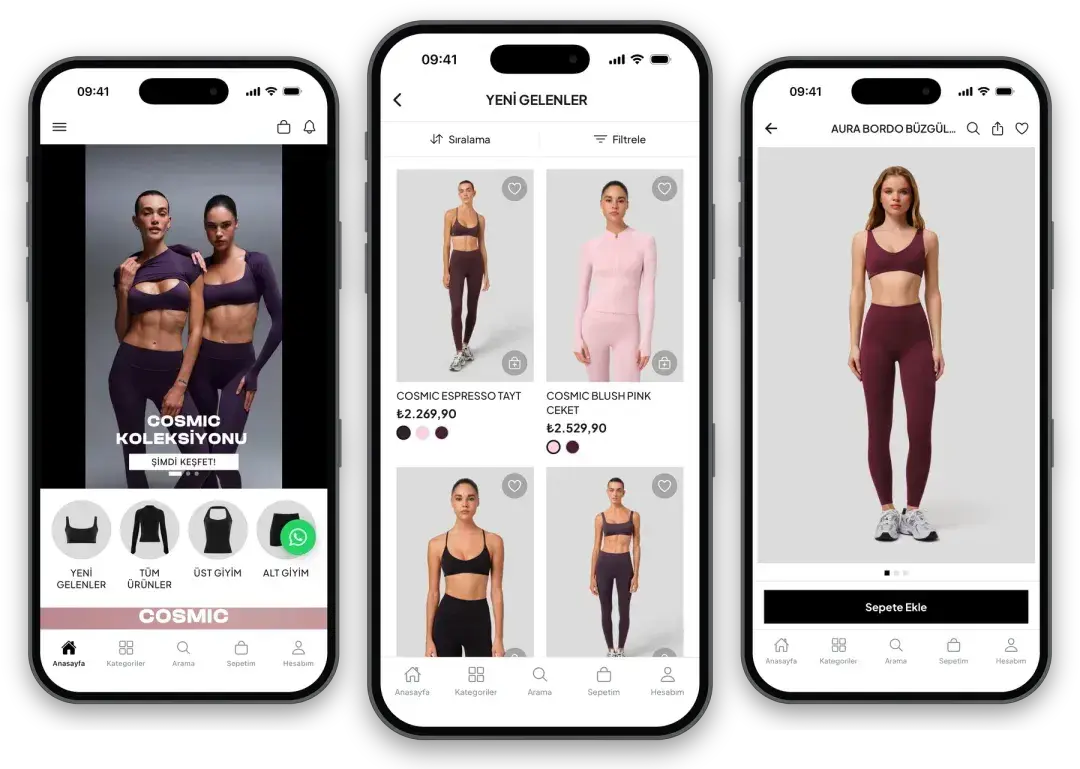
A Custom Mobile App for Your Shopify Store

For Shopify stores, the mobile experience is no longer limited to a responsive theme alone. When customers download a brand from the App Store or Google Play, they expect faster browsing, clearer product discovery, a smooth cart experience, push notifications and a shopping flow tailored to mobile devices. NodMob transforms your Shopify store into a branded iOS and Android mobile app, taking this experience beyond the web theme.

Ask about the mobile app

Brands growing with Nodus Works

The Nodmob app

Your store on the phone: from collection to cart

An app built with Nodmob works with the product, collection and store data in your Shopify store. Customers browse the store on screens built for the phone rather than on a shrunken web page: collections, product details and the cart.

  • Collections

    Collection structure and product images come from Shopify; no separate catalog is managed for the mobile app.

  • Product details

    Metafields such as size charts, color information and care instructions are shown on the mobile product page with richer components.

  • Cart and checkout

    The cart is built from the products in Shopify; checkout is completed through Shopify checkout, the same way as on the web.

iOS & Android

a branded mobile app published on the App Store and Google Play

Push

campaign, restock announcement, product launch and cart reminder notifications

250+

250+ active brands growing on Shopify with Nodus Works

Drag & drop

mobile app design without writing code, right inside the Shopify Admin

Shopify sync

a mobile experience aligned with product, collection, price and stock data

Metafield-supported product experience

NodMob, with its mobile app builder structure that runs inside the Shopify Admin, makes it easy for store teams to bring their product, collection and campaign data into the mobile app experience. With the drag-and-drop editor, the home page, collection showcases, campaign areas and content blocks can be arranged visually. Because the app works with the real product and collection data in Shopify, the mobile experience stays aligned with the store's current commercial structure.

Brand-owned app

Antioch's app sells from the same stock as its web store

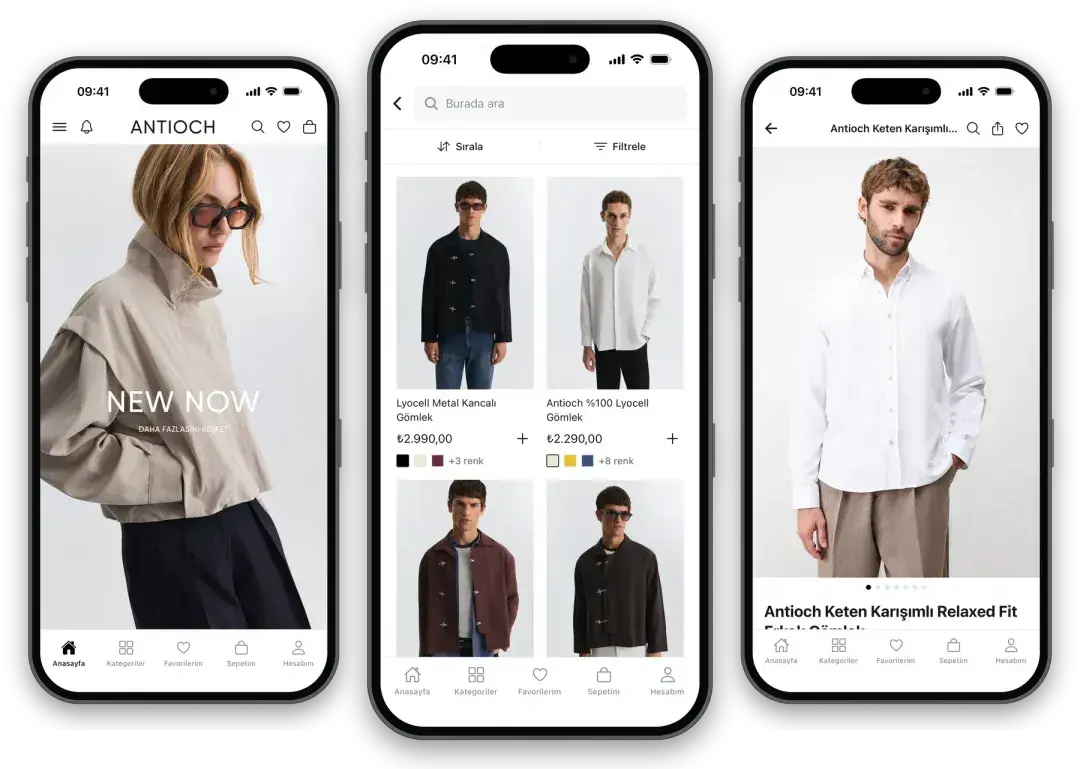
Antioch's sales are split between the website, the mobile app and Noon, and most customers shop from their phones. In the brand-owned mobile app we built, the same catalog and campaigns appear exactly as they do on the web, with stock and prices coming from Nebim, the brand's ERP.

6,000+

products, one stock across three channels

  • More than 6,000 products with the same stock and price on the website, the mobile app and Noon
  • A product that has sold does not stay available on any other channel
  • Theme, mobile app, Nebim sync, SEO and technical support handled by one team
Three screens of the Antioch mobile app side by side

Mobile web or app

Mobile web, PWA, app builder and custom development

There are several ways to build a mobile channel for a Shopify store. The differences show up in App Store and Google Play presence, push notifications and maintenance effort.

OptionStore listing and pushDevelopment and maintenanceWhen it fits
Mobile-friendly themeNot listed on the App Store or Google Play; no push notifications.Covered by regular theme maintenance.A baseline every store needs; an app is added next to it, not instead of it.
PWAprogressive web appNot listed in app stores; on iOS, web push only works once the app has been added to the home screen.Low; added on top of the theme.Brands that do not need app store visibility and see few repeat visits.
App that wraps the websitewebviewCan be submitted, but risks rejection under Apple's guideline 4.2 on “minimum functionality”.Low, but the experience is no different from the web.We do not recommend it; the risk of store rejection and unhappy users is high.
App builderNodmobiOS and Android under the brand's own account, with push and deep links.Screens are edited from the Shopify admin without code; platform updates ship with the product.Most brands that want to launch quickly with their Shopify catalog and campaigns.
Cross-platform custom developmentReact Native, FlutteriOS and Android from a single codebase, with push and deep links.High; every iOS and Android release requires maintenance.Brands whose app needs functions beyond the store (appointments, special memberships, personalization).
Fully nativeSwift, KotlinTwo separate apps with the deepest access to device features.Highest; two separate codebases to manage.Products built around device features such as the camera or augmented reality.

A mobile-friendly theme is the foundation of the mobile channel; an app should be planned as a second channel for customers who order again. When choosing, the real question is not “which technology” but “what will the app offer that the web does not”.

Mobile app

NodMob Mobile App Features

NodMob's most critical advantages include being able to use Shopify data richly within the mobile app. Alongside product and collection information, metafield fields, custom badges, campaign labels, product technical details, size charts, color options, loyalty components or brand story blocks can be brought into the mobile interface. This structure opens up a powerful space especially for fashion, cosmetics, lifestyle and Shopify Plus brands that want to offer an experience beyond the standard product page.

  • iOS and Android Mobile App

    It turns your Shopify store into a permanent mobile sales channel that lives on the customer's phone, beyond the website.

    Drag-and-Drop App Builder

    It lets you edit the mobile app experience faster from within the Shopify Admin, without depending on a developer.

  • Shopify Product and Collection Sync

    It helps you use up-to-date store data in the mobile app without managing a separate catalog between the web store and the mobile app.

    Metafield Support

    It lets you display the rich product data defined in Shopify with more premium and clearer components in the mobile app.

  • Push Notifications

    By communicating directly with existing customers, it turns the mobile app into an active sales channel that gets revisited.

    Firebase and Release Management

    It makes the technical release process more centralized; it ensures the app is managed in harmony with store accounts and mobile services.

Only in the app

What will the app offer that the web does not?

If everything in the app is the same as on the web, customers will not download it. What keeps an app on the home screen is a handful of things the web store cannot provide; we start every project by writing these down.

  1. A concrete reason to download

    An app-only discount code, early access to a new collection or a points program. Which one to offer is decided before screen design begins. Without a reason, installs stall after a few campaigns.

  2. Push permission at the right moment

    The permission prompt is not shown on first launch; it appears when the user sees value, such as adding a favorite, signing up for a stock alert or tracking an order.

  3. Alert when stock returns

    In the app, a back-in-stock alert for a sold-out size or color is one tap away. When the product is restocked, the customer who signed up is notified.

  4. Links open in the app

    With Universal Links and Android App Links, a product link in an email or on social media opens straight in the app when it is installed.

  5. Moving customers from web to app

    Existing customers are directed to the app through the smart app banner on the web store (iOS Smart App Banner), the order confirmation email, packaging and in-store QR codes.

  6. Checkout works as on the web

    The cart is built from the products in Shopify and payment is completed through Shopify Checkout; discount codes and the store's payment provider work exactly as on the web. Apple's and Google's in-app purchase commission does not apply to sales of physical goods.

  7. App orders are measured separately

    Installs, active users, push opt-in rate, push opens and orders from the app are tracked separately; campaign links are tagged with UTM and deep link parameters. Download count alone is not a measure of success.

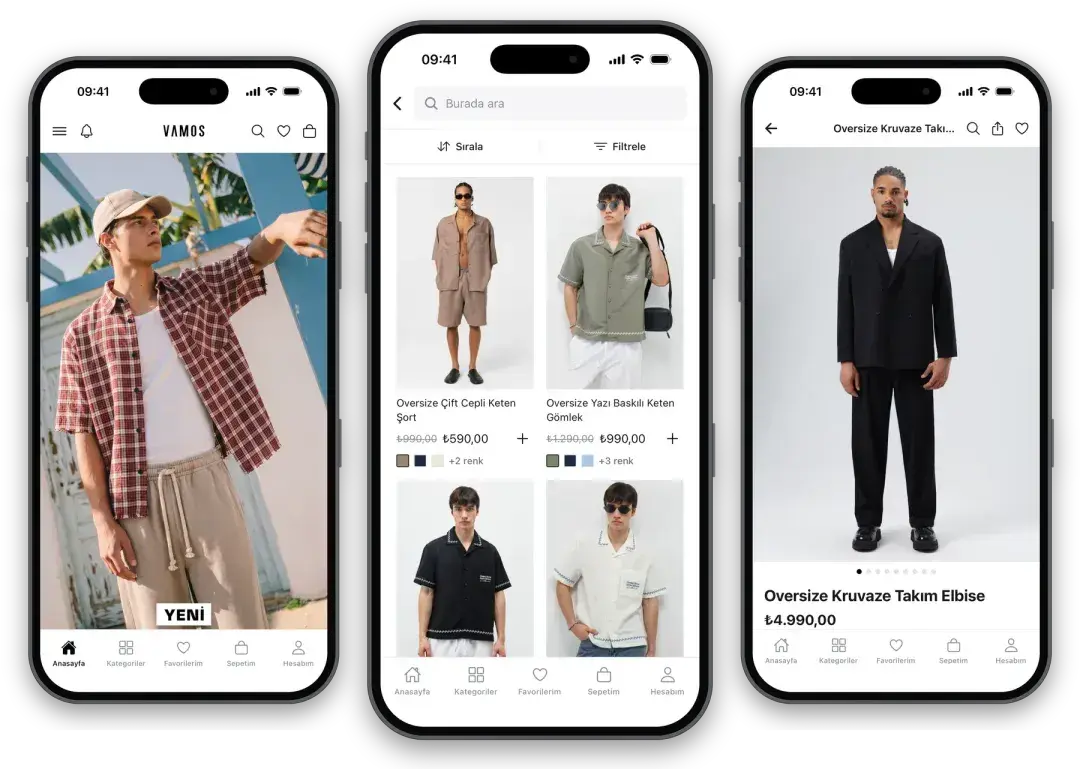
Three screens of the Vamos mobile app side by side
Vamos's mobile app runs on the same catalog and campaigns as its web store.

Our apps

Which of our apps go into a brand-owned mobile app?

Three of our apps work together in mobile app projects: Nodmob turns the Shopify store into an iOS and Android app, Loyalis gives customers coins and rewards as a reason to open the app again, and Wishalert keeps products saved for later on the phone in a wishlist and notifies the customer when they are back in stock. Because we build all three, they are set up within the launch schedule by the same team.

15+ apps built by Nodus WorksUsed in this service

  • Bundle Works app icon
  • Sortmax app icon
  • Bulkly app icon
  • Wizard app icon
  • Toptan app icon
  • Peakmerce app icon
  • Seodus app icon
  • Goldus app icon
  • Syncly app icon
  • CompliTR app icon
  • Scheduly app icon
  • Support app icon
  • Nodmob app icon
  • Loyalis app icon
  • Wishalert app icon

123

Nodus Works
  1. 1Nodmob
  2. 2Loyalis
  3. 3Wishalert
Nodmob app icon

01

Nodmob

iOS and Android app

It turns a Shopify store into an iOS and Android app without any coding. This is the foundation of the project: push scenarios, deep links and tracking events are added on top of the app built with Nodmob. After launch, changing a screen does not require a separate development job.

Where it runs
App Store, Google Play, Shopify admin
Metric we track
Orders from the app, active users

View Nodmob

Loyalis app icon

02

Loyalis

Coins, rewards and VIP tiers

Customers earn coins for purchases, referrals, birthdays, product reviews and signing up; coins turn into discounts, free shipping, gift products, gift cards or store credit. VIP tiers reached through total spend raise the coin multiplier. The reason given for downloading the app stops being a one-off code.

Where it runs
Product page, cart, floating launcher widget
Metric we track
Repeat purchase rate

View Loyalis

Wishalert app icon

03

Wishalert

Wishlist and stock alerts

Customers browsing on their phone often do not buy right away; they save the product for later. Wishalert stores wishlists for logged-in customers and guests, and when a saved product is restocked it sends an email from the store's own domain, so the news also reaches users who declined push notifications. Customers add the product to the cart straight from the wishlist page.

Where it runs
Wishlist page, product page, email
Metric we track
Revenue from wishlists

View Wishalert

Configuring the three apps falls into the setup and integration weeks of the launch schedule below. Our other apps and their App Store links are on the apps page.

All our apps

Our process

Our Mobile App Development Process

From analysis and planning to launch and support, we develop your mobile app end to end.

Analysis & Planning

Defining your needs, analyzing the target audience and clarifying the app's features.

UI/UX Design

Designing user-friendly interfaces that match your brand identity and presenting them for your approval.

Development and Integration

Coding the app and setting up the connections with Shopify APIs and the database.

Testing and Quality Control

Running performance, speed and error tests of the app across different devices.

Store Setup

Setting up the App Store and Google Play Store accounts and submitting the app for review.

Launch and Support

Taking the app live, followed by ongoing maintenance and update support.

Launch schedule

In which week does an app built with Nodmob go live?

The process above, laid out on a calendar. Account approvals and store review are in Apple's and Google's hands, so these steps start in parallel with development.

Step

Week 1

Week 2

Week 3

Week 4

Week 5

Week 6

Week 7

Week 8

Decision and scopeScreen list, push scenarios, measurement goal

3-5 business days

Developer accountsApple Developer Program, Google Play Console, D-U-N-S if needed

Parallel

Screen design and contentHome, collection, product, campaign

Design

Setup and integrationFirebase push, deep links, tracking events, ERP stock

Setup

Store listing and privacy formsApp Privacy, Data safety, screenshots

Listing

Beta testingTestFlight and Google Play internal testing

Beta

Store review and releaseApple and Google review

3-10 business days

An app built with Nodmob typically goes live in 4-8 weeks; a fully custom-coded app takes several months depending on the number of screens and integrations. The two steps that delay the schedule most are the D-U-N-S number and Apple account approval for a company account, and the rejection and fix round that comes back from store review; that is why both are planned from the first week.

Contact

Let's Bring Your Store to an App

Let's turn your Shopify store into an iOS and Android app with NodMob; let's discuss your needs in a free meeting.

Book a Meeting

Common mistakes

Why do apps get downloaded and then forgotten?

An app that is downloaded and forgotten is rarely a technical problem; it is usually a planning mistake. These are the mistakes we see most often in projects, and what we do instead:

Publishing the app under the agency's account

Result: The app, its reviews and its user base are tied to the developer account; moving them becomes a tedious job when you change agencies.

What to do instead: The app is published under the brand's own Apple and Google accounts; we get access as team members.

Wrapping the website as it is

Result: It can be rejected in Apple's review; even if accepted, it offers customers nothing different from the web.

What to do instead: Critical shopping flows are built for the app rather than embedded as web pages.

Asking for push permission on first launch

Result: Users who see the permission prompt before getting to know the app usually decline, and turning it back on means going into settings.

What to do instead: Permission is requested when the user sees value: a favorite, a stock alert, order tracking.

Daily campaign notifications

Result: Notifications get turned off or the app gets deleted.

What to do instead: Segments, frequency caps and quiet hours are set from the start.

Giving no reason to download

Result: If everything in the app is the same as on the web, customers will not download it.

What to do instead: An app-only offer, early access or a points program is planned.

Making decisions without measuring

Result: The app's return and which push drove sales stay invisible.

What to do instead: Orders from the app are tracked separately and push-driven sales are reported.

Filling in privacy forms by guesswork

Result: If the App Privacy and Data safety declarations do not match the data actually collected, updates get stuck in review.

What to do instead: The forms are filled in by listing every SDK in the app and every piece of data it collects.

Forgetting account deletion

Result: In apps where users can create an account, Apple requires that the account can be deleted from within the app; otherwise the app is rejected.

What to do instead: Account deletion is on the checklist before submission.

Leaving the store listing to the last day

Result: The app is hard to find in store search, even by brand name.

What to do instead: Name, subtitle, keywords, description and screenshots are prepared in parallel with development.

Web and app together

At Dossha, the web and the app run the same campaign

Dossha's website and mobile app were connected so that both deliver the same experience. Whichever channel the customer arrives from, product, stock and campaign information is consistent, and shopping continues without interruption even during peak campaign periods.

One stock

for the web store and the mobile app

  • Web and mobile app on a single stock pool with the same campaigns
  • Stock and order sync with Nebim ERP
  • Post-purchase processes and customer communication largely automated
Three screens of the Dossha mobile app side by side

FAQ

Frequently Asked Questions

What does Nodmob do for my Shopify store?

Nodmob helps you create a branded iOS and Android mobile app using the product, collection and store data in your Shopify store. The app lets you build an end-to-end mobile commerce experience with a mobile home page, collections, product details, cart, push notifications, metafield fields and the publishing process.

Is Nodmob a webview app or a native mobile app?

Nodmob's goal is to bring your Shopify store to a genuine mobile app experience. Critical shopping flows are designed to fit the native mobile behaviors that iOS and Android users expect. Depending on the project scope, some hybrid components may be considered; however, the goal is not merely to embed the website inside an app, but to create a branded mobile commerce experience.
Can I design a mobile app without writing code?

Yes. Nodmob helps you edit mobile app screens without writing code through its drag-and-drop editor that runs inside the Shopify Admin. The home page, collection blocks, campaign areas and product showcases can be configured visually.

Do products and collections come from Shopify automatically?

Nodmob works with the product and collection data in your Shopify store. This way, you don't have to manage a separate catalog for the mobile app. Product information, collection structure, images and store data can be used in harmony with the Shopify infrastructure.

Is there metafield support?

Yes. Shopify metafield fields can be brought into the mobile app experience. Product technical details, size charts, color information, care instructions, certificates, campaign badges or custom brand content can be shown with richer components on the mobile product page.

Can I send push notifications?

Yes. With Nodmob, push notifications can be set up for campaigns, product launches, restock announcements, cart reminders or segment-based custom messages. Push notifications turn the mobile app from a merely passive sales channel into an active communication channel through which you can reach the customer again.

Can segment-based push campaigns be created?

Yes. Depending on the store structure and data setup, push notifications can be planned for specific customer groups, behaviors or campaign goals. For example, different messages can be created for customers interested in a new collection, those who shop from a particular product group or app users.

What is deep link support good for?

Deep links help direct the customer from a push notification or campaign message straight to the relevant product, collection, cart or campaign screen. This way, when the user opens the app, they reach the area promised by the message faster instead of getting lost on the general home page.

Is the App Store and Google Play publishing process supported?

Yes. Nodmob supports the configurations needed to make the App Store and Google Play publishing process more manageable. Apple and Google developer accounts, app information, store visuals, the build process, the Firebase connection and release preparations can all be handled within the project scope.

Is maintenance needed after the app is published?

Yes. Mobile apps need to be monitored after they are published as well. iOS and Android version updates, device compatibility, Shopify API changes, App Store / Google Play requirements and app performance require regular maintenance. Nodmob helps make this process more sustainable for brands.

Can custom mobile screens be created for my brand?

Yes. Alongside standard mobile showcases, custom screens, custom content blocks, campaign areas, story flows, loyalty areas or integration modules can be built according to the brand's needs. This structure is especially important for enterprise and Shopify Plus brands. You can get in touch with us for requests like these.

Join the boutique and enterprise brands that choose us

We build Shopify solutions for everyone.

Do you want to set up a new Shopify store, improve your existing store, make custom integrations, or solve speed problems? We are an expert Shopify partner who handles technical work for you.

All references
  • Brands with a success story
  • Our own brand

Why you should work with us

We know Shopify inside out, and we bring day-one energy to every segment in Turkey :)

Close-up black-and-white portrait of a smiling man with abstract patterns in the background.Young woman with long dark hair in a black jacket, posing calmly against a gray background.Smiling young man with dark hair and a beard in a gray sweater, against a gray geometric background.Young man with short curly hair and a beard, neutral expression, in front of a gray background.
Portrait of a softly smiling young woman with wavy light-brown hair in a green sweater, against a gray background.Portrait of a woman with straight black hair, fair skin and a neutral expression.Young man with glasses, dark hair and dark clothing, in front of a dark patterned background.

A team of only Shopify experts

We communicate very quickly - thanks to our ticket system

Portrait of a woman with straight brown hair and fair skin in a dark top, looking straight at the camera.

Hey!

My banners look cut off :(

Can you help? I'm in the middle of a campaign.

Hi Elif!

We'll fix it in 2 minutes.

Eren
Abstract curved glass-like shape with reflections and colorful light refractions on a dark background.

Transparent contract model

Get Quote

Start your next project with Nodus Works

Scroll —