Shopify speed optimization is the set of technical changes that shorten a store's page load times and improve its Core Web Vitals scores. Unoptimized images, extra JavaScript from apps and slow third-party scripts slow stores down the most. Site acceleration means measuring the current state, deleting unused apps, optimizing images and fonts, applying lazy loading and measuring again.
Shopify speed optimization is the set of technical changes made to shorten a store's page load times, improve its Core Web Vitals scores and strengthen the user experience. According to Google's research, when page load time rises from 1 second to 3 seconds, the bounce rate increases by 32 percent; at 5 seconds, that figure climbs to 90 percent. We see this effect in our own projects too: for the women's fashion brand Nocturne, we reworked the theme and technical infrastructure of its UAE and US storefronts so they stay fast even during busy campaign periods; the speed improvement, most noticeable on mobile, helped visitors stay on the site longer and buy more.
Why Does Shopify Speed Optimization Matter So Much?
Shopify speed optimization is not just a technical improvement; it is a business decision with a direct impact on revenue. Page speed affects performance through three separate channels: search engine rankings, conversion rate and customer experience.
Google has used Core Web Vitals as a ranking factor since 2021. Pages whose LCP (Largest Contentful Paint), INP (Interaction to Next Paint) and CLS (Cumulative Layout Shift) scores fall short of the set thresholds lose ground to their competitors. Optimizations made on the Shopify platform affect all three metrics together.
On the conversion side, a 2020 Deloitte study found that a 0.1 second improvement in mobile page speed raised retail conversion rates by an average of 8.4 percent. During high-traffic periods, this effect multiplies.
Important note: A Google PageSpeed Insights score is a diagnostic tool, not a goal in itself. Even with a score of 90, LCP or CLS may still be hurting the user experience. Base your optimization decisions on real user experience (field data), not on the score alone.
Core Web Vitals and Shopify: Google's Speed Criteria
Core Web Vitals are the three core metrics Google defines to measure page experience. Shopify stores influence these metrics directly through their choice of theme, their app load and their image optimization.

LCP (Largest Contentful Paint): The time it takes for the largest image or text block on the page to load. Good: under 2.5 seconds. On Shopify, the LCP element is usually the hero image or a collection banner; uncompressed images hurt this metric directly.
INP (Interaction to Next Paint): The time between a user's interactions with the page and the browser's response. Since 2024, Google has used INP (Interaction to Next Paint) in place of FID. Good: under 200 milliseconds. On Shopify, a heavy JavaScript load is the factor that affects this metric most.
CLS (Cumulative Layout Shift): Elements shifting while the page loads. Good: under 0.1. Font loading, ads and banner areas drag this score down.
7 Main Reasons a Shopify Store Slows Down
The problems that slow Shopify down fall into seven categories. Each category calls for a different technical approach to diagnose and fix.
1. Unoptimized images: The most common problem. Large images saved as PNG or JPEG get noticeably smaller when converted to WebP or AVIF; according to Google's WebP documentation, lossless WebP files are 26 percent smaller than PNGs, and lossy WebP files are 25-34 percent smaller than JPEGs of comparable quality. Shopify 2.0 themes support WebP automatically; older themes require manual conversion.
2. Unnecessary JavaScript load: Every Shopify app adds JavaScript to the page. In stores running 10-15 apps, the JS payload can exceed 2-3 MB. Unused apps should be removed, and the ones you need should be optimized with defer or async loading.
3. Render-blocking resources: When CSS and JS files block page rendering, users see the content late. Critical CSS should be loaded inline and the remaining stylesheets deferred.
4. Slow third-party scripts: Google Analytics, Meta Pixel, live chat and marketing tools each send requests to external servers. These requests extend render time and worsen LCP and INP. Managing them from a single point with Google Tag Manager keeps this load under control.
5. Outdated theme architecture: Pre-2021 themes that do not support Sections Everywhere cannot benefit from modern caching and lazy loading optimizations. Every additional development on these themes adds to the speed debt.
6. Large, bloated Liquid code: Unused code and inefficient loops that build up in a theme's Liquid files increase server-side render time. If TTFB is high, the Liquid code should be reviewed first.
7. Missing or misconfigured CDN: Shopify provides a built-in CDN, but if the custom domain and cache settings are not configured correctly, you do not get the full benefit.
Shopify Speed Tests: Which Tools Should You Use?
In Shopify speed optimization, making decisions based on a single tool leads to wrong conclusions. Each tool measures a different dimension, and they complement one another. Optimization without a proper diagnosis turns into wasted time, while measuring the same symptom with different tools produces conflicting results.

Tip: In PageSpeed Insights, pay attention to the difference between "Field Data" (real user data) and "Lab Data" (simulation). If your field data is poor, your real user experience is broken, even when the lab score is high. Base your optimization decisions on field data.
Google PageSpeed Insights is the starting point: it is free, fast and gives separate results for mobile and desktop. However, lab conditions vary from one test to the next, so scores can fluctuate; take the average of several runs instead of relying on a single measurement.
GTmetrix offers a waterfall view. It is the most practical tool for seeing the load time, size and order of every resource. With GTmetrix, you can spot within seconds which JavaScript file is blocking rendering or which image is larger than it should be.
Shopify Theme Inspector is a Chrome extension built specifically for Shopify. It visualizes the render time of Liquid templates and pinpoints bottlenecks caused by theme code. In custom theme development or extensive Liquid customization in particular, finding the source of slowness becomes very difficult without this tool.
At Nodus Works, our standard workflow for speed audits is as follows: first PageSpeed Insights for the overall picture, then GTmetrix for resource-level analysis, and finally Theme Inspector to examine the Liquid layer. Used together, these three tools make it clear where the problem comes from.
How to Speed Up Shopify: Step by Step
Shopify speed optimization delivers the greatest impact in the shortest time when it follows a clear order of priority. The sequence below is arranged by impact-to-effort ratio.
Step 1: Measure Your Current Performance
Record both mobile and desktop scores with Google PageSpeed Insights, GTmetrix and Shopify Analyzer. Without a baseline, you cannot measure the effect of your optimization. Prioritize the mobile score in particular; Google indexes pages using their mobile version, and most e-commerce visits come from mobile devices.
Step 2: Remove Unused Apps
Disabling apps you no longer actively use is not enough; delete them completely from the Shopify admin. Apps that are disabled but not deleted leave traces in the theme code and may keep loading JavaScript. Run PageSpeed again after each app you delete; this shows you concretely how much load each app was adding.

Step 3: Optimize Your Images
Shopify's CDN automatically serves images in WebP or AVIF when the browser supports it, regardless of your theme, so you don't need to convert files yourself. Aim for a maximum of 200-300 KB for hero images, don't upload images at a higher resolution than you need, and in your theme code, load images with the image_url / image_tag filters rather than hard-coded CDN URLs. Serving different image sizes to different screen sizes with the srcset attribute also improves LCP directly.
Step 4: Implement Lazy Loading
Images and videos outside the viewport should not load when the page opens; they should load as the user scrolls. Modern Shopify themes support this. However, applying lazy loading to the hero image and other above-the-fold content is a mistake, because it worsens LCP. Lazy loading only applies to below-the-fold content.
Step 5: Clean Up Unnecessary JavaScript
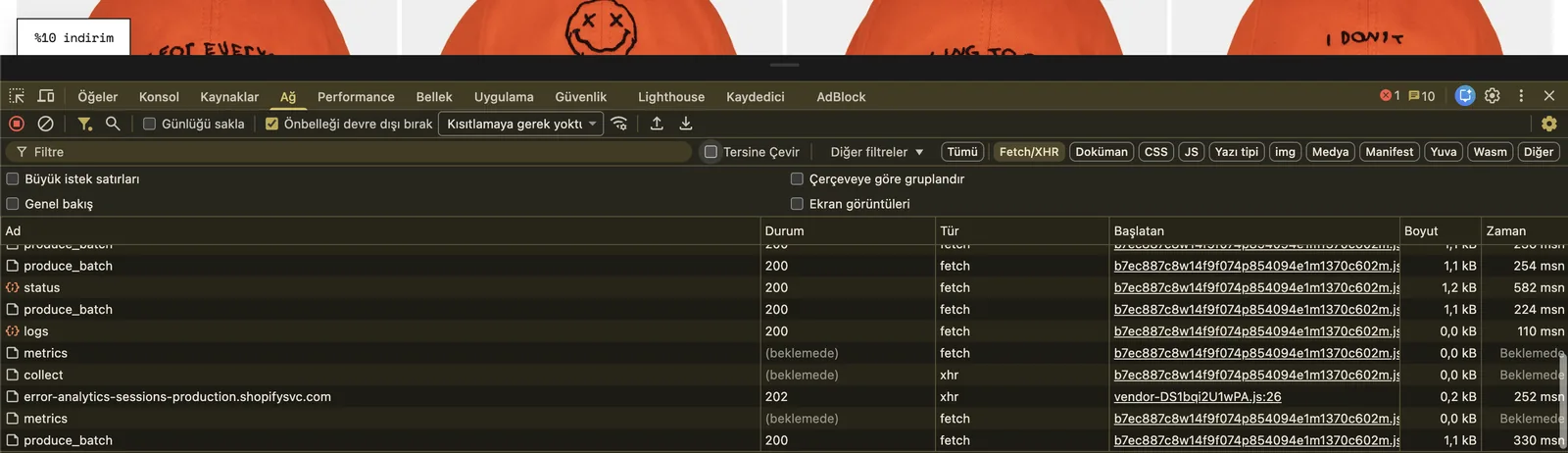
Use the Coverage tab in Chrome DevTools to see how much of each JS file is actually used. Files with a usage rate below twenty percent should be optimized or removed. Managing third-party scripts (chatbots, marketing tools, survey widgets) through Google Tag Manager and firing them only when needed reduces the JS load noticeably.
Step 6: Optimize Font Loading
Web fonts cause CLS. Use font-display: swap and choose system fonts where possible. If you use a custom font, preload it with <link rel="preload">. Instead of loading Google Fonts directly, moving the font files to the Shopify CDN shortens render time and LCP.
Step 7: Review Your Theme Code
Use the Shopify Theme Inspector extension to identify which Liquid template has the longest render time. Inefficient Liquid loops, unnecessary object calls inside a forloop and large metafield queries increase server-side render time. If TTFB is above 800 ms, the problem usually lies in the Liquid layer.

Step 8: Measure and Compare
After each step, record your PageSpeed score and Core Web Vitals metrics again. Document how much impact each change made. Optimization is not a one-off task but an ongoing process; check your scores again after adding a new app or updating your theme.
How Your Shopify Theme Choice Affects Speed
In Shopify speed optimization, theme choice is the starting point. On a poorly built theme, no amount of optimization will easily take you past a certain threshold.
Dawn is Shopify's official reference theme, and its PageSpeed scores are generally above 90. Premium themes such as Prestige and Impulse offer visual richness, but their speed scores drop without optimization. In custom theme development, every additional feature has the potential to become speed debt.
At Nodus Works, we evaluate themes against these criteria: Sections Everywhere support, built-in lazy loading, a minimal default JS load and how often the theme developer releases updates. When these four criteria are not met, switching themes often brings a significant speed gain on its own. To narrow down themes that meet these criteria, try our Shopify Theme Finder.
For a comparative review and help choosing a Shopify theme: The Best Premium Shopify Themes
Speed Optimization for Shopify Plus Stores
On the Shopify Plus plan, speed optimization has a much wider scope than on standard plans. The checkout page is locked on standard Shopify; on Plus, Checkout Extensibility lets you customize both the speed and the user experience of this page. Checkout is the most critical page, where the conversion actually happens, and every delay there directly increases the abandonment rate.
Checkout Extensibility: This system replaces the old script-based checkout customization and works with Preact and Polaris web components (such as s-stack and s-button). Implemented correctly, it can noticeably shorten checkout LCP compared with the old method. On Shopify, checkout.liquid was deprecated on August 13, 2024, and Shopify Scripts on June 30, 2026; Plus stores are required to complete this migration.
Shopify Functions: This system replaces Shopify Scripts and runs operations such as discount calculations, product filtering and cart logic on the server side. Processing on the server instead of in client-side JavaScript improves the INP metric. The difference is especially clear in B2B stores and high-SKU stores that apply complex cart rules.
Headless Commerce: Shopify Plus makes it possible to move to a fully headless architecture with Hydrogen (Shopify's React-based headless framework). Because the frontend is fully decoupled in a headless setup, you gain direct control over Core Web Vitals; in a well-built Hydrogen store, LCP can drop below 1 second. However, headless development requires far more technical expertise than traditional Shopify development, and maintenance costs rise.
At Nodus Works, we plan speed optimization for Shopify Plus projects at the infrastructure selection stage; setting up the right architecture from the start, rather than patching things later, pays off in both cost and performance over the long term. For enterprise-scale performance requirements, take a look at our Shopify Plus solutions.
Frequently Asked Questions
How long does Shopify speed optimization take? Depending on the scope, anywhere from one day to several weeks. Image optimization and removing unused apps can be done within a day. Optimizing theme code and reducing the JavaScript load can take a week, while a structural rewrite can take two to four weeks.
What should my PageSpeed score be? On the Lighthouse scale, 90 and above is considered good, 50-89 needs improvement and below 50 is poor. But the score alone is not enough: LCP, INP and CLS should all be in the "good" range. If the score is high but LCP is poor, the real user experience is still broken.
How much do Shopify apps affect speed? Every app adds JavaScript to the page. Shopify's Built for Shopify requirements allow a badged app to lower the storefront's Lighthouse performance score by no more than 10 points; as the number of active apps grows, these effects add up and can increase load time noticeably. To test whether an app affects speed, disable it temporarily and compare your PageSpeed scores.
Does Shopify speed optimization affect SEO? Yes, directly. Google uses Core Web Vitals as a ranking factor. Pages with poor LCP and CLS scores are at a disadvantage compared with competing pages. Speed optimization improves organic traffic and conversions at the same time.
Can you improve speed without changing your theme? In most cases, yes. Image optimization, app cleanup and JavaScript optimization bring significant improvements without a theme change. However, if your theme has a pre-2021 architecture and a lot of custom code has built up, switching themes offers a cleaner, one-time solution.
Which Shopify themes are the fastest? Shopify's Dawn theme stands out as the theme with the highest default speed scores. Sense, Craft and Crave also perform well on speed. Among premium themes, Impulse and Prestige reach high scores when well optimized. A theme's speed changes with the customizations made after installation and the apps you add.
How much does speed optimization cost? Basic steps such as image optimization and app cleanup can be done yourself with free tools. Theme code optimization and JavaScript reduction require developer expertise, and the cost of these services depends on the scope of the project. At Nodus Works, we report your store's specific issues and the estimated impact in a free discovery call.
Shopify speed optimization is a process that delivers measurable results quickly, even with basic steps such as image compression, app cleanup and reducing the JavaScript load. Optimization that targets Core Web Vitals improves both SEO rankings and conversion rates together. The change that delivers the highest return is different for every store, and optimization without the right diagnosis wastes time.
You can request a free technical analysis to identify your store's speed issues and set your priority steps.
For Shopify store setup and technical configuration: Shopify Store Setup
For Shopify technical support and maintenance: Shopify Technical Support





