
You link Shopify to Google Tag Manager by adding the GTM code as a custom pixel in the Shopify admin under Settings > Customer events > Add custom pixel. The pixel passes Shopify's customer events (page views, add to cart, checkout started, purchase) to the dataLayer, and the GTM container uses those events to fire your GA4, Meta and Google Ads tags. Once you have tested the setup with Shopify Pixel Helper, you publish it.
Over the past two years, our ad measurement projects at Nodus Works have shown the same pattern again and again: a store has set up GTM correctly and defined all of its pixels, yet the number of conversions reported in Google Ads and Meta is clearly lower than Shopify's own order count. The gap usually has nothing to do with the GTM setup. It comes from the browser itself. Safari's Intelligent Tracking Prevention (ITP), Apple's App Tracking Transparency (ATT) restriction on iOS and widely used ad blockers wipe out a large share of the data collected by a standard GTM setup that runs in the browser (client-side). In this guide we explain in detail how to connect GTM to Shopify, how client-side and server-side GTM differ, why that difference has a direct effect on data loss, and how apps such as Hardal and Stape help you recover what is lost.
What Is the Shopify Google Tag Manager Link?
Google Tag Manager is a tag management system. Instead of writing every tracking tag your store needs (GA4, Meta Pixel, TikTok Pixel, the Google Ads conversion tag) into the theme code one by one, you manage them all from a single central container. Once GTM is linked to Shopify, adding a new ad platform means defining a new tag in the GTM interface without touching the theme. For stores that run more than one ad channel, this cuts tag clutter directly.
How Do You Connect GTM to Shopify?
Setup starts with creating a GTM account and then follows the script rules Shopify changed with Checkout Extensibility.

- Create a new container in Google Tag Manager and note the container ID (in the GTM-XXXXXXX format).
- In the Shopify admin, go to Settings > Customer events > Add custom pixel. Add the GTM code to this custom pixel, subscribe to customer events such as page views and product views, and send them to the dataLayer.
- For checkout events (add to cart, checkout started, purchase), you need to use Shopify's Custom Pixel framework. Since the Checkout Extensibility update, these events no longer fire through scripts written directly into the theme; they fire through this separate framework.
- Test with Shopify Pixel Helper: browse the store as a test and confirm that every customer event reaches the custom pixel without errors. The Google Tag Assistant extension shows which Google tags load on the page, but according to Shopify, Tag Assistant's "Troubleshoot tag" feature does not detect GTM tags inside a custom pixel.
- Before you publish the container (Submit), check that the tags going live are exactly the same as the tested version.
Important: If your GTM setup was built before Checkout Extensibility, don't assume the checkout events still work the old way (direct script injection). They may have silently stopped firing in the new checkout flow. We explain how to move to the Custom Pixel framework in our guide to Shopify custom pixel integrations.
The Limits of Client-Side GTM: Why Is Data Lost?
In a standard (client-side) GTM setup, the tracking code runs directly in the visitor's browser and sends the data it collects straight to Google, Meta or TikTok servers. This approach has three structural weaknesses. First, Safari's ITP and browser privacy settings shorten the lifetime of third-party cookies or block them entirely, which makes it harder to recognize the same user across several visits. Second, since iOS 14.5 the App Tracking Transparency (ATT) framework prevents apps such as Instagram and Facebook from tracking users across other companies' apps and websites and from accessing their advertising identifier when they don't give permission, which weakens ad measurement for iOS users. Third, common ad blockers block GTM and pixel code running in the browser outright; these users never show up in GA4 or Meta.

All three restrictions lead to the same result: your store looks as if it sold less than it actually did, because the ad platforms never see part of the conversions that took place. Because this blind spot leaves the ad algorithm with incomplete data to optimize on, even a campaign that is actually performing well can be judged "underperforming" and have its budget cut. To compare your ad spend with your actual sales in Shopify, you can use Peakmerce for ad analysis and true ROAS tracking.
What Is Server-Side GTM and What Difference Does It Make?
Server-side GTM is an architecture in which the tracking code runs on a server you control (or one hosted by a service provider) rather than in the visitor's browser. The browser sends data first to your server container instead of directly to Google or Meta; the server processes the data and forwards it to the relevant platforms. This change makes three concrete differences. Because the data travels over a first-party connection, it is largely unaffected by browser restrictions and ad blockers. Because cookies are set on the server side, their lifetime can be extended independently of restrictions such as Safari ITP. And because the data is processed on the server, you get finer control over which information goes to which platform (for example, sensitive customer data can be masked on the server before it leaves).
Setting Up Server-Side GTM on Shopify: Hardal and Stape
Hosting server-side GTM on your own server from scratch is technically possible, but it carries a significant engineering workload. That is why most Shopify stores set it up through an app that provides this infrastructure out of the box. Two real options stand out: Hardal and Stape.
Hardal: Conversion Tracking
Hardal is an app that offers cookieless, first-party, server-side attribution for GA4, Meta and Google Ads. Alongside server-side GTM, the same package supports TikTok eAPI and Meta Signals Gateway (Conversions API). Its main features include unlimited custom events and parameters, real-time tracking and GDPR compliance. Pricing starts at $249 per month on the Basic plan; the Professional ($599/month) and Premium ($1,399/month) plans include easy server-side setup support. A 7-day free trial is available.
Stape: Conversion Tracking
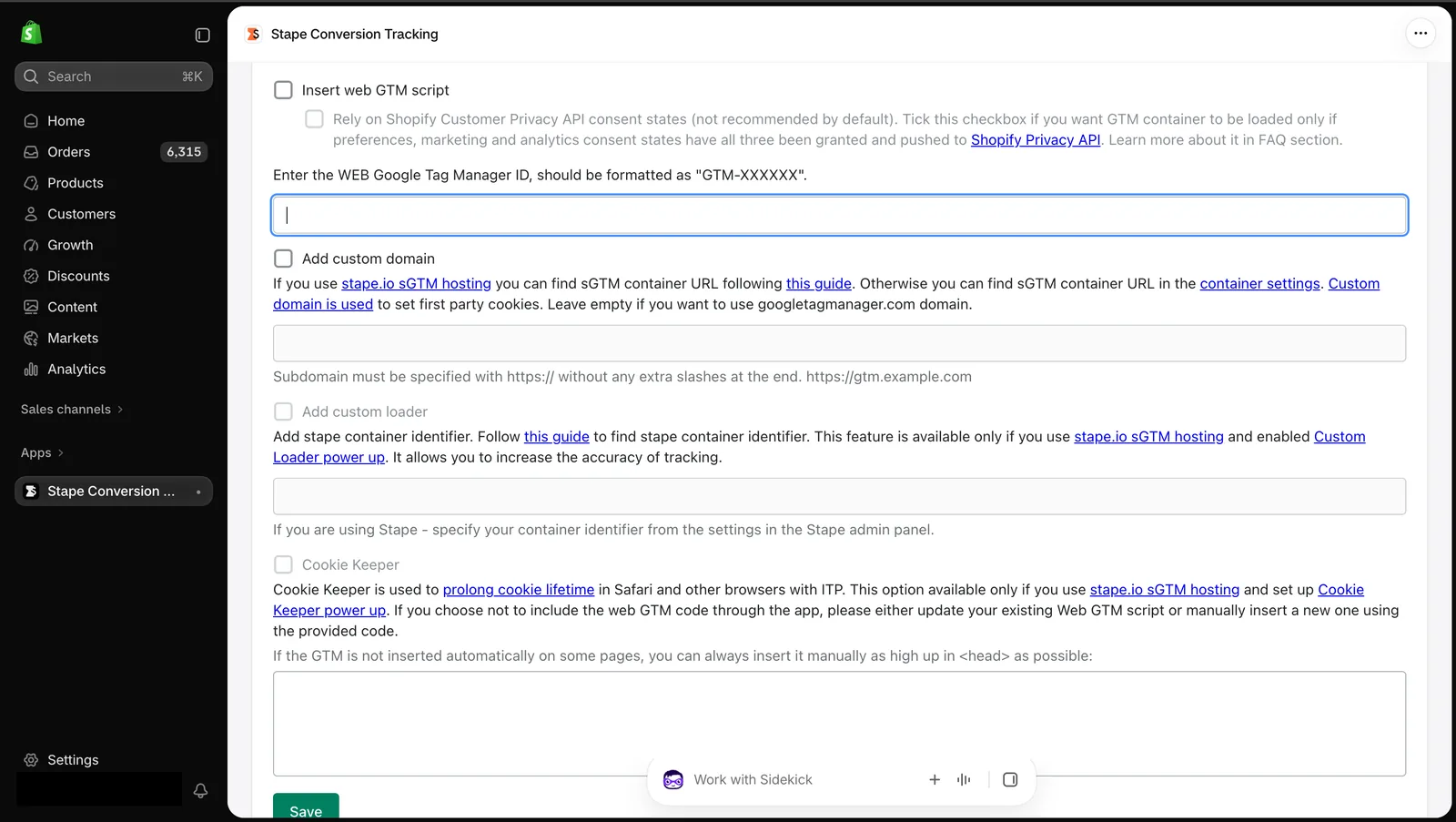
Stape's Shopify app injects a server-side GTM setup into your store in one click and automatically creates the main e-commerce events (add to cart, purchase, refund). The app itself is free, but hosting the server GTM comes with a separate, traffic-based hosting fee. Its "Cookie Keeper" feature, which extends cookie lifetime, and its purchase/refund webhooks make Stape a practical starting point, especially for stores that want to recover GA4 and Google Ads conversion data.
Tip: Before moving to a server-side GTM setup, measure how much data you are really losing. Track the gap between Shopify's own order count and the conversions reported in GA4/Meta for a month. If the gap is above 15-20%, investing in a server-side setup usually pays for itself quickly.
How Server-Side GTM Connects to GMC and Consent Management
Server-side GTM is not an isolated topic; to work properly it has to fit with two neighboring systems. First, if you run Shopping or Performance Max campaigns in Google Ads, the conversion data GTM sends has to be consistent with your product feed in Google Merchant Center. A product rejected in GMC will not show a conversion, however well GTM is set up. We cover GMC feed setup in detail in our guide to Shopify Google Shopping and Merchant Center integration.
Second, the fact that server-side GTM extends cookie lifetime does not mean it can ignore the user's cookie consent choice. Under KVKK (Turkey's data protection law) and similar regulations, tracking cookies should only be active once the user has given consent. In a server-side architecture, if that consent status is not passed correctly to the GTM server container, you end up with a tracking setup that works technically but is a problem legally. We cover how to manage cookie consent and server-side tracking together in our guide to Shopify server-side tracking and consent/cookie management.
Reading GTM Data Together with GA4 and Google Ads
The final value of the events sent through GTM depends on how that data is interpreted in GA4 and Google Ads. GTM is only a transport layer; the real analysis and optimization happen through GA4's Enhanced Ecommerce structure and Google Ads' conversion tracking. We explain the Enhanced Ecommerce event chain on the GA4 side in our Shopify Google Analytics (GA4) link guide, and the Google Ads and GMC connection in our Shopify Google Ads link guide.

Frequently Asked Questions
Is adding GTM to Shopify free?
Yes, GTM itself and the custom pixel setup in Shopify are free. When you move to server-side GTM, the cost of an app such as Hardal or Stape and/or server hosting comes into play.
Isn't client-side GTM enough? Why should I move to server-side?
Client-side GTM is enough for many stores. But if there is a clear gap between your Shopify order count and the conversions reported in your ad accounts because of ad blockers, Safari ITP and iOS ATT restrictions, server-side GTM recovers that loss.
Should I choose Hardal or Stape?
If you only want to fix Google Ads and GA4 conversion loss and are looking for a lower starting cost, Stape gets you started faster. If you are a store with a bigger budget that also cares about Meta and TikTok ads at the same time, Hardal's multi-channel scope may suit you better.
Is a server-side GTM setup compatible with Checkout Extensibility?
Yes, but you need to separately confirm that checkout events are passed correctly to the server-side container through Shopify's Custom Pixel framework. An integration built the old way can silently lose these events.
Does server-side GTM let me bypass cookie consent rules?
No. A server-side architecture can technically extend cookie lifetime, but the user's consent choice still applies, and it has to be passed correctly to the server container. Otherwise you end up with a setup that is a problem from a legal standpoint.
Conclusion
For most stores, the Shopify Google Tag Manager link starts with a client-side setup, and for small stores using a single ad channel that is usually enough. But if you see a growing gap between your actual sales and the conversions reported in your ad accounts because of ad blockers, Safari ITP and iOS ATT restrictions, moving to server-side GTM with an app such as Hardal or Stape recovers that loss directly. Setting up this move so that it fits with your GMC feed and your cookie consent process keeps it from turning into a system that works technically but falls short legally or in terms of data.
If you want to plan your GTM setup, your move to server-side and your conversion tracking infrastructure end to end, you can get in touch with our team about our Google Ads management service.





