
Shopify LLMs.txt integration no longer requires uploading a file: since May 2026, Shopify natively serves /llms.txt, /llms-full.txt and /agents.md on every Online Store. To change the content, add a templates/llms.txt.liquid template to your theme. For setups outside the Online Store, such as headless storefronts, a Cloudflare Worker answers /llms.txt requests at the domain level.
In the Shopify projects we manage at Nodus Works, one question keeps coming up more and more: "How do we add an llms.txt file to our store?" Most of the setup instructions circulating online skip a critical technical fact specific to the Shopify platform: since May 2026, Shopify natively serves /llms.txt, /llms-full.txt and /agents.md on every Online Store, and since May 28, 2026, these files can be customized with the templates/llms.txt.liquid template. This guide explains the native support and, as an alternative only for headless storefronts, the Cloudflare Worker method step by step, with sources.
What Are LLMs and LLMs.txt?
An LLM (Large Language Model) is an AI model trained on large text datasets that understands and generates natural language. ChatGPT, Claude and Google Gemini are the best-known examples. In e-commerce, LLMs create direct value in three areas: product recommendations tailored to each user (hyper-personalization), better semantic search results and customer support automation.
LLMs.txt is a guidance file that helps these models understand a website more accurately. Proposed in 2024 by Jeremy Howard, co-founder of Answer.AI, the standard is a plain Markdown file placed in the site's root directory. When LLM crawlers visit the site, they read this file and learn which pages, collections and content are the priority, without having to decode cluttered HTML. We cover where LLMS.txt fits within GEO (Generative Engine Optimization) as a whole and how it relates to other ranking factors in our GEO guide.
The Difference Between LLMs.txt and robots.txt

Important: Shopify serves robots.txt automatically at yourstore.com/robots.txt. Since May 2026, llms.txt is also served automatically at yourstore.com/llms.txt. Files uploaded to the Assets folder in the Shopify theme editor, however, are served from the cdn.shopify.com/... CDN address and cannot be reached at yourstore.com/llms.txt. Source: Shopify Developer Community: Adding llms.txt file to Shopify store
Why Can't You Upload LLMs.txt Directly to Shopify?
The restriction comes from Shopify's platform architecture. Store files (theme, images, static assets) are hosted on Shopify's global CDN network, and every file uploaded through the theme editor gets a URL in the cdn.shopify.com/s/files/... format. The store's own domain (yourstore.com) connects directly to Shopify through A and CNAME records, and Shopify decides which response these addresses return; there is no way to place a file manually at the domain root.
The result: a file at the CDN address does not answer a request for yourstore.com/llms.txt. Since May 2026, Shopify answers requests to this address itself and returns the file it generates automatically; to change the content, you add a templates/llms.txt.liquid template to the theme.
For setups outside the Online Store, such as a headless storefront, the solution sits at the domain layer, in an intermediate layer that kicks in before the request reaches the storefront server. A Cloudflare Worker takes on this job as an alternative in these cases. A domain connected to the Online Store does not need this intermediate layer; in addition, Shopify does not support placing a Cloudflare proxy in front of that domain.
Setting Up LLMs.txt on Shopify: The Cloudflare Worker Method
This method is an alternative only if the storefront is hosted outside Shopify (headless), and it works if the domain is managed through Cloudflare; if the record points to Shopify, no Worker is set up. The Cloudflare Worker intercepts the /llms.txt request before it reaches the storefront server and returns the file content directly, while every other request continues to be passed on to the storefront server.
Critical Note: Do not use this method on a domain connected to the Shopify Online Store. Shopify does not support the Cloudflare proxy (including Orange-to-Orange setups) and requires every DNS record that points to Shopify to be DNS only (gray cloud); if the proxy stays on, the SSL certificate cannot be issued or renewed and the domain connection can break. On Online Store shops, Shopify already serves /llms.txt; the Worker is only for setups where the storefront is hosted outside Shopify.
A working example: jennaraecakes.com/llms.txt. This implementation was shared on the Shopify Developer Community by FireNet_Designs.
Step 1: Prepare Your LLMs.txt Content
Write your content in Markdown. The minimum structure needed for a Shopify store:

Prepare this content in a text editor; you will paste it into the Worker code converted to a single line. Instead of writing it by hand, you can generate a draft for your store with the Shopify LLMs.txt Generator.
Step 2: Create a Worker in Cloudflare
Log in to the Cloudflare Dashboard. In the left menu, go to Workers & Pages > Create Application > Create Worker. Give the Worker a name (for example: llms-txt-worker).
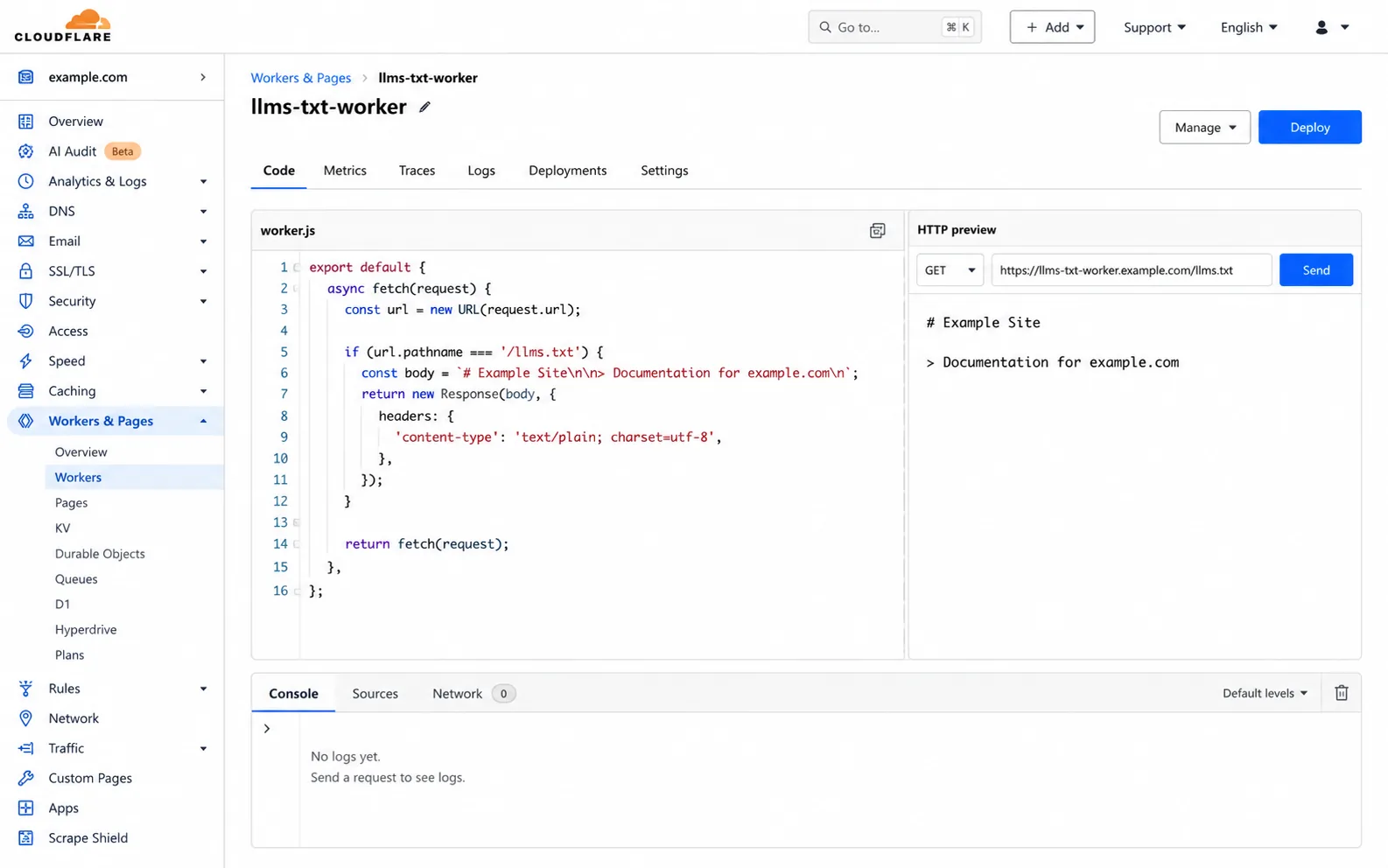
Paste the code below into the editor. Replace the WRITE YOUR LLMS.TXT RAW TEXT HERE line with the content you prepared, and replace example.com with your own domain:
Click the Deploy button.
Step 3: Add a Route to the Worker
To connect the Worker to your store domain, you need to add a route. On the Worker page, go to Settings > Domains & Routes > Add > Route.
Add these two routes:
Select your own domain as the Zone. Save.
Step 4: Check Your DNS Settings
The domain record that points to your headless storefront must be in proxy mode on Cloudflare. In the Cloudflare DNS panel, confirm that the cloud icon next to this A or CNAME record is orange (proxy active). If the cloud is gray (DNS only), the Worker will not run. The record to switch to the orange cloud is the one pointing to the server that hosts your headless storefront; do not put an A, AAAA or CNAME record that points to Shopify (23.227.38.65 or shops.myshopify.com) into proxy mode. Shopify does not support the Cloudflare proxy or Orange-to-Orange setups; these records must stay DNS only.

Step 5: Test It

You should see these headers in the response:
Also open yourstore.com/llms.txt in a browser to confirm the file loads with the right content.
Tip: This method does not work if the domain is not managed through Cloudflare. As an alternative, a Vercel Edge Function or an nginx reverse proxy can be set up with the same logic. Still, Workers, available on Cloudflare's free plan, need the least configuration and run on a global edge network.
What Does LLMs.txt Bring to a Shopify Store?
The value of LLMs.txt comes through two separate channels: visibility in AI search engines and content accuracy.
Visibility in AI Search Engines
llms.txt makes it easier for AI search systems to find your store's priority pages without having to parse the HTML. However, these systems have made no clear commitment about how far they use the file; do not tie your citation expectations to llms.txt alone, and treat the file together with product page content and structured data. We cover how product pages should be structured to earn these citations in our article on connecting products to AI .
Content Accuracy and Brand Control
If LLMs read the llms.txt file before crawling the store, prioritization is in your hands: you define in the file which product categories, collections and pages you want to stand out. When it comes to protecting brand identity in AI answers, this is a role robots.txt cannot play.
LLMs.txt Compared with Classic SEO Tools
If you want to configure your Shopify store's search engine infrastructure together with llms.txt, Nodus Works' SEO optimization service handles technical SEO setup and AI search visibility together; robots.txt, sitemap, schema markup and llms.txt integration are completed in a single process.
Why Set Up LLMs.txt Now, in 2026?
LLMs.txt is not yet a mandatory standard. So why should you set it up now?
AI search traffic is growing: according to Adobe Analytics data, traffic from generative AI tools to US retail sites rose 693.4% year over year during the 2025 holiday season (November 1 to December 31). Part of this traffic is made up of shopping queries, such as "best organic baby clothing brands Turkey" or "safe shopping from Shopify stores".
Since Online Store storefronts now serve the file automatically, the difference comes from what the file contains, not whether it exists: stores that use templates/llms.txt.liquid to define their priority collections and pages give AI systems clearer context. This window will narrow as competition heats up.
FAQ: Frequently Asked Questions
Q: I don't use Cloudflare. Can I still add llms.txt to Shopify?
A: Yes. For stores on the Online Store, Shopify has served the /llms.txt file natively since May 2026, and its content is customized with the templates/llms.txt.liquid template. For special setups such as headless, there are two options for getting the same result without Cloudflare. First, you can build the same proxy logic with an Edge Function hosted on Vercel or Netlify, although this requires a change to domain routing. Second, if the store runs on a VPS or a dedicated server, you can route the /llms.txt request with an nginx location block.
Q: How often do I need to update the LLMs.txt file?
A: Update it when you launch a new collection, add important pages or change the store's positioning. Adding or removing products does not require an update each time; as long as the collection and category structure stays the same, the file remains valid. Reviewing it 2-3 times a year is enough.
Q: Does LLMs.txt directly affect SEO rankings?
A: Google's classic ranking algorithm does not use llms.txt as a signal. Google Search (including AI Overviews) does not use llms.txt either, and whether the file affects source selection in systems such as ChatGPT Search has not yet been clearly confirmed. Indirectly, stores cited in AI answers gain brand awareness and direct traffic, and over time these metrics feed into organic rankings.
Q: Is LLMs.txt a standard, or is it mandatory?
A: It is a standard, not a requirement. The format, proposed by Jeremy Howard of Answer.AI, is voluntary. However, no AI search system has made a clear commitment about how much it uses the file; think of it alongside your product page content and structured data.
Q: Does setting up a Cloudflare Worker require technical knowledge?
A: With basic JavaScript knowledge, it can be done in 15-20 minutes through the Cloudflare interface. Misconfiguring DNS records or Worker routes can affect access to the site; if you do not want to take that risk, getting technical support is the safer choice.
Q: How do you add llms.txt to a Shopify store?
A: Since May 2026, Shopify has natively served /llms.txt, /llms-full.txt and /agents.md on every Online Store; to change the content, you add a templates/llms.txt.liquid template to the theme. Files uploaded to the theme editor as Assets, on the other hand, are served from Shopify's CDN and cannot be reached from the store's domain root. For headless setups where the storefront is hosted outside Shopify, the alternative is to use a Cloudflare Worker: you deploy a Worker script that intercepts the /llms.txt request before it reaches the storefront server and returns the file content directly. Source: Shopify Developer Community
Q: What is LLMs.txt and what does it do?
A: LLMs.txt is a Markdown-based guidance file that tells LLM crawlers visiting the site which pages, collections and content are the priority. It was proposed in 2024 by Jeremy Howard of Answer.AI. It aims to help systems such as ChatGPT Search and Perplexity cite the site in the right context; Google Search (including AI Overviews) does not use the file.
Q: How do you set up a Cloudflare Worker for llms.txt on Shopify?
A: Create a new Worker under Workers & Pages in the Cloudflare Dashboard. Paste in the script that intercepts the /llms.txt path and returns text/plain content; all other requests are passed on to the server that hosts your storefront. Then define the yourstore.com/llms.txt route under the Worker's Triggers section. The Cloudflare proxy (orange cloud) must be active on the DNS record that points to your headless storefront. On a domain connected to the Shopify Online Store, the proxy is not turned on: Shopify does not support the proxy, and records that point to Shopify must stay DNS only.
Conclusion
Setting up llms.txt on Shopify does not work with the widely described "upload it to the Assets folder" method. Since May 2026, Shopify serves the file natively from the domain root; its content is customized with the templates/llms.txt.liquid template, and a Cloudflare Worker is only an alternative for headless setups where the storefront is hosted outside Shopify. This setup is the most direct technical step for making sure AI search engines read your store correctly.
If you want to set up a Cloudflare Worker or configure your Shopify store's AI search visibility, get in touch for the technical details.





