
Dropshipping with Shopify means selling products in your Shopify store without keeping them in your own warehouse, while a supplier or logistics partner ships each order to the customer. If you also sell on Amazon, the stock in Amazon's warehouse can fulfill your Shopify orders through Multi-Channel Fulfillment (MCF). This requires product, stock and order sync between the two platforms; this guide walks through the setup and app selection step by step.
How Does Dropshipping Work?
With dropshipping, you make the sale and your supplier ships the order. The flow has four steps:
- A customer buys a product in your Shopify store and pays you.
- The order goes to your supplier through a connected dropshipping app or the supplier's XML integration, and you pay the supplier for the product.
- The supplier packs the order and ships it to your customer; the tracking number is added to the Shopify order and sent to the customer.
- Your profit is the difference between your sale price and the cost of the product, shipping, payment fees, apps and ads.
Because you don't buy inventory up front, you can start with little capital and expand your product range without a warehouse. The trade-off is that shipping times, packaging and product quality are in your supplier's hands. To the customer, you are the seller: delays, damage and returns are your responsibility.
How Do You Choose a Dropshipping Supplier and App for Shopify?
Start by choosing suppliers based on where your customers are. Shipping to customers in Turkey from a supplier inside Turkey, and to customers in the US or Europe from warehouses in those regions, shortens delivery times and takes customs risk off the table.
Many wholesalers in Turkey give their resellers product, price and stock data through an XML feed. Connect that feed to Shopify with an app like Stock Sync, forward orders to the supplier, and you have a domestic dropshipping setup.
Tip: Before you start working with a supplier, get these points in writing: which carrier they use and how many days shipping takes, whether parcels go out under your brand without the supplier's prices, whether they accept damaged items and returns, and how often stock data is updated.
Dropshipping Costs and Profit Margin
There is no inventory cost, but there are fixed monthly costs and variable costs on every order:
- Shopify plan: A monthly subscription. For current plan prices, see our Shopify fees guide.
- Apps: Monthly fees for dropshipping and stock sync apps.
- Product and shipping: What you pay the supplier for the product and for shipping.
- Payment fees: The per-transaction fee charged by payment providers such as iyzico and PayTR.
- Ads: Customer acquisition cost per order.
- Returns and damage: Shipping costs for items returned under the right of withdrawal, plus items you can't resell.
Here is an example: if you sell a product for 600 TL, the supplier charges 300 TL, shipping is 60 TL, the payment fee is 20 TL and ad spend per order is 120 TL, you keep 100 TL per order, and that has to cover your Shopify and app fees. These figures are only an example; run the numbers with your own supplier prices and ad data.
Dropshipping in Turkey: Customs, Delivery Times and Returns
Shipping from abroad and customs: Under a Presidential Decree published in Turkey's Official Gazette on January 7, 2026, the simplified procedure for postal and express shipments worth up to €30 was abolished as of February 6, 2026. Apart from medicines and dietary supplements, these shipments now go through a standard customs declaration and are subject to the applicable import taxes. Shipping directly from overseas suppliers such as AliExpress to customers in Turkey therefore takes longer and costs more; either the customer pays the taxes and declaration costs, or you build them into your price. Overseas suppliers are a better fit for selling to customers outside Turkey.
Delivery time: Under Turkey's Distance Contracts Regulation, you must deliver the product within 30 days of the order at the latest; if you don't, the customer can cancel the contract. As the seller, you are also responsible for loss or damage until the product reaches the customer.
Withdrawal and returns: Customers can withdraw within 14 days of receiving the product without giving a reason. You must refund the payment within 14 days of the item being handed to the carrier named in your pre-contract information, and you can't charge the customer for return shipping through that carrier. The returned item comes back to you, not to the supplier, so confirm before you start whether your supplier takes returns.
Invoicing and registration: Because you sell in your own name, you invoice the customer and the supplier invoices you. Your store must be registered with ETBİS; see our ETBİS guide for details.
Dropshipping with Amazon Inventory: Shopify Amazon Integration
If you also sell on Amazon, there is a second route: shipping Shopify orders from your inventory in Amazon's warehouses (FBA) through Multi-Channel Fulfillment. In that case, Amazon's warehouse takes on the supplier's role. The rest of this guide explains how to connect the two platforms.
Shopify Amazon integration is the process of syncing a Shopify store's product catalog, stock data and order flow with the Amazon marketplace in real time. Part of the broader field of e-commerce infrastructure management, this integration combines the strengths of both platforms: Shopify's flexible store management and Amazon's large customer base on a global scale. From Turkey, access to both Amazon.com.tr and Amazon's global marketplaces (amazon.com, amazon.de, amazon.co.uk) is managed through this integration from a single dashboard.
What Is Shopify Amazon Integration?
Shopify Amazon integration is a technical connection that syncs product, stock and order data between two separate platforms in both directions. Once the integration is in place, a sale in your Shopify store automatically updates your Amazon inventory, and an order from Amazon lands in your Shopify admin.
The system covers three core data layers: product information (title, description, images, price), inventory levels (stock quantity, warehouse location) and order management (payment status, tracking number, returns). When these three layers run in sync, you no longer carry the load of managing each platform separately.
What Happens Without a Shopify Amazon Integration?
Without an integration, each platform runs on its own: stock on Amazon does not affect Shopify, and a sale on Shopify does not update your Amazon inventory. For a store with a catalog of more than 500 SKUs, this means dozens of manual updates every day; the risk of overselling and customer complaints becomes unavoidable.
Selling on Amazon from Turkey: What to Know Before You Start
Selling on Amazon from Turkey brings different legal and operational requirements depending on the marketplace you choose. Settle these infrastructure decisions before you move to a Shopify Amazon integration.
Amazon.com.tr vs. International Amazon: Key Differences
To sell on international Amazon marketplaces from Turkey, registering for the Amazon Global Selling program is enough; you do not have to set up a separate foreign company. In certain categories (electronics, food supplements), however, the target country's certification requirements come into play.
Important note: When you sell on Amazon.com.tr, your e-invoice and e-archive invoice obligations still apply. If you do not also connect your Shopify Amazon integration to your e-invoicing system, accounting stays manual, and that becomes an operational burden as you scale.
Prerequisites for Selling on Amazon from Turkey
Before you set up a Shopify Amazon integration, the following need to be in place:

- Amazon Seller account: a choice between the Individual and Professional plans
- Active Shopify store: Basic plan or higher
- GTIN/EAN barcode: required in most categories to create a listing on Amazon
- Bank account setup: Payoneer or Hyperwallet integration for Amazon's payouts (a local bank account is enough for Amazon TR)
- Tax number: international sales may require tax registration in the target country
How to Set Up a Shopify Amazon Integration
There are two ways to set up a Shopify Amazon integration: Shopify's official Amazon sales channel or third-party integration apps. Which one you choose depends on your catalog size, the number of Amazon marketplaces and how much automation you need.
Method 1: Marketplace Connect, Shopify's Official App
For direct integration with Amazon, Shopify offers its own app, Marketplace Connect. The setup steps are:

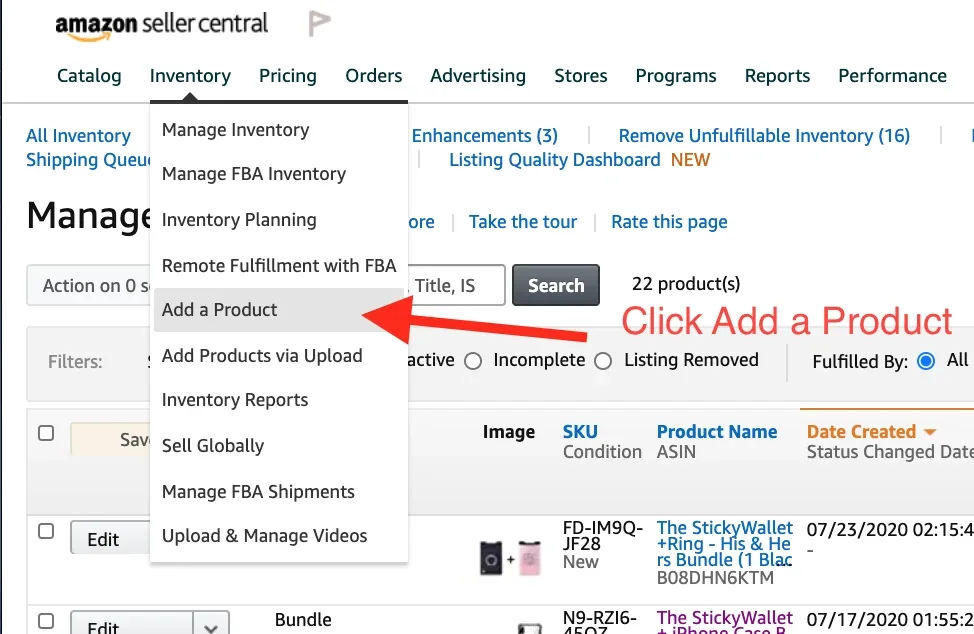
Step 1: Prepare Amazon Seller Central Create your Amazon Seller Central account and complete the store approval. A Professional seller account ($39.99 per month) is required for the Shopify integration; an Individual account does not allow API access.
Step 2: Add Marketplace Connect to Your Shopify Admin Install the Marketplace Connect app from the Shopify App Store, select Amazon as a channel and connect it to your Amazon Seller Central account.
Step 3: Connect Your Product Listings Match your existing Amazon listings to Shopify products (link) or create new Amazon listings from Shopify (create). ASIN matching is critical at this step; a wrong match leads to stock sync errors.
Step 4: Set Pricing and Shipping Rules You can keep Amazon prices the same as your Shopify prices or define a pricing rule specific to Amazon. Amazon's commission rates (6-45% depending on category) affect your pricing decision.
Step 5: Test the Sync Before going live, place test orders with 5-10 products. Confirm that stock changes update on both platforms at the same time.
Method 2: Third-Party Integration Apps
With Shopify Marketplace Connect you can connect to Amazon marketplaces, including Amazon.com.tr; third-party apps become an alternative when you need different pricing or extra customization. If you would rather get product, stock and price sync and order import set up for you instead of using an off-the-shelf app, take a look at our Shopify Amazon integration page.
The Best Shopify Amazon Integration Apps
Your choice of app directly affects your monthly order volume, the number of Amazon marketplaces you support and your budget.
Tip: For an Amazon.com.tr integration, consider Shopify Marketplace Connect or CedCommerce; Marketplace Connect also supports the Amazon Turkey marketplace. Before choosing an app, use the free plan or a trial period (3 days on Stock Sync) to test catalog import speed and stock sync accuracy.
Moving Products from Shopify to Amazon: What to Watch For
Product transfer is the most critical step of the integration; a faulty configuration can stop Amazon listings from going live or lead to an account violation penalty.
Amazon Product Listing Requirements
Unlike Shopify, Amazon applies strict rules to product titles, descriptions and image standards:

- Title: in the format Brand + Product type + Key attributes (color, size) + Quantity, up to 200 characters
- Images: minimum 1000×1000 pixels, white background (mandatory for the main image), at least 6 images recommended
- Bullet points: each point should stay under 200 characters and follow a feature + benefit format
- Category selection: the wrong category lowers visibility; use Amazon's Browse Tree Guide as your reference
ASIN and Barcode Management
If you are adding to an existing Amazon listing (piggybacking), ASIN matching is enough. If you are creating a new listing, an EAN, UPC or ISBN barcode is required. You can apply for a barcode exemption (GTIN exemption) for private label, unbranded and handmade products without a GTIN, as well as for certain spare parts and bundles.
Stock and Order Sync
Stock sync is the operational heart of the integration. A badly configured sync creates the risk of overselling or missed sales (stockouts). If other marketplaces are connected alongside Amazon, Station, our multichannel integration panel, syncs stock from one place and reduces the risk of overselling.

How Should You Set the Sync Frequency?
Set your stock sync frequency according to your order volume:
- 0-20 orders a day: a sync interval of 15-30 minutes is enough
- 20-100 orders a day: sync every 5-10 minutes, with real-time threshold alerts
- 100+ orders a day: real-time (webhook-based) sync is a must; enterprise solutions such as Linnworks are the better choice
Shopify Integration with Amazon FBA
For stores that use Amazon FBA (Fulfillment by Amazon), stock management adds another layer: products in Amazon's warehouse can also be the fulfillment source for Shopify orders. This "Multi-Channel Fulfillment (MCF)" feature lets orders from Shopify be fulfilled from Amazon's warehouse. MCF fees are calculated on a separate rate card based on product size and delivery speed, and they are usually higher than standard FBA fees; do not turn it on without running a cost analysis.
Optimization After the Integration
The work does not end when the integration is set up; growth only comes from continuous optimization.
SEO for Amazon Listings
Amazon has its own search algorithm (A9/A10), and it works independently of your Shopify SEO strategy. In your Amazon listings, conversion rate, sales velocity and number of reviews are the main ranking factors. Do Amazon-specific keyword research with tools such as Helium 10 or Jungle Scout; copying your Shopify product descriptions to Amazon as they are is not enough.
Price Competition and Repricing
Price competition on Amazon is far more aggressive than on Shopify. Winning the Buy Box may require a dynamic pricing (repricing) strategy. Add repricing tools (Feedvisor, Seller Snap) that adjust your Amazon price to the market automatically while keeping your Shopify price, to your integration strategy.
FAQ: Frequently Asked Questions
Q: Is Shopify and Amazon integration difficult?
A: The technical complexity depends on catalog size. For a catalog of fewer than 50 SKUs, setup with Shopify's Marketplace Connect app takes 1-2 hours. With more than 500 SKUs and several marketplaces, professional integration support prevents delays and data errors.
Q: Which app is best for Shopify Amazon integration?
A: For a starter catalog and for Amazon marketplaces including Amazon.com.tr, Shopify Marketplace Connect is enough; the first 50 synced orders are free. If you need different pricing or extra customization, consider CedCommerce; test the catalog import before you decide.
Q: How long does the integration setup take?
A: A basic integration (account connection + product matching) takes 1-3 business days. Once you include configuring the stock sync rules and testing, a full setup takes 5-7 business days. Large catalogs and an FBA integration can stretch to 2-3 weeks.
Q: Can you integrate Amazon.com.tr with Shopify?
A: Yes. Shopify's own app, Marketplace Connect, supports Amazon.com.tr; the CedCommerce Amazon integration app also supports the Turkish marketplace and is available on the Shopify App Store. The integration requires both a Shopify Basic plan and an Amazon Professional Seller account.
Q: Will my store go offline during the integration?
A: No. Setting up the integration does not interrupt your Shopify store or your Amazon listings. Product matching and sync rules run in the background. The only wait is for Amazon's listing approval process (usually 24-48 hours) when you create new listings.
Q: How do you integrate Shopify with Amazon?
A: To integrate Shopify with Amazon, add the Marketplace Connect app from your Shopify admin, connect it to your Amazon Seller Central account and transfer your products either by matching ASINs or by creating new listings. Marketplace Connect connects to Amazon marketplaces including Amazon.com.tr; CedCommerce can be used as an alternative. Setup takes 1-3 business days; for large catalogs, professional support prevents delays.
Q: How much does a Shopify Amazon integration cost?
A: With Shopify Marketplace Connect, the first 50 synced orders each month are free; after that you pay 1% per order (up to $99 per month). Among third-party apps, CedCommerce starts at $19/month. An Amazon Professional Seller account is an additional $39.99 per month.
Q: How does stock sync work in a Shopify Amazon integration?
A: Once the integration is set up, the stock quantity on both platforms updates automatically at the interval you set (5 minutes to 1 hour). A product sold on Amazon reduces your Shopify stock, and a product sold on Shopify updates your Amazon inventory. For real-time sync, choose a solution with webhook support such as Linnworks.
Conclusion
Shopify Amazon integration lets e-commerce businesses in Turkey reach both local and global customer bases from a single dashboard. Choosing the right app, complying with catalog standards and configuring the sync rules correctly are the three critical factors that decide whether the integration succeeds.
At Nodus Works, we manage Amazon integration end to end alongside our Shopify store setup, integration solutions and Shopify technical support services. The most common problems in the integration process, namely incorrect ASIN matching, stock sync delays and Amazon account violations, are monitored proactively as part of our technical support.
Get a free technical consultation to plan your Amazon integration → Contact





