On Shopify, XML is used in three areas: the sitemap, product feeds for channels such as Google Shopping, Akakçe and Cimri, and SEO. Shopify generates the sitemap automatically at yourstore.com/sitemap.xml, while product feeds need a channel-specific app or script. Google Shopping and Akakçe or Cimri shouldn't share one feed, because each channel requires its own fields and category structure.
On Shopify, XML is a data format used for three different needs: generating a sitemap, sending data to external channels through a product feed, and SEO configuration. These three uses work independently of each other, and each needs a different technical approach. The point that gets confused most often in the projects we manage is the assumption that a "product feed" is a single thing; in reality, a feed prepared for Google Shopping and a feed prepared for Akakçe or Cimri (Turkish price comparison sites) go to different platforms under different rules.
Where Is XML Used on Shopify?
XML use on Shopify falls into three areas, and each area has its own in-depth guide; this page draws the overall map and leaves the setup itself to the relevant guide.
Critical Note: Do not try to use the same XML feed for Google Shopping and Akakçe/Cimri. Google requires its own mandatory fields for product identifiers and category taxonomy, while Akakçe and Cimri match products against their own category trees. Trying to make a single feed fit both leads to approval errors on at least one of them.
A Sitemap and a Product Feed Are Not the Same Thing
Because both are in XML format, they are often confused, but they are prepared for different readers: a sitemap helps search engine bots crawl the site, while a product feed supplies your product catalog to a specific channel (Google Shopping, Akakçe, Cimri).
How Does XML Work for the Sitemap?
Shopify generates the XML sitemap for your store automatically; there is no manual setup or template to choose. Your sitemap is always at yourstore.com/sitemap.xml and updates automatically whenever products, collections, blog posts or pages change.
The Sitemap File Is Actually an Index File
When you open sitemap.xml, you do not see a single list; according to Shopify's documentation, this file is an index that points to child sitemaps split by content type, such as sitemap_products_1.xml, sitemap_pages_1.xml, sitemap_blogs_1.xml and sitemap_collections_1.xml. As your catalog grows, Shopify automatically adds more of these child files (each time one reaches a set limit on the number of URLs); this keeps the file size a search engine has to process in one go at a reasonable level.

How to Submit Your Sitemap to Google Search Console
- In Google Search Console, open your sc-domain:yourstore.com property.
- Go to the "Sitemaps" section in the left-hand menu.
- In the "Add a new sitemap" box, enter the full sitemap URL (https://yourstore.com/sitemap.xml); a domain property has no prefix in the box, so Google needs the full URL.
- Click Submit.

Tip: After submitting the sitemap, check the "Success" status and the "Discovered pages" count in the sitemaps report. You can see how many of those pages have been indexed in the Page indexing report using the sitemap filter; because indexing takes time, a low number in the first few days is not a sign of a problem on its own. To keep an eye on your sitemap and indexing data every month, take a look at our Shopify SEO reporting and performance tracking service.
Common Syntax Errors in XML Feeds
Our Google Shopping and Akakçe/Cimri guides referred to in the previous sections cover platform-specific approval errors; the errors we look at here sit at a more basic layer and relate to XML's own syntax.
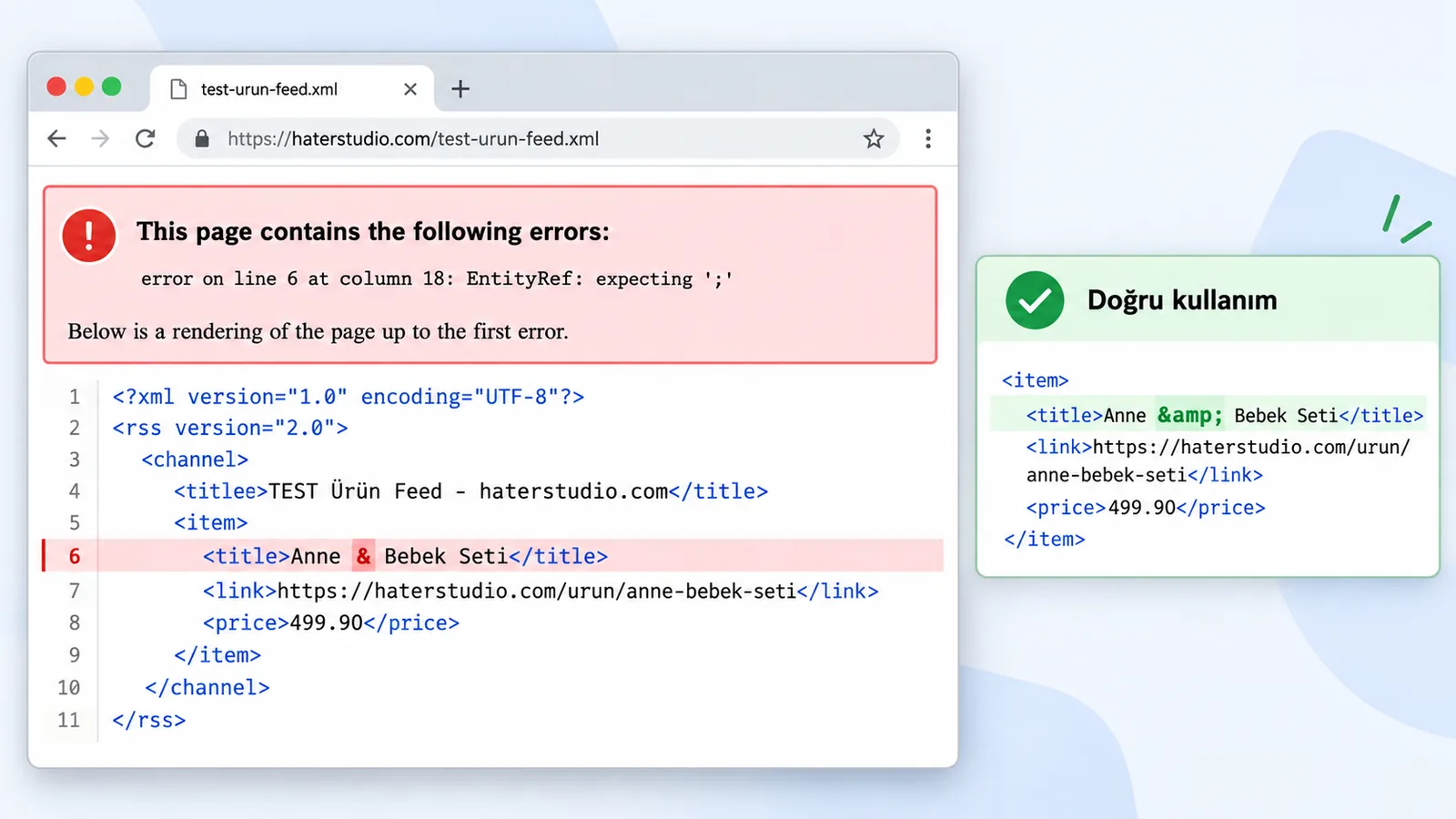
Turkish product titles are the field that causes the most problems in XML feeds. An & sign in a product name (for example, "Anne & Bebek Seti", a mother and baby set) has a special meaning in XML, and if it is not written as an escaped entity (&), the entire feed becomes invalid. The same risk applies to the < and > signs. So if you use a script that writes product titles or descriptions into XML by hand, a setup that does not escape these characters automatically can break the whole feed.
A Risk to Avoid: If you use a script you wrote yourself instead of a feed generator app, and a single product contains an unescaped special character, the XML parser usually rejects the entire file; one product's error can stop your whole catalog from updating on that channel. Keep this risk in mind if you edit your product titles manually.
Where Does XML Come In for SEO?
On the SEO side, XML is not used to edit titles and descriptions directly; those settings are entered page by page in the Shopify admin. XML's real role in SEO is to make sure the sitemap described above is read correctly by search engines.
You edit SEO elements such as the product title, meta description and URL structure not through XML but in the "Search engine listing" section of each product and page. XML is only the infrastructure that carries these edits to search engines; it is not an editing interface itself. To see which pages are missing a title or meta description, you can use our free Shopify SEO analysis tool.
Frequently Asked Questions
Question: Do I need to create the XML sitemap on Shopify by hand?
Answer: No. Shopify automatically generates and updates the sitemap for every store. All you need to do is submit this URL to Google Search Console once.
Question: Can I use the same product feed for Google Shopping and Akakçe?
Answer: It is not recommended. The two platforms have different mandatory fields and category rules; trying to make the same feed fit both usually leads to approval errors on one of them. Preparing a separate feed for each channel gives more reliable results.
Question: How do you create a product feed on Shopify?
Answer: If the channel is Google Shopping, it is explained step by step in our Google Shopping and Merchant Center guide; if it is Akakçe or Cimri, see our Akakçe and Cimri integration guide.
Question: Can I change my title and meta description using XML?
Answer: No, these settings are made not through XML but in the "Search engine listing" section of each page. XML is the infrastructure that makes sure these edits reach search engines correctly; it is not an editing interface.
Question: Will my feed break if my product title contains an "&" sign?
Answer: Yes, if it is not written as an escaped entity (&), the XML parser may reject the entire file. If you generate the feed automatically through an app, this is usually handled for you; the risk is higher with scripts edited by hand.
Question: How can I see in Search Console whether the pages in my sitemap have been indexed?
Answer: The sitemaps report shows the "Success" status and the "Discovered pages" count. For indexed pages, open the Page indexing report and select the sitemap filter; a low number in the first few days is not a sign of an error on its own.
Conclusion
On Shopify, XML does three different jobs: the sitemap (automatic, no manual work needed), the product feed (should be prepared separately for each channel) and the infrastructure behind SEO (not edited directly). If you have decided which channel you need a product feed for, you can move on to the relevant guide: Google Shopping or Akakçe/Cimri. If you have a specific need for your setup, get in touch with Nodus Works.





