The Shopify Craftgate integration takes six steps: open a Craftgate account and install the ready-made module from the Shopify App Store (it does not ask for an API Key or Secret Key) and activate it under Settings > Payments in your Shopify admin, define your banks and virtual POSs, choose the payment experience, test in the sandbox and go live. Craftgate is a payment orchestration platform that does not process payments itself but combines your banks' virtual POSs.
In the Shopify projects we manage, we have encountered a recurring issue for stores with multiple bank agreements: a virtual POS tied to a single bank stops sales entirely when that bank temporarily declines a payment. Craftgate is a Shopify payment integration built to distribute this risk. It functions as a payment infrastructure provider that consolidates bank virtual POS systems and alternative payment methods into a single dashboard; instead of being tied to a single payment institution like iyzico or PayTR, it allows you to manage multiple bank agreements for your store through the same integration.
What is the Shopify Craftgate Integration?
The Craftgate integration is a payment routing layer that connects your Shopify store to multiple bank virtual POS systems and alternative payment methods through the ready-made Shopify module. According to Craftgate, the platform lets you manage multiple providers through a single infrastructure instead of building separate integrations with each payment institution and bank.
According to a 2022 announcement by Fintechistanbul.org, the partnership between Craftgate and Shopify was formalized that year, and the Craftgate Payment Gateway app was added to the Shopify App Store. As described on Craftgate's Shopify module page, the app offers two different payment experiences: the Common Payment Page (CPP), where the customer is redirected to a screen hosted by Craftgate, and on-site payment, where the customer completes the transaction in the payment step on the Shopify store's own domain without being redirected to another payment page. According to Craftgate's announcement, on-site payment works for single (non-installment) card payments.
There are three technical features that distinguish Craftgate's Shopify integration from other single-payment providers:
- Real-time synchronization: The payment result is reflected on the Shopify order screen as soon as the transaction is completed; no separate webhook configuration or manual synchronization step is required.
- Payment Retry & Autopilot: When a transaction is declined, the system automatically routes the transaction to another bank and retries it based on predefined rules.
- Smart/Dynamic Payment Routing: Craftgate automatically determines which bank's virtual POS a transaction will be routed to based on criteria such as transaction amount, card type, or success rate.
Critical Note: The Craftgate Payment Gateway app has had 0 reviews on the Shopify App Store since its release in 2022. This does not mean the app is non-functional; it means you can't look to other stores' experiences on the App Store; Craftgate supports the integration through its own developer documentation and support team. Before starting the installation, confirm the current integration steps through Craftgate's own support channel.
For a small-scale store that does not require multi-bank management and operates with a single virtual POS, this layer may be unnecessarily complex; Craftgate's real value shows in stores that have multiple bank agreements.
Opening a Craftgate Account: Application and Sandbox Testing
To open a Craftgate account, you need to fill out the application form on craftgate.io and submit your company information and bank agreement details; after approval, you get access to the Craftgate panel. The ready-made Shopify module does not ask for an API Key or Secret Key.
Live Environment Application
Unlike a standard virtual POS application, the application on Craftgate's website asks for information on all the banks your store has agreements with, not just one. Once the application is approved, you install the ready-made Shopify module. Craftgate's developer page states that ready-made e-commerce modules, including Shopify, do not require API integration; the module does not ask for an API Key or Secret Key. That key pair is only for a custom integration built with the open-source libraries (craftgate.io/gelistirici).
One thing to settle during the application is the order in which the banks will be added. If you have multiple bank agreements, agree with the Craftgate sales team in advance on whether to add them all at once or in stages; this prevents confusion during setup.
Sandbox (Test) Environment
Craftgate provides a test environment via sandbox-panel.craftgate.io, which is completely separate from the live panel. The sandbox needs its own registration, separate from your live account; you run the trial on that separate account. The ready-made Shopify module does not ask for an API Key or Secret Key in the sandbox either.
In the sandbox environment, you can test the full payment flow (card entry, 3D Secure verification, payment result) without any real money movement. According to Craftgate documentation, the sandbox environment simulates all features of the live environment (including Payment Retry and Smart Routing); so before going live, test at least two scenarios (a successful and a declined transaction) rather than a single test card, and you will catch issues before they reach the live environment.
Shopify Craftgate Integration: Step-by-Step Setup
The setup starts with opening your Craftgate account and ends with testing the app you installed from the Shopify App Store in the live environment; the steps in between cover defining connected banks and selecting the payment experience.
Step 1: Open a Craftgate Account
Complete the application process described in the previous section. The ready-made Shopify module does not ask for an API Key or Secret Key, and the store connects without entering keys.

Step 2: Install Craftgate Payment Gateway from the Shopify App Store
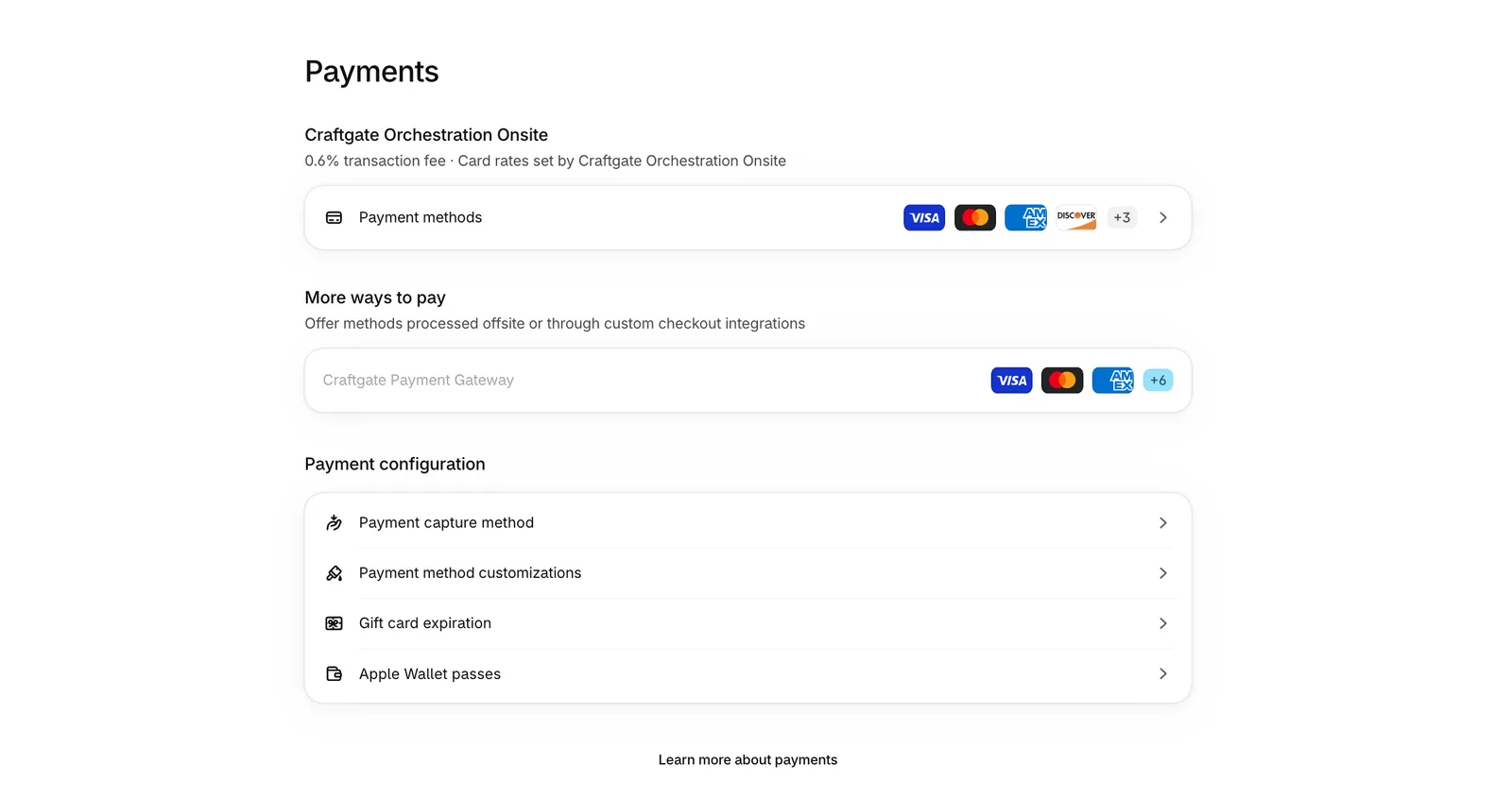
Go to Apps in your Shopify admin, search for Craftgate Payment Gateway, and install it on your store. The app is free; during installation, it asks for permission to access your store information.

Step 3: Define Connected Banks and Virtual POSs
After you install the ready-made module and connect your Craftgate account, you define which bank virtual POSs and payment institutions will be active via the Craftgate panel. If you have an agreement with a bank that does not have a direct Shopify integration, you can also include that virtual POS in the system during this step.
Step 4: Choose the Payment Experience (Common Payment Page or On-Site)
Here, you decide whether your customer will be redirected to a screen hosted by Craftgate or if they will make the payment without ever leaving your Shopify store. The on-site option is for single (non-installment) card payments; alternative methods such as Multinet, Edenred Gift Card and GarantiPay are offered through the Common Payment Page.
Step 5: Perform a Test Transaction in the Sandbox
Before going live, complete a test order with your sandbox account without any real money movement. Check that the payment result shows up correctly and in real time on the Shopify order screen; if you skip this step, you will only discover a "paid but order not visible" problem in the live environment.
Step 6: Go Live
Once the test transaction is completed successfully, switch to live mode from the Craftgate panel. Confirm that Craftgate appears as an active provider in your Shopify payment settings and monitor your first real order closely.
Key Features of Craftgate
What sets Craftgate apart from a single-bank virtual POS setup is that it manages multiple payment sources from one panel and routes transactions between them automatically.
At Nodus Works, a common problem we see in stores working with multiple payment providers is that sales stop completely when one provider fails. Craftgate's automatic routing removes this dependency on a single provider by spreading the risk; however, it also makes the setup more complex, so it may be an unnecessary layer for small stores where a single bank is enough.
Craftgate vs. iyzico/PayTR Comparison
Unlike iyzico and PayTR, Craftgate is not a single payment processor; it is positioned as a layer that manages multiple banks and payment processors through a single integration. This distinction directly determines which provider a store should choose.
In our experience at Nodus Works, for a store where a single bank virtual POS is enough, Craftgate's multi-routing layer adds unnecessary complexity; the single integration of iyzico or PayTR means less maintenance for that store. Craftgate's real value shows in mid-sized and large stores that have multiple bank agreements and want to reduce payment decline rates.
Common Mistakes and Points to Consider
The most common mistake during Craftgate setup is skipping the sandbox test and going straight to the live environment; then, if the payment result doesn't show up on the Shopify order screen, you have to troubleshoot it live.
The second common mistake is leaving routing rules untested when multiple bank virtual POSs are defined. With Smart Routing active, the bank a transaction goes to is decided at the moment of the transaction, based on rules such as amount, card type and success rate, so confirming that one bank works with a small test order is not enough; run test transactions through at least two different bank virtual POSs.
Tip: After activating Payment Retry, be sure to test how many retries the customer gets and how they appear on the checkout screen. If this setting is left at default, the customer may have to re-enter their card information repeatedly, which increases the cart abandonment rate.
Third, activating alternative payment methods like Multinet or Edenred Gift Cards in the Craftgate panel doesn't make them appear automatically at Shopify checkout; there is a separate step in between. A method activated in the panel won't show on the customer's screen unless you also make it visible in Shopify's payment settings.
FAQ: Shopify Craftgate Integration
How do you install Craftgate on Shopify? After opening an account on Craftgate.io, install the Craftgate Payment Gateway ready-made module from the Shopify App Store. The module does not ask for an API Key or Secret Key, and you do not enter keys in the app settings. Define your connected banks and go live after performing test transactions in the sandbox environment.
Is Craftgate free? The Shopify app itself is free; costs consist of the commission rates of the bank virtual POSs you connect and, if applicable, Craftgate's own service fees. You need to get current commission information from Craftgate's sales team, as these rates vary from store to store.
Which banks work with Craftgate? Craftgate consolidates the bank virtual POSs you have agreements with into a single panel; which banks are supported depends on Craftgate's current bank list. When you make an agreement with a new bank, you need to define this bank separately in the panel.
Should you choose Craftgate or PayTR? For small-to-medium scale stores where a single bank virtual POS is sufficient, PayTR's single integration requires less maintenance. For stores that have multiple bank agreements and want to reduce payment decline rates, Craftgate's multi-routing layer is more suitable.
How do you use Craftgate's sandbox environment? You can open a separate test account at sandbox-panel.craftgate.io to complete test orders without any real money transactions. Live account credentials and sandbox accounts are independent of each other, so you need to create a separate registration in the sandbox before going live.
Conclusion
Craftgate is a middleware solution for Shopify stores that want to manage multiple payment sources where a single-bank virtual POS setup is insufficient. Its setup requires more steps than iyzico or PayTR, but in return, it offers automatic routing and retry mechanisms that reduce payment decline rates.
Before deciding which payment provider is right for your store, analyze your current commission structure and order volume; if a single bank is sufficient, the setup burden of Craftgate becomes unnecessary. For stores that want to set up their payment integration end-to-end along with Shopify's other technical components (shipping, ERP, accounting), our Shopify integration service (/en/services/shopify-integration-solutions) handles the entire process from bank virtual POS connection to ERP synchronization under one roof. We compare the other payment providers that connect to Shopify in Turkey (Sipay, Paratika, Lidio) in our Shopify virtual POS setup guide.





