A Shopify custom app is an app built for a single store only. It isn't published on the Shopify App Store, and the store owner installs it directly. Custom apps are the usual choice for one-to-one integrations with ERP systems, accounting software or logistics platforms, and they need a different token and authorization process from standard public app development.
This guide is for developers building a custom app for their own store, and for technical teams that want to connect a SaaS product or enterprise system to Shopify.
What is a Shopify Custom App?
A Shopify custom app is an app written from scratch for one store's specific needs. It's installed only on that store and doesn't use Shopify's public app infrastructure (the App Store and the OAuth authorization flow). It gives you programmatic access to the Admin API or the Storefront API.
Mixing up Shopify app types is a very common mistake. The table below shows which type to use in which scenario:
A custom app is the right fit for ERP integrations (SAP, Netsis, Logo), connections to a custom logistics or shipping system, internal automation workflows and data sync between commerce platforms.
Private App to Custom App: Shopify's 2023 Change
Shopify stopped allowing new private apps in January 2022, and in January 2023 existing private apps were automatically converted to custom apps. Before that, store admins could generate an API Key and API Secret and get direct access. That route is no longer available.
Critical Note: Existing private apps were automatically converted to custom apps in January 2023. If you're building a new integration, set it up as a custom app from the start.
Why was this change made? From a security standpoint, the old private app system posed serious risks in API key management: there was no key rotation, scope control was lax, and there was no detection mechanism for credential leaks. The new custom app system closes these gaps with HMAC verification, scope limitation, and token tracking features.
Technical differences introduced by the change:
- Old: Direct requests using API Key + API Secret. New: Access_token obtained via OAuth 2.0.
- Old: API Password in the X-Shopify-Access-Token header. New: OAuth token in the same header
- Old: No token expiration. New: For public apps created after April 1, 2026, offline tokens expire and are renewed with a refresh token; custom apps can still get non-expiring offline tokens. Online tokens last 24 hours
Shopify Custom App Token Types
Shopify custom app development involves two different APIs, each with its own token type.
Most enterprise integrations require Admin API access tokens. The Storefront API is used for customer-facing front-end development (headless commerce, mobile apps) and does not provide access to the Admin API.
Offline vs Online Token Difference:
Offline tokens are for background processes, cron jobs and server-to-server integrations. In new apps they expire and are renewed with a refresh token, so build refresh logic into your background jobs. Online tokens are for flows that require a user session, and they expire after 24 hours.
Tip: If you are writing ERP or accounting integrations, always use offline tokens. A synchronization process running at midnight with an online token will silently fail when the token expires.
Why is the New Custom App System Complex?
At Nodus Works, when we work with third-party SaaS platforms and enterprise ERP teams, the question we hear most often from the other side is: "How do we get the Shopify token?"

Shopify had good reasons to make the new custom app system secure, but that design also made setup a lot more complex. The process is especially unclear for backend or integration teams working with the Shopify ecosystem for the first time.
Sources of complexity:
1. Two different ways to get a token. A custom app can be set up either directly in the Dev Dashboard with a client credentials grant or via the OAuth flow through the Dev Dashboard. Each one needs a different token procedure. If you start without knowing which path you're on, you can spend hours stuck on a half-finished setup.
2. Dev Dashboard configuration. If you choose the OAuth route, you need to create an app in the Dev Dashboard, define callback URLs, and specify scopes. An error in any of these steps leads to invalid_client or redirect_uri_mismatch errors.
3. Scope management. The requested scopes must match exactly in both the .env or configuration file and the Dev Dashboard. Even a small discrepancy will invalidate the token.
4. HMAC verification. Shopify expects you to verify the parameters returned in the callback against the signature it generates. Skipping this step creates a security vulnerability; not implementing it causes errors in production.
Obtaining a Shopify Admin API Token: Two Methods
Method 1: Direct Token from the Dev Dashboard
This method only applies if you're getting a token for stores in your own organization.

Steps:
- Create an app in the Dev Dashboard → enter an app name
- Select the required Admin API scopes (e.g., read_orders, write_products)
- Install the app on the store → Approve
- Get an access token by sending a client credentials grant request with your client ID and client secret
- The token is valid for 24 hours; refresh it every 24 hours
Warning: The Shopify admin path Settings → Apps and sales channels → Develop apps has been closed to new custom apps since January 1, 2026; it only applies to apps created before 2026. In those legacy apps, the Admin API access token is displayed only once; if you lose it, you'll need to uninstall and reinstall the app to get a new token.
Limitation of this method: it only works for stores in the same organization. If you want to connect the same integration to other stores, you need to switch to the OAuth flow.
Method 2: Dev Dashboard and OAuth 2.0 Flow
This is the route for SaaS products, agencies and multi-store integrations. An app created in the Dev Dashboard can be installed on different stores through the OAuth flow.
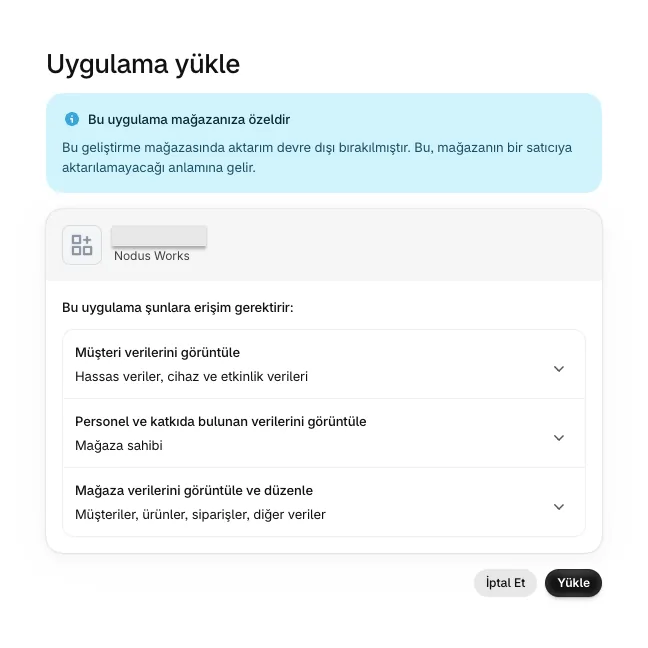
Technical flow:
1. User → Redirected to the Dev Dashboard app page
2. The /auth endpoint is called with the store domain
3. The Shopify OAuth authorization page opens
4. User grants permission → Shopify redirects to the callback URL with the code
5. The server verifies the HMAC
6. The token endpoint is called with the code + client_id + client_secret
7. The access_token is returned → stored in the database
Building this flow from scratch leaves a lot of room for error, especially around HMAC verification and scope management.
Shopify App Token Generator: Our Open Source Solution
We kept running into this problem on integration projects, so at Nodus Works we built a lightweight tool to solve it and released it as open source:

github.com/nodusworkscom/shopify-app-token-generator
This tool runs the OAuth 2.0 flow locally and generates an Admin API access token. How long the token lasts depends on the app type: tokens obtained with the client credentials grant in the Dev Dashboard are valid for 24 hours; for public apps created on or after April 1, 2026, the offline token is valid for 1 hour and is renewed with a refresh token that is valid for 90 days. Custom apps and apps a merchant creates in their own store can still get non-expiring offline tokens. You can obtain a valid token in just a few minutes without having to write a full OAuth implementation.
What does it do?
When you run the tool, it starts a small Express server on localhost and redirects you to Shopify's OAuth authorization page. Once you approve, it automatically captures the code returned to the callback URL, verifies the HMAC and shows the access_token in both the terminal and the browser.
Installation:
git clone https://github.com/nodusworkscom/shopify-app-token-generator.git
cd shopify-app-token-generator
npm install
cp .env.example .env
Fill in your .env file:
SHOPIFY_API_KEY=your_client_id
SHOPIFY_API_SECRET=your_client_secret
SHOP=your-store.myshopify.com
SCOPES=read_products,write_orders,read_customers
npm start
Go to localhost:3000 in your browser → Click "Install app" on the Shopify confirmation screen → The token will be displayed in the terminal and on the screen.
Prerequisites:
- Node.js v16 or higher
- Shopify Partner account (free)
- An app created in the Shopify Dev Dashboard
- Callback URL defined as http://localhost:3000/callback
Important: In your app settings in the Dev Dashboard, set the base URL to http://localhost:3000 and the redirect URL to http://localhost:3000/callback. Otherwise, you'll get a redirect_uri_mismatch error.
For multiple stores: You can change the SHOP value in the .env file and repeat the process for each store. Each generated token is specific to that store.
This MIT-licensed tool can be used as a starting point for Shopify integration projects and as a practical reference for understanding the token generation process.
Custom App Security and Best Practices
Token security is the most critical aspect of integration. An Admin API access token grants permission to manage orders, customers, and products in your store.
Token storage: Store the token as an environment variable; never include it in source code or version control systems. Verify that you have added .env to your .gitignore file. In production environments, use Vault, AWS Secrets Manager, or a similar secret management tool.
Principle of least privilege: Don't request more scopes than the integration needs. For a system that only reads orders, read_orders is enough; don't add write_orders or read_customers. Shopify lets you narrow the scope list later, but expanding it requires reinstalling the app.
HMAC verification: Do not accept the token without verifying the HMAC signature sent by Shopify in the OAuth callback. Implementations that skip this step become vulnerable to token theft attacks. Our token generator tool automates this step.
Webhook security: Also verify Shopify webhooks with HMAC. Do not process incoming webhook data without checking the X-Shopify-Hmac-Sha256 header.
For help with security and technical architecture in your Shopify integrations, take a look at our Shopify integration solutions service.
Common Errors and Solutions
invalid_client error: The Client ID or Client Secret was entered incorrectly. Compare the credentials in the Dev Dashboard with the .env file.

redirect_uri_mismatch error: The callback URL does not exactly match the redirect URL defined in the Dev Dashboard. Even a trailing slash difference will cause an error: http://localhost:3000/callback and http://localhost:3000/callback/ are considered different.
invalid_scope error: One of the requested scopes is invalid or incorrectly written. Refer to Shopify's official scope documentation.
Token shown only once: If you didn't save a token created in the admin panel, you'll have to uninstall and reinstall the app. A token obtained through the Dev Dashboard OAuth flow can be renewed by running the OAuth flow again.
HMAC verification failed: The Client Secret is incorrect or the query string parameters have been changed. The token generator tool performs verification automatically; in manual implementation, pay attention to the parameter order.
To learn more about ERP connections and system integrations in Shopify projects, read our Shopify ERP integration guide and our article on Shopify integrations. For accounting integrations, see our guide to Shopify invoicing and accounting integration.
Frequently Asked Questions
What is the difference between a Shopify custom app and a private app? A private app is a legacy setup: Shopify stopped allowing new private apps in January 2022 and converted them to custom apps in January 2023. A custom app is the system that replaced private apps and offers more secure token management. Existing private apps were automatically converted to custom apps.
Is the custom app token valid indefinitely? In new public apps, offline tokens expire and are renewed with a refresh token, and client credentials tokens are valid for 24 hours. Online tokens expire after 24 hours. For background integrations, use offline tokens and build in refresh logic.
Can a Shopify custom app be developed for free? A Shopify Partner account is free. There is no additional fee for custom app development; however, the store you integrate must have an active Shopify plan. You can use a free development store during development.
How many stores can I connect with a custom app? A custom app created in the admin panel only works for a single store. To connect multiple stores, you need a setup that uses the OAuth flow through the Dev Dashboard; each store then gets its own access token.
How do I choose between the Shopify GraphQL Admin API and the REST API? Shopify is actively developing the GraphQL Admin API and phasing out the REST API. We recommend building your new integrations on GraphQL. GraphQL solves the data over-fetching problem and offers more flexible querying.
Can I obtain a token without an OAuth flow? Yes. An app you create in the Dev Dashboard can get a token for stores in the same organization through a client credentials grant, without an OAuth redirect; the token is valid for 24 hours. This method only works for stores in your own organization; OAuth is mandatory for installing on other stores.
How do I listen to Shopify webhooks through a custom app? Once you have the custom app token, you can create a webhook subscription through the Admin API. Define an endpoint and listen for the POST requests Shopify sends to it. Verify the X-Shopify-Hmac-Sha256 header on every webhook request before processing it.
Can the token generator tool be used in a production environment? The tool is designed to generate tokens; once you have a valid token, you no longer need the tool. If the token expires, though (as it does for public apps), you need to build the refresh logic into your own system. The generated token can be used in production API requests. The tool is ideal for learning, quick token generation, and integration testing.
Conclusion
Shopify custom app development has become unnecessarily complex, especially with the new token system. Starting without knowing which token type to use and how to obtain it can waste hours.
Getting a token directly from the admin panel is only possible for custom apps created before January 1, 2026; new single-store integrations are created in the Dev Dashboard and get their token through OAuth. If you need to support multiple stores or integrate a third-party system, you can't avoid the OAuth 2.0 flow.
The open-source tool we developed, shopify-app-token-generator, cuts the hardest step of this process, the HMAC-verified OAuth flow, down to a few minutes.
If you are seeking technical consulting, architectural design, or development support for your Shopify integration project, you can take advantage of our Shopify technical support and maintenance services or contact us directly.