

Shopify Migration Project Process
We move your existing ecommerce site to Shopify without data loss. By fully transferring your product, customer, order and content data, we create a seamless transition process for your brand. With SEO matchups and 301 redirects, we maintain your current search visibility, ensuring that your page authority continues on the new platform without losing its authority.
Bu belge, Shopify fiyatları ve güncel Shopify maliyetlerine atıfta bulunmaz. Basitçe Shopify’ın 3 paketi vardır ve aylık / yıllık ödeme ile devam edersiniz. Paket özelliklerinin komisyon oranı harici birbirine bariz bir farkı bulunmaz. Ancak Shopify Plus paketinde diğerlerinden 50 kat daha fazla ödeme yaparsınız ve özellikle ödeme sayfasında çok fazla geliştirme yapma imkanınız doğar..
Project Schedule and Basic Phases
Elements to Migrate to Shopify






WHY WITH US
We understand Shopify very well; we stand out against every segment in Turkey:)
Cumulative income from the projects we produce
The daily number of visitors of the projects we produce
Number of brands we partner with to date
1 - The turnover generated by our Shopify stores in the first quarter of 2026, based on USD
2 - The average amount of traffic we manage (per day), excluding campaign periods
Why should you switch to Shopify?
Shopify is a powerful, secure and flexible ecommerce infrastructure that is the choice of millions of brands around the world. As Nodus Works, build your brand on this modern platform

Transition Without Data Loss
We fully import your product, customer, and order data to Shopify.

SEO and URL Protection
All old links are protected by 301 redirects, so your Google rankings remain stable.

Theme Customization & Design Matching
We choose or custom rebuild the Shopify theme that best suits your existing design.

Performance and Speed Gain
With Shopify's powerful CDN infrastructure, your site speed increases, and the user experience improves.
Buraya kadar olan kısımda hiçbir sorun kalmadıysa, oyunu Shopify’a göre kurmamızı gerektirecek 3 kritik alan üzerinde konuşmak gerekir. Ardından her şeyi tamamladıysanız, geçiş süreci başlayabilir.
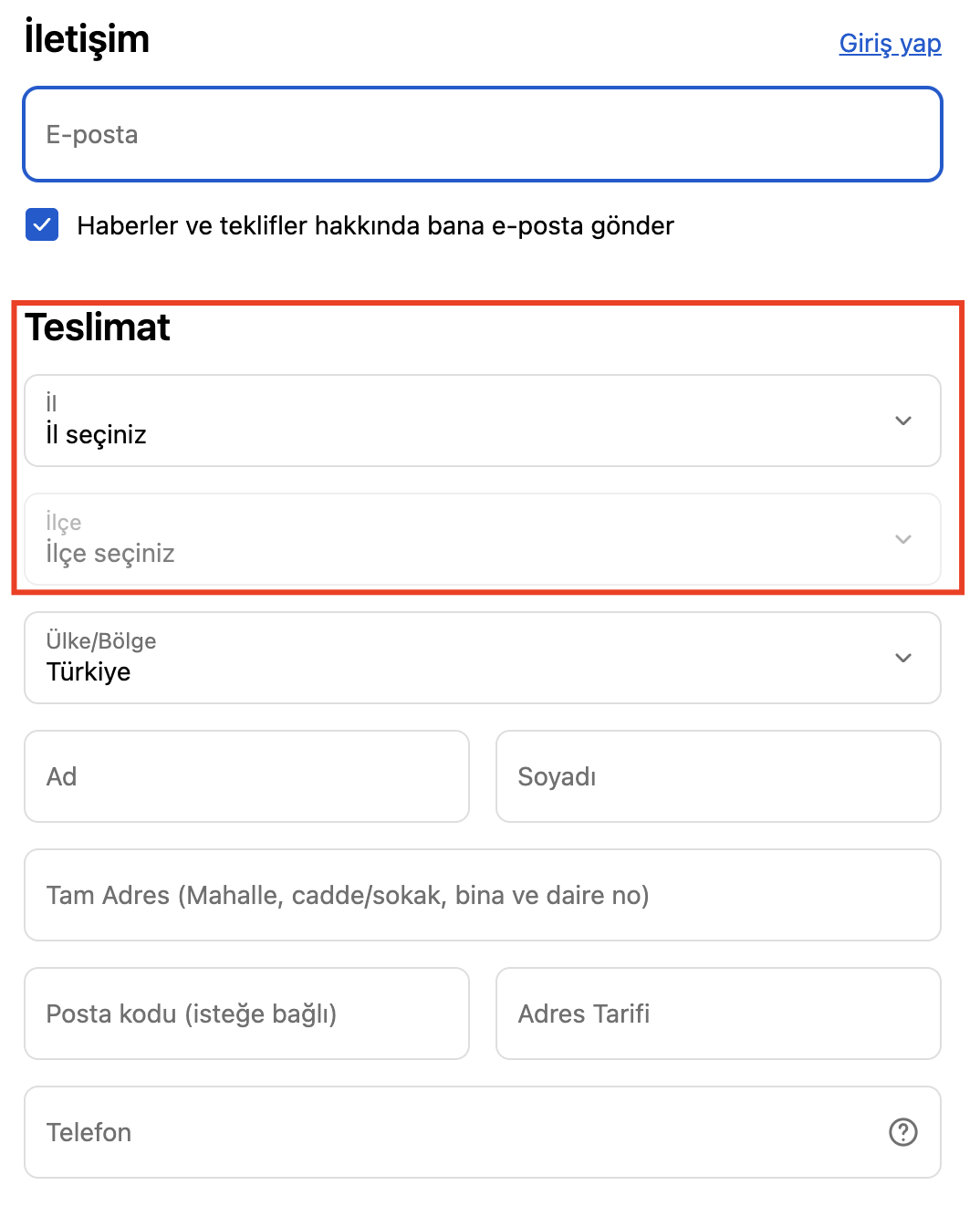
Province/County/Neighbourhood Election
Payment and address fields for projects that are not used by Shopify Plus do not meet the province, county, and neighborhood structure commonly used in Turkey by default. In particular, the lack of district area and the lack of multiple choice structure can lead users to make errors.The most commonly used solution is to evaluate the second address line (address2) in the address structure for county information. If you are going to work with an integration company, it is critical to specify from the beginning that the address2 area should be translated as a county.
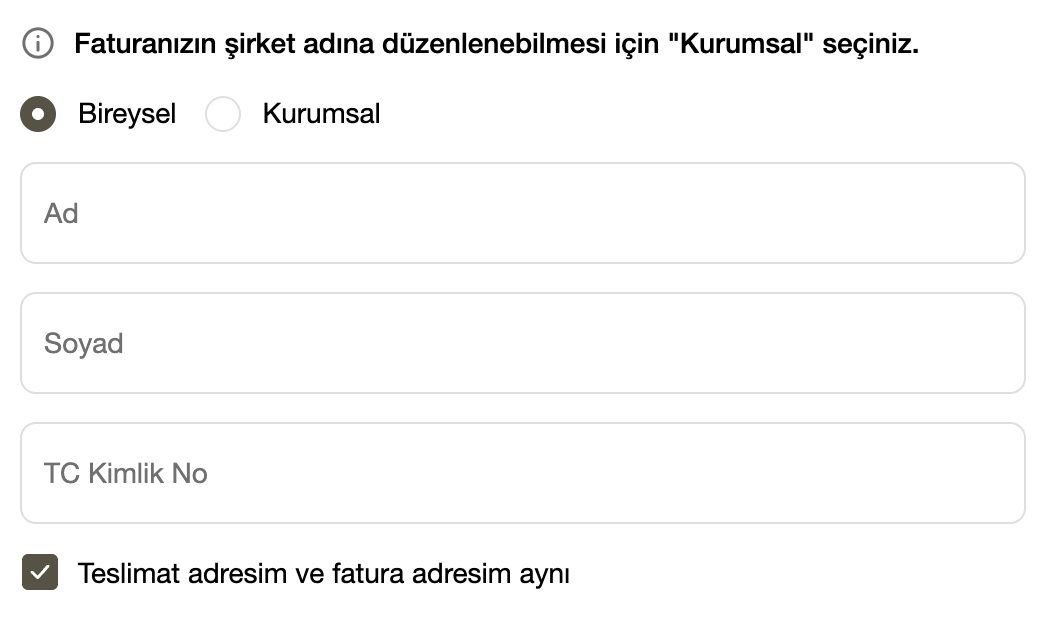
Corporate Invoice/Tax Office/Tax Number
Fields such as tax number, tax office, and company name are not included by default in the standard Shopify checkout flow, in accordance with the needs of Turkey. It should be clarified at what stage and by what method the necessary information will be received from customers requesting corporate invoices at the beginning of the project.
Common approach: collecting corporate information through additional fields, custom forms, or checkboxes created on the cart page.
KVKK, Distance Sales Agreement and ETBİS
In Shopify's standard structure, the Turkish-specific KVKK stream is not available as embedded. At least the following texts must be published in the store: KVKK/Illumination Text, Privacy Policy, Distance Sales Agreement, Pre-Information Form, Return and Delivery Policies. It is not enough to put text; data collection points must also be set up.
The newsletter, contact form, cart drawer and cart page must have the necessary checkboxes and information flows. For this need, the ComplitR application offers functions such as ETBIS logo integration, legal text management and automatic mailing of post-order emails in one roof.
For more in-depth information on Shopify compliance in Turkey Shopify Türkiye yasal gereklilikler rehberimize göz atabilirsiniz.

Critical Transition Risks Managed by Nodus Works
In transition projects, risks are not only technical; data quality, integration order, team coordination and legal compliance are also assessed equally. In this section you can find the critical transition areas that Nodus Works actively manages in each project.
Data Validation and Cleaning Protocol
If your existing infrastructure has been in use for many years, your product, category, and customer data may naturally become complex over time. One of the most critical topics in the process of migrating to Shopify is deciding how much of the data really needs to be moved, long before you move it as it is.
Especially on the product side, it is quite common to unnecessarily move products that have been discontinued in the past, are no longer active or have no operational value to the new structure. The same applies to categories. When legacy category structures that have formed over the years, breaks that are no longer used, or complex menu flows are just migrated to the new platform, the Shopify side misses the opportunity to build a simpler and more manageable structure. So be sure to check the category structure and menu tree by eye before switching.
It is also very important that you maintain some critical elements when simplifying. In particular, active product numbers, product distributions within categories and product rankings should be carried as accurately as possible. Even small differences in these areas can affect both the user experience and the operation habits of teams.
Carefully plan the import order in order and member data. For example, when you bring in members first and after orders, in some structures, the address data from orders may overlap with existing customer records, and repeat records may occur at registered addresses. Although this may seem minor at first glance, it can create confusion in customer accounts over time.
Address data is one of the most sensitive areas of migration. Especially if address fields on the legacy system and the fields on the Shopify side don't work in the same logic, mismatching can lead to serious operational issues. For example, if in the new structure it is planned to keep the county information in the address2 field, entering the address continuum, city or other free text in this field during import may cause the registered addresses of users to be corrupted. This, in turn, directly affects the order and cargo operation. More importantly, the user can leave the order if they encounter corrupted or meaningless registered addresses after logging in.
Plan carefully at the outset which data to move, which to eliminate, how to map fields, and in what order to import. Otherwise, seemingly minor data errors turn into much larger operational problems after the transition to live.
URL Migration and SEO Protection Plan
One of the most important technical issues to consider when switching to Shopify is that the platform keeps certain fields fixed in its URL structure. In Shopify, product pages work under /products, collection pages /collections, content pages /pages, policy pages /policies, and search page /search. Although the handle field can be changed, these master folder structures are standard and cannot be changed.
So if your existing infrastructure has a different URL architecture, it won't be possible to maintain the old structure one by one when migrating to Shopify. In such cases, the most critical issue is to correctly map old URLs to new Shopify URLs and fully identify the required 301 redirects. Otherwise, there will be organic traffic loss, indexing problems, 404 errors, and user experience breakdowns.
Evaluate organic traffic pages, legacy category URLs, product detail pages, content pages, and policy pages individually before migrating. In a successful migration, the goal is not to try to keep the URL structure the same as the old system, but to create a seamless migration plan for search engines and users by identifying URLs that will change in advance.
Another important issue to note here is slug problems arising from Turkish characters. Especially in product or page names with a capital “I”, it is difficult to notice in URL generation, but the effect can be a big character problem. This is a situation that has been known for a long time, but in practice it still causes problems.
For example, in a product called “Thin Sole Loafers”, slug can sometimes be formed in the form of a thin-soled moccasin... The character here is not the standard lowercase “i”; it is the dotted lowercase “i” character. Although it may seem the same at first glance, it can lead to serious problems in cross-system data flow, URL handling logic, and some integration scenarios.
This is especially problematic with XML, API, and custom integration flows. For example, if a system that receives products via API is also called size chart or additional data, a query such as V1/ShowChart/Slim-based Makosen may give unexpected errors. As a result, there may be problems such as product not being imported, URL corruption, redirect errors or some pages not matching properly.
Therefore, before migrating, take an export with all the URLs, detect records with the i character in slugs, and correct them manually if necessary, or secure them with a redirect.
Theme Compatibility Assessment
In Shopify transitions, it is possible to move the theme of the current site one by one, but not by copying and pasting, but by redoing it. Since each infrastructure has its own theme structure, template logic, domain editing, and technical limits, migration projects can reference the current look, but the theme is often reworked to fit Shopify logic.
At this point, Nodus Works prefers themes that are in Shopify's own theme ecosystem as much as possible. Regardless of whether it is paid or free, themes.shopify.com It is healthier to prioritize themes on it. This is due to trust, ease of maintenance, quality of documentation, update layout, and level of compatibility with Shopify.
With outsourced themes, some risks are more common: code quality may be inconsistent, the theme developer may not provide regular support, quality control processes may be weak, or the theme may become incompatible with Shopify updates over time. Some structures that appear to be working in the initial setup may cause unexpected problems during development or after the transition to life. This increases both development time and increases maintenance cost.
If a completely new theme is to be made in the transition process, it should be clarified at the beginning of the work whether this will proceed from the design or be executed through an existing reference. If a work from scratch is to be done, it usually proceeds through Figma or Adobe XD design. Mobile experience is one of the main priorities since the vast majority of e-commerce traffic today comes from mobile devices; a structure that looks good on desktop but remains weak on mobile directly affects sales performance.
Integration Map and Addiction Analysis
While Shopify offers a strong infrastructure, some of the features that many brands need don't come embedded in the platform or are limited in scope. That is why it should be clarified from the beginning which needs can be solved on the theme/code side during the migration process and for which applications will need to be used.
For example, while the breadcrumbs structure is available in Shopify based on Liquid, its scope may remain narrow in most projects. Other than that, titles like favorites, “let me know when it comes to cart”, integrated mobile app, recent Instagram posts, bulk discount app, popup, WhatsApp button and free shipping bar are often solved with app support. Some can be advanced with paid apps and others with free plans.
Especially on the bulk discount side, it cannot be said that Shopify offers a very practical interface from within the panel. Product price and plotted price updates are either done individually in most scenarios or managed by Excel/CSV import-export processes. Therefore, consider this issue separately for brands with intensive campaign operations.
Installing apps directly for every need is not always the right approach. Overuse of applications creates cost increases, performance loss, code clutter, and maintenance difficulty. Therefore, separate the areas that can be solved with Liquid template as much as possible; do not unnecessarily enlarge the application dependency.
For example, if your product is a backgammon and the user is going to add custom lettering with a laser on it, then in such a scenario this structure can often be improved with a good partner without the use of additional applications. So whether the need really requires app, or can it be solved more cleanly on the theme/code side, decide this at the beginning of the project. If app dependency is kept high at the beginning of the project, a slower, cumbersome and costly site may emerge after the transition.
Payment and Cargo Infrastructure Transition Plan
Before the transition, you need to have clarified by what structure you will proceed on the payment and cargo side. On the payment side, decide on iyzico, PayTR, Craftgate, or any other infrastructure you will use and complete the application, approval and necessary technical installation processes before going live.
Likewise, determine from the beginning how to manage the current agreement on the cargo side. Whether the shipping process will run through a shipping integrator firm, use the Shopify app directly, or whether the operation will be managed manually, make that decision before migrating.
The main goal in this title is very clear: to be able to receive payment when the site goes live and print the cargo barcode. If these two issues were not clarified before the transition, there would be serious disruption on the operational side even if the site was technically opened.
A simple pre-transition test order, a simple test barcode saves lives. Always do these before going live.
Multi-Language and Currency Configuration Plan
Multi-language and multi-currency editing is one of the issues that should be clarified in the first place in Shopify migrations. This structure can also be installed later, but if the right decision is not made from the beginning, the theme, SEO, implementation and operation costs will grow unnecessarily.
On the SEO side, it is important that hreflang and canonical editing work correctly in multi-language structures. If there are different language or region versions of the same content, properly tell search engines which page is available for which country or language. Otherwise, you may see the wrong page stand out, content competing with each other, or duplicate content issues. If a multi-country structure is planned, consider the technical SEO side along with translation, also with hreflang, canonical and domain structure.
On the currency side, the critical issue is: Receiving checkouts in your local currency on Shopify is basically supported by Shopify Payments. If these infrastructures are not used, the transaction is taken in the store's default currency at the time of payment, even if the customer is shown a different currency within the store. So showing multiple currencies is not the same as actually receiving payments in multiple currencies.
That's why, for example, if you're going to sell in three different regions and there's no Shopify Payments, there are practically two main scenarios. The first is to set up a single site and receive payment from everyone in one currency. In this scenario, all sales can be taken in a single currency, and the Shopify Markets structure can be used. With Shopify Markets, country, region, and price display can be managed, but the available market structure and some international sales features vary depending on the scope of your package.
The second scenario is to set up separate sites.
For example:
siteadi.com
uk.siteadi.com
us.siteadi.com
Separate structures such as these can be set up and connected by IP routing or region selective logic. This approach allows for more control; however, it actually multiplies the costs. Theme licensing, application costs, maintenance, content management, campaign fixes and operational load should be considered individually for each site.
The question you need to answer in summary is: will a simpler structure be built on a single site with a single currency, or will a more flexible but more costly structure be preferred by opening separate sites for different regions? Starting on the multi-language and multi-currency side without this decision being made subsequently presents unnecessary difficulties on both the SEO and the operation and the budget side.
Companies that provide services in Turkey usually set up separate sites. The partner agency forwards them to each other via IP forwarding or information popup. Thus, a user who enters from the United States does not accidentally make a purchase from the Turkish site.
How to align the Product and Variant Data Model with Shopify
One of the most critical issues in the migration process is the correct adaptation of the product and variant logic on the old site to the Shopify structure. Especially if in the old build the colors were arranged as variants under a single product, the healthier approach for most projects on the Shopify side is to open these colors as separate products and connect them to each other via the metafield.
This is mainly due to the fact that this structure works more flexibly on both the management and marketing side. Separate URLs are created for each color, which provides a more controlled structure in terms of SEO. It's easy to create separate visuals for each color, separate description, separate media editing, and separate campaign management if necessary. Stock tracking also becomes clearer.
Also, separate product logic often results in cleaner results in collection pages, filtering, product feeds on the ad side, and third-party integrations. Especially in feed structures such as Meta, Google, XML and so on, it is a serious advantage that each color can be treated like a separate product. On the user experience side, the products remain interconnected, so the customer can see the color transition again, but in the background the structure becomes more orderly.
Carefully map stock, SKU, barcode, visual, variant, and product relationships as you make this conversion. Otherwise, product links may break when colors are separated, filtering may be broken, or incorrect product matches may occur. The goal is not just to move data, but to make the product structure more sustainable and flexible in Shopify. Consider the Shopify migration as an update in every sense, rather than a counterpart migration.
Customer Accounts and Order History Management
Customer accounts and order history management in the process of migrating to Shopify is a topic that should be handled with caution, especially for stores that sell live. If you have a strong ERP infrastructure, it may not always make operational sense to import all of the thousands of past orders into Shopify. However, as customers who have made recent purchases continue to need returns, exchanges, delivery checks, or access to order history, it is recommended that orders from at least the last 1 month be transferred to Shopify up to date by the time of transition.
- It is not always necessary to carry the entire order history. If you have an active ERP infrastructure, it may be operationally pointless to transfer thousands of backdated orders to Shopify. However, it is very important for trust that users who have ordered recently can see their old orders. Keep orders from at least the last 1 month up to date until the changeover.
- Be careful not to send automatic emails to customers during order taking. If notification settings in API or import processes are not managed correctly, mail can go to thousands of users at a time. This both creates chaos and makes the transition process amateurish.
- Controlly match product data within the order. Products must be drawn correctly according to areas such as price, discount, tax, quantity, SKU and barcode. If there is an active integration inside, mismatching of products can disrupt the marketplace and inventory operations. Therefore, if possible, do these operations before the integration is activated.
- Move address data without duplication. Do not unnecessarily duplicate the customer's existing address records during order transfer. If the district information will be kept in the address2 field in the project, the historical order addresses should be entered in this field with the same logic.
- Do not forget about auxiliary order data. Although additional fields such as invoice URL, contract links, and similar may seem trivial at first glance, they can be useful in support and operations processes in the future.
- Correctly mark the statuses of old orders. If Fulfillment API is to be used, ensure that delivered orders do not appear to still be “in preparation” or “on the way” in the system. Transfer tracking ID and tracking URL information correctly as well.
- Check Shopify notifications before migrating. Temporarily turn off notifications, especially Settings > Notifications > Staff notifications. Otherwise, dozens of unnecessary notifications may fall into the team. After the process is complete, do not forget to turn it on again.
- Carry basic data in customer accounts in full. Email, telephone, country code/area code, address information and permission data must be transferred in the correct format.
- IIS and communication permissions are critical data. Move commercial message permissions on the existing system with the right columns or with the right API structure. If this data is lost, marketing and communication processes are damaged.
- Also evaluate additional customer areas, if any. If specific fields used for gender, date of birth or segmentation are also transferred, it generates value for marketing and CRM processes in the long term.
- Passwords are immovable; this is normal. The password structure in Shopify was removed in 2026.
Legal Texts and KVKK/Distance Sales Compliance
At least the following texts must be published in the store: KVKK/Lighting Text, Privacy Policy, Distance Sales Agreement, Pre-Information Form, Returns and Delivery/Shipping policies.
It is not enough to put only text on the KVKK side, but also edit data collection points. The newsletter, contact form, cart drawer, cart page and similar fields should have checkboxes and information flows if necessary. Ensure compliance with cookie notification, policy pages, and form-based checkbox structures, as Shopify's standard structure does not include a Turkish-specific embedded KVKK stream. Applications such as ComplitR can be used for this need.
ISP and commercial messaging permissions must be part of the data migration. Correctly transfer email/SMS permissions, related columns, and data processing logic when moving customer data. However, Shopify typically requires an ISP partner or appropriate integration structure to manage these permissions sustainably; make this clear at the beginning of the project.
Assess the ETBIS liability separately. For businesses engaged in e-commerce in Turkey, ETBİS registration and notification obligation is important. If there is a new domain, company information or structure change in the migration, also review the ETBİS side.
Transition to Live Risk Assessment and Mitigation Plan
Operational risks in Shopify migration projects don't just occur on the day of migration. The main critical risks often occur during the pre-transition preparation period, the data matching phase, integration setup, and during the reinstallation of the marketing infrastructure. A small mistake in this process can result in decreased ad performance, disrupted order flow, damaged SEO visibility, stalled marketplace sales, or damaged customer experience.
Don't see Shopify migration as just a change of the front face and the visible world. Transition is a process that requires data architecture, integration, marketing continuity, customer experience, law, SEO and operations to be addressed together.
Integrations not working, catching up late or disrupting the living structure: The lack of readiness of the integration side or damage to the living system is one of the biggest risks of the transition process. For example, if Trendyol does not catch up with the marketplace, cargo, e-invoice or ERP integration in time, the operation may be disrupted. In even more critical scenarios, integration can passivate existing products, disrupt stocks or contents, mismatch products, and incur a direct loss of turnover due to the failure to reopen records.
Marketing accounts are not ready to migrate: Even if the Shopify migration is technically complete, if marketing tools such as Meta, Google Ads, GA4, Search Console, GMC, TikTok, Criteo, Klaviyo, etc. are not properly prepared for the new structure, there can be serious data loss on the performance side. Check ad accounts, catalogs, domain verifications, pixel links, and event structures before migrating.
Deterioration of event and conversion tracking: During the migration process, the failure of events such as add to cart, begin checkout, purchase, view item, sign up and so on is one of the most critical risks. The complete disappearance of events, double triggering, or sending incorrect values impairs both ad optimization and analytical accuracy.
Moving on to transition without product matching: If products do not correctly match the old SKU, barcode, handle, variant logic, or category structure in the new structure, advertising catalogs, remarketing flows, marketplace connections, and ERP processes can be disrupted. Especially if the product ID logic changes, product matching issues occur on the Meta catalogs and Google Merchant side.
Incomplete or incorrect preparation of the 301 routing plan: Failure to redirect old URLs to the new Shopify URL structure can lead to serious losses in SEO visibility, ad quality score, and user experience. Prepare the redirect map in advance, especially for product, category, brand, blog and campaign pages.
301 referrals are prepared in theory and do not work in practice: If the redirect list is left untested even if the redirect list is removed, there are problems such as chain redirection, 404, incorrect target page, or parameter loss. Test that prepared redirects actually work with sample URLs.
Deterioration or incomplete transport of GTM structure: The Google Tag Manager structure on the old site gets bigger and more complicated in most projects over the years. In case of incomplete installation of the container during migration, if the triggers do not fit into the new DOM structure, or if the Datalayer changes, many tracking systems can be broken at the same time.
Incorrect data going to GA4 and ad platforms: Even if the event seems to be working, if fields such as currency, value, item_id, item_name, quantity, coupon, shipping, tax go wrong, reporting and optimization. Data quality is just as important as event presence.
Merchant Center and product feed structure degradation: Feed source, product URLs, stock information, variant logic, or visual links may change after the Shopify migration. This can cause product rejection, match issues, or decreased ad performance in Google Merchant Center.
Adherence of meta catalogs to old product IDs: If catalog products on the meta side are tied to the ID structure on the legacy platform, pixel events and catalog products may not recognize each other after the Shopify migration. In this case, dynamic ads, remarketing, and Advantage+ catalog feeds suffer.
The waste of email and CRM automations: If automations running on Klavio, Omnisend, HubSpot, or similar systems are not aligned with the new store, new domain, new event structure, or new customer segments, abandoned cart, welcome, recovery, and after-sales flows may not work.
Incorrect handling of customer permissions and marketing data: If email permission, SMS permission, KVKK/IIS status and segment data are transmitted incorrectly, the marketing operation is damaged. Switching without protecting the permissive/unauthorized customer distinction creates subsequent legal and operational problems.
The assumption that the integration logic in the old platform will be preserved one by one: The shipping, invoicing, marketplace, ERP, loyalty, or reseller structure that runs on Shopify may not work the same way as the old system. If existing processes are not redesigned, operations may be disrupted after the transition.
Marketplace and ERP connections disrupt products: If active integrations are turned on when you import products into Shopify, the marketplace or ERP systems can rewrite products, change inventory, break variants, or crush descriptions. Therefore, plan the data flow sequence from the beginning.
Overlooked critical functions in the theme development process: Even if the design is approved, filtering, variant selection, bundle structure, campaign edits, delivery messages, stock indicators, popups, and custom landing flows may be missing. Go through all the pages one by one; do this work in teams.
Search, filtering, and collection logic remain incompatible with the old structure: If users can't find products like they did on the old site, the conversion rate drops. Rebuild collection rules, tags, filter structure, menus, and internal search experience before you migrate.
Thinking SEO is all about redirects: If titles, meta descriptions, canonical constructs, schema, indexability, robots, sitemap, internal links, and collection content are ignored, SEO performance decreases. Although a redirect is important, it alone is insufficient.
Forgetting content and campaign pages: Transition projects often focus on product and category pages, but blog posts, custom campaign landings, influencer pages, SEO landings, and ad traffic micropages can be forgotten. The loss of these creates a direct loss of traffic and sales. Be sure to pull all the pages and edit their design as well.
Testing payment and shipping scenarios only at the technical connection level: Even if the integration is established, operational problems are not tested if real scenarios such as installment, bank referral, failed payment, remittance, payment at the door, free shipping threshold, regional shipping rule are not tested.
Infact that in-house teams are not ready for the new panel: If operations, customer service, content, marketing, and warehouse teams migrate to the Shopify panel without getting used to the Shopify panel, even the technically correct store creates inefficiencies inside. Teach authority roles, order management, and daily operations flows in advance.
Failure to manage the old and new system in parallel for some time: In many projects, the two systems need to be considered together in the transition process. If this process is not planned correctly, the order, inventory, customer and campaign data can differ on the two sides.
Not doing the test process realistically enough: Only the test “does the site open” does not give an exact result. Test end-to-end scenarios such as real user navigation, finding products, adding to cart, applying discounts, completing payments, receiving mail, order tracking, cancellation/returns. Experience the order journey from a relatively slow Android phone; observe the website from a small screen.
Did you know? 1366×768 is still a very common resolution in Turkey.
Treating migration as a design project, not just a data migration project: The biggest mistake with Shopify projects is seeing the work as just a theme post. This process requires data architecture, integration, marketing continuity, customer experience, law, SEO and operations to be considered together.
Scope of Performance Optimization
One of the most critical topics when migrating to Shopify is performance. Performance here is as much about how quickly the user sees the main content as quickly as the quick opening of the page, how comfortable he interacts with the page, and how stable the elements on the screen remain during loading. Shopify evaluates store performance largely through the Core Web Vitals approach.
One of the metrics that stands out in this area is LCP. The LCP measures how long the main content on the page is visible. In particular, home page banners, large product images, collection showcases, and media areas in the top section directly affect this metric. The INP shows how quickly the user responds to actions such as button, filter, variant selection, or adding to cart. CLS, on the other hand, measures visual shifts during loading; undefined images, late pop-ups, and dynamic blocks are the most common issues here.
In Shopify projects, speed isn't solved just by analyzing the theme source code. The theme structure, applications used, third-party scripts, images, video fields, review widgets, analytics tags, and marketing tools should be evaluated together. The main thing that determines the performance is the total effect of each ingredient added to the store. The healthy approach is to be able to distinguish between really necessary code, really necessary integration, and content that really needs to be shown on the first screen. It is possible to make very well engineered themes unopenable by running 8-9 applications.
Mobile performance should be treated separately and as a priority. Since traffic in e-commerce is often mobile-heavy, a structure that works well on the desktop may not give the same result on mobile. Heavy banner usage, unnecessary JavaScript, excessive application output, and slow filter structures can seriously undermine the mobile experience. The goal is to keep product listing, product detail, cart and pre-checkout flow smooth for the actual user. Just scoring high doesn't make sense on its own; overly aggressive optimization decisions can also spoil the experience.
On the marketing and measurement side, Shopify's pixel and script structure is more controlled, especially due to permission management and customer privacy. This structure may seem more limited to some brands in the first place, but when set up correctly it does not create a direct disadvantage in terms of SEO. The important thing here is to create a balanced fiction between performance, measurement, and consent management.
Post Transition Support Frame
The Shopify migration process isn't complete when the site goes live. The most important period is often experienced on the first day after the transition, the first week and the first month. In this process, order flows, payment steps, shipping and invoice integrations, customer notifications, advertising metrics, referrals, form structures, and overall user experience should be closely monitored. Even if the transition to broadcasting is technically successful, real user behavior and realized needs arise during this period along with live operation.
Therefore, the post-transition support plan is at least as critical as the transition. Verify that key operations are working correctly in the first 24 hours, review performance and user flows within the first week, and optimize the store to fully adapt to the new infrastructure during the first month. Feedback after the transition, the process of familiarization of teams to the new panel, and the behavior of third-party systems in the field should be carefully considered during this period.
As part of our partner agency approach to Shopify migration projects, Nodus Works aims to maintain the operational continuity of your store by providing monthly technical support after the migration is complete, responding quickly to potential technical needs, and supporting more efficient use of new infrastructure.
Migrating and Migrating to Shopify
.png)
Discovery & Preliminary Analysis
We review the structure of your existing website. A migration strategy is created by analyzing the number of products, URL structure, themes, integrations, and data formats. This step allows us to detect data loss and SEO risks in advance.

Data Transfer & Conversion
We securely import product, variant, category, customer, and order data to Shopify. Data from different platforms (WordPress, WooCommerce, Wix, IdeaSoft, Ticimax, ikas, etc.) is converted and configured.

Theme Adaptation & Design Revision
We can keep your existing design or redesign it specific to Shopify. We develop fast and modern interfaces that fit your brand identity.

Content Strategy & Blog Plan (optional)
We create content plans that meet Google's E-E-A-T (Experience, Expertise, Authority, Trust) criteria. We grow search volume with keyword sets, sub-category descriptions, frequently asked questions, and blog content.
Frequently Asked Questions
PREFER US
AMONG THE ONES
TAKE PART IN...
We build Shopify solutions for everyone.
Do you want to set up a new Shopify store, improve your existing store, make custom integrations, or solve speed problems? We are an expert Shopify partner who handles technical work for you.

Dossha
#shopify

Les Benjamins
#shopify

Nocturne
#shopify

The Fellas
#shopify

Mai
#shopify

Karaca
#shopify

Milagron
#shopify

Kigili
#shopifySeo

Loreipsum
Lorem ipsum dolor sit amet, consisttetur.

Loreipsum
Lorem ipsum dolor sit amet, consisttetur.

Loreipsum
Lorem ipsum dolor sit amet, consisttetur.

Loreipsum
Lorem ipsum dolor sit amet, consisttetur.

Loreipsum
Lorem ipsum dolor sit amet, consisttetur.

Loreipsum
Lorem ipsum dolor sit amet, consisttetur.

Loreipsum
Lorem ipsum dolor sit amet, consisttetur.

Loreipsum
Lorem ipsum dolor sit amet, consisttetur.
Loreipsum
Lorem ipsum dolor sit amet, consisttetur.
Loreipsum
Lorem ipsum dolor sit amet, consisttetur.
Loreipsum
Lorem ipsum dolor sit amet, consisttetur.
Loreipsum
Lorem ipsum dolor sit amet, consisttetur.
Loreipsum
Lorem ipsum dolor sit amet, consisttetur.
Loreipsum
Lorem ipsum dolor sit amet, consisttetur.
Loreipsum
Lorem ipsum dolor sit amet, consisttetur.
Loreipsum
Lorem ipsum dolor sit amet, consisttetur.










.webp)
.webp)