.png)
What should a Shopify product page look like? Conversion Oriented Design and SEO Guide
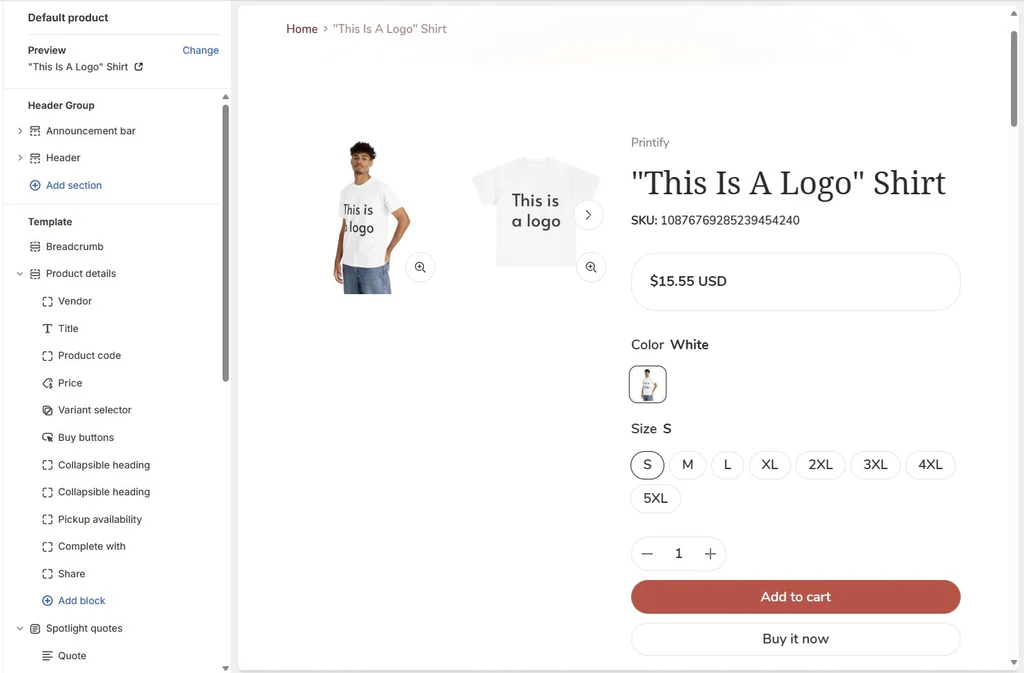
Shopify Product Pageis the most critical area in e-commerce where the visitor makes the “buy” decision. That's why this page is designed not just to look stylish; it should be designed to give confidence, present the right information in the right order, and take the user to the checkout step in a frictionless way. A successful product page; visual hierarchy, compelling content, strong trust signals and fluid user experience (UX) works in conjunction with. The purpose of the guide is not just to drive traffic, but to set up a system that leads the visitor to the page to buy from “add to cart”.
Why a First Impression on a Shopify Product Page Determines Conversion
A user entering the product page asks in the first seconds “Am I in the right place?” and “is this brand reliable?” Seeks answers to their questions. If you cannot give these answers clearly, the user can leave the page without even reviewing the price of the product, which both increases the bounce rate and conversion rate takes your goals straight down. What we call a first impression is not only aesthetic: the layout at the top of the page is the sum of many “micro-signals”, such as the clarity of the titles, the visibility of the price, the intelligibility of the options, the quick opening of the page and comfortable reading on the mobile. While Shopify's infrastructure is strong, the page can easily become crowded with theme and app choices; unnecessary badges, overlapping pop-ups, long block text, and distracting banners undermine the decision-making process. In the first impression, your goal is to tell the user about the product in one sentence, show the price and the confidence signal, make the purchase action visible and create the motivation to “continue the review”.
A well-designed first screen, tirelessly guides the user. What is critical here is to give the information “in the right order”: first what the product is, then why it is valuable, then the purchase action. For example, if the product name is too long, it becomes difficult to read; the user cannot understand the category/promise of the product at first glance. A short value phrase next to the price (e.g. “free shipping”, “30 days return”) both increases confidence and balances price perception. In addition, the general design language of the page (typography, spaces, color consistency) reflects the professionalism of the brand. This creates a feeling of “shopping here” even without reading user reviews. Remember: If the first impression is not good, the best SEO compatible even the description remains unseen, because the user does not even need to scroll down.
What elements should be in the above-the-fold area (first screen)?
The “above-the-fold” area of the product page, that is, the section that the user sees without even scrolling, is the backbone of the transformation. Must-haves in this area are: a clear product title, price (discounted price + old price if applicable), main image or gallery, variant/size/color selection, stock information (without exaggeration), delivery and returns, and a powerful buy button. The user, looking at this field, asks “Is this product suitable for me?” and “Can I buy it now?” They should get answers to their questions. A frequent mistake is to pile too much text on the first screen: long descriptions, unnecessary icon sets or distracting multiple campaign messages distract the user from the moment of decision. Choose a single main message instead: the essential promise of the product. Example: A short, benefit-oriented sentence, such as “breathable cotton fabric — comfort all day long”, puts the user in the correct context when placed just below the title.
Visual hierarchy is essential when designing this space. The product image and price/purchase space should be in the natural flow of the eye; CTA (call-to-action) should not be lost. Variant selections should be clear and error-free; if the user cannot add it to the basket without selecting a size, the error message should be understandable and friendly. It is also necessary to add confidence signals in microdoses: short phrases such as “Secure payment”, “Free return”, “Same day shipping” give the user the message “low risk”. Here the goal is to get the user to approach the right action, and not to scroll through the product page. The clearer you set up the above-the-fold area, the more efficiently the contents (comments, descriptions, images) in the continuation of the page will work and conversion rate The increase is more sustainable.
The fastest ways to win the first screen on mobile
Product page performance on mobile can be more decisive than desktop, because a significant portion of users visit the store from the phone and are impatient. therefore mobile compatibility just “Is the theme responsive?” the question is not; it means establishing the triad of “readability + speed + one-finger action” on mobile. On the mobile first screen, the product name should be optimized so that it does not exceed two lines, the price should appear clear, and the product image should take up space without unnecessary gaps. The most critical point is CTA: Sticky on mobile buy button elevates conversion in most scenarios; the purchase action always remains accessible even when the user scrolls down and reads descriptions. In addition, the choice of variant should not turn into small click areas on mobile; the buttons should be wide, easy to touch and clearly labeled.
In mobile, “speed” is also the basis of the first impression. Too large images, heavy applications, unnecessary animations and overlapping pop-ups slow down the page. The user can give up even while waiting for the first image. Therefore, as well as technical steps such as visual compression, lazy-loading, reducing unnecessary scripts, reducing the number of elements on the page is critical. In mobile, content presentation also needs to be fragmented: short blocks, clear titles, accordion fields provide information without tiring the user. And place the elements of trust “short and visible” on mobile: payment badges or messages such as “30 days refund” reduce the perception of risk without overwhelming the screen. After all, the goal in mobile is this: Let the user understand the product in a minute, be able to add it to the basket without experiencing distrust and proceed comfortably to the purchase flow. When this order is established user experience (UX) rises and conversion rate increases naturally.
How Product Images Increase Conversion Rate
In e-commerce, the user cannot touch the product; therefore, most of the decision is shaped by visual perception. accurately product imagesasks the user “is the product real, is it of good quality, how does it look to me?” gives answers to questions and reduces uncertainty. As uncertainty decreases, the fear of returns and “will the wrong product arrive?” anxiety decreases, which is directly conversion rate reflected in its increase. High-resolution, well-lit and consistent photos demonstrate the professionalism of the brand. But “high quality” is not enough; images need to tell a story. For example, the first visual should be a clear packshot (product alone), followed by detail shots (texture, stitching, material), then usage scenarios (product top/hand/medium). This ranking “embodies” the product step by step in the user's mind and facilitates the purchase decision.
Also, the images should not slow down the page. Uploading images too large on Shopify lowers mobile performance, and trust is shaken if a user gets stuck while swiping. Visual optimization is therefore part of the design. Another critical issue is consistency: Different light, different hue, or different backgrounds can create an “amateur” feeling. This prompts the user to “Don't the product look the same as in the picture?” It gives rise to suspicion. Images also carry the burden of description: showing the dimensions of the product, the way of use, the package contents and even elements such as warranty/certificate with infographics can convince the user without reading the text. When you set up the visual language correctly, your product page is both more compelling and receives fewer support requests.
Photo types: packshot, detail, usage scenario
The set of visuals on the best performing product pages is not random; it is planned based on the user journey. The first photo should usually be a packshot: a clear, clean, high-contrast, and distraction-free version of the product. This image tells the user “what exactly is being sold?” gives the answer to your question. The second and third photos should be detail shots: Fabric texture, zipper/button quality, material surface, attachment points, logo/workmanship areas that prove quality. Because the user takes risks when buying; detail shots offer “proof” and increase confidence. Detail visuals, especially in products with a mid-upper price segment, seriously reduce the purchase barrier and conversion rate exerts a strong effect on it.
The use-case visuals are “How does the product stand on me?” solves the question. If you sell clothes, photos of models in different sizes; in household products, the scale and style harmony of the product in the space; in electronic products the actual size of the product on the table/hand; scenes such as the image of application in cosmetics push the user to dream. At this point, not only the “beautiful photo” is important, but the photo that provides information: such as the measurement comparison, the steps to use or the image of the package contents. And reduce color/size uncertainty to lower return rates: Instead of defensive text like “Color may look different on screen,” show color variants in the same light and in the same frame. The correct visual set completes the description; the wrong visual set forces you to read the description.
Visual optimization: speed, subtext, sizing
Visual optimization carries two goals at once: (1) fast loading of the page (2) SEO compatible build structure. Many stores upload huge files for the sake of high resolution, which slows down page opening and loses the user, especially on mobile. That's why it's important to present images in the right format and the right size: Files optimized to the dimensions your theme needs instead of unnecessarily large pixel sizes improve speed while maintaining quality. In addition, theme preferences, which support the sequential loading of images (lazy-load), are important so that the user immediately sees the product on the first screen. Another point is not that there are a lot of images, but that there are images that are chosen correctly, that serve the decision-making process. Instead of 12 similar photos, 6 “proving” photos bring higher conversions.
On the SEO side, the subtext of each image is important. The subtext tells search engines what the image is telling; it is also necessary for accessibility. Think of the subtext not as a keyword stuffing field, but as short phrases that describe what the product really is. A clear definition, such as “black leather wallet front face detail”, for example, supports both user experience and search visibility. Also, visual file names should be meaningful; regular names such as product name + variant can be preferred instead of “IMG_3847.jpg”. In summary: Visual optimization is not just technical; it is a speed and confidence improvement that serves sales. The faster the page opens, the user does not get hung up on the limit of patience, the more comfortable he examines the product, buy button more clicks and conversion rate rises.
How Product Videos Speed Up the Buying Decision
In e-commerce, the visual set is powerful to “show” the product; but product videos can be even more effective to “prove” the product. Because the video presents the user with the real-life posture, scale, movement, ease of use and details of the product at the same time. In the user's head, “I wonder if it turns out the way I expected it to turn out?” If it bears suspicion, a short and clear video reduces that doubt in seconds. This, in turn, increases the rate of adding directly to the basket and conversion rate It has a noticeable effect on it. Especially the “experience” side, such as clothing, cosmetics, electronics, home life, sports equipment, conveys the emotion and flow that video, text and photography struggle to convey in strong categories. Video on the Shopify product page allows the user to get to the “got it, I trust” point faster, thus shortening the decision process.
Critical in video strategy is to produce “the right video”, not “a lot of videos”. By the time the user gets to the product page, they are usually not ready to watch long content, so the first video should be in the 10—30 second band, quickly understandable and clearly showing the benefit. More detailed content (e.g. installation/usage steps) can be presented at the bottom of the page or in a drop-down area. In addition, the trust effect of video does not only come from the content; professional light, clear sound, clean frame and real use scene also reflect the quality of the brand. Therefore, the video is not a “marketing ornament”, but part of the persuasion mechanism of the product page. When set up correctly, the user asks fewer questions, hesitates less and buy buttonIt gets closer to it faster.
Video types: demo, UGC, comparison
Three types of videos stand out on conversion-oriented product pages: demo, UGC, and comparison. Demo videos show how the product is used and what problem it solves in a short time. For example, if you sell a kitchen product, the “out of the box—use—result” stream sends the user a message of both speed and practicality. In clothing products, the demo can show the flow, elasticity, posture of the fabric; in electronic products, the “felt” details such as menu transitions, ease of connection, screen brightness. The goal of the demo video is not to rank features, but to tell the user, “I'm comfortable using this too.” When this happens, the uncertainty decreases and conversion rate increases.
UGC (User Generated Content), meaning user-generated content, increases trust. People may be wary of claims from the brand, but the fact that a real user uses the product in their environment increases the “social proof” effect. The best part about UGC is that it gives confidence by not being flawless: A real light, a real space, a real use, gives the user the message “This product is like this in real life”. Comparison videos also work especially well in categories where competition is intense: they show the difference between the product and an alternative (material quality, durability, performance, ease of use) in clear and respectful language. The goal here is not to belittle the competitor; it is to speed up the decision “this is the right product for my need” with the right expectation management.
Video placement and performance measurement
The performance of the video is not only related to the content, but also to its position on the product page. One of the best practices is to add a video to the main image gallery and be able to show it in the first 2—3 images. While scrolling through the gallery, the user sees the video and enters the “I'll watch and decide” behavior. But aggressive choices, such as auto-starting the video with audio, often backfire; the user wants to keep control. The video should also be comfortable to watch on the mobile: it should turn on quickly, not freeze, be usable without covering the screen. In addition, the choice of “thumbnail” for the video is critical: The thumbnail should tell you the clearest utility of the product in one frame; otherwise, there is video, but no one clicks. Therefore, the video placement, directly user experience (UX) is a component.
On the measurement side, the video should not be left “beautiful”; its performance should be monitored. Metrics such as view rate, clicks on video, rate of people watching the video add to cart, and purchase rate show whether the video is working or not. If the video is watched but the add to cart does not increase, the video may not be clear about the benefit or create false expectations. If the video does not click, its location/thumbnail may be weak. Adding video is not a miracle on its own; it needs to be tested with the right hypothesis. This approach takes the Shopify product page from being a “static showcase” into an ever-evolving sales mechanism. Thus, both conversion rate increases as well as returns and customer inquiries may decrease.
How to Write a Product Description? (Persuasion + SEO)
A good product descriptionis not a breakdown of technical information; it is a text of persuasion. When the user comes to your product page, he looks for two things from his point of view: “What will this product gain me?” and “Will this product solve my problem?” The explanation should answer these two questions quickly and convincingly. The critical point here is to describe the benefits that the features provide to the user, rather than to count the properties. To say “100% cotton” is a feature; it is useful to mean “sweat-free, all-day breathable fabric”. People buy results, not products. When the explanation clarifies this result, the uncertainty in the user's mind is reduced and buy buttonthe probability of clicking on increases. In addition, the description should also give clear details such as size, material, area of use, package contents to reduce the risk of return. That is, when persuading, you must also do the right expectation management.
The SEO side of the description is equally important. Your product page appears in search engines, but if that traffic doesn't translate into sales, you're just bringing in “visitors.” Therefore, the text is both SEO compatible It also needs to be transformation-oriented. In Shopify, product page text should be structured correctly in terms of title structure, keyword usage, readability, and responsiveness to user intent. Instead of long, wall-like paragraphs; short blocks, bullet points, mini-headings and “ideal for whom?” Sections like this make the user comfortable. Such a structure both increases the time users stay on the page, and sends a signal to search engines “this page clearly answers the searched question.”
Feature not benefit: conversion text template
You can use a practical template to write a transformation-oriented description. First, start with a “promise phrase”: What result does the product provide? Then proceed to the section “for whom”: What type of user is the product suitable for, in which scenarios does it stand out? Then come the blocks of “benefits”: the strongest benefits in 3—6 items, short and clear. Then add “evidence”: such as material, certificate, durability data, warranty period, common insight from user reviews. At the very end, give the technical information in order with the “details” section: dimensions, package contents, maintenance instructions, shipping/return information. This construct first captures the user emotionally (benefit), then logically persuades (evidence), finally lowering the perception of risk (details). When this stream sits conversion rate The increase becomes more stable.
When applying this template, your language should be “like it speaks”; overselling and assertive phrases (e.g., “miracle”, “best”, “unbeatable”) can undermine trust. Instead, tell it measurable, concrete and scenario-oriented: “Support for those who stay up all day”, “Ready to use in 5 minutes with quick installation”, “Comfortable use even in small spaces thanks to compact design”. It also helps to meet objections up front in the description: a simple measurement guide if “size selection” is confusing; “is it difficult to maintain?” care instruction if the question arises; “can it be returned?” clarity of return conditions if there is concern. If the product description is clear enough to reduce the burden of customer service, the after-sales satisfaction also increases. This in turn strengthens brand confidence and shopping again.
SEO compatible structure: headings, keyword, schema
SEO compatible product description is not “keyword stuffing”; it is setting up an orderly information architecture that meets user intent. Use the main target keyword on the product page (e.g. Shopify Product Page in the context of the name/category of the product) it is important to pass naturally in the title and in the first parts of the description. Then interspersing synonyms and related terms (material, field of use, problem solution, target audience) into the text; tells search engines about the scope of the content. Use mini-headings, bullet points, and short paragraphs to improve readability. In addition, the importance of subtexts in images contributes to the overall SEO performance of the page. The goal here is that both Google and the user can easily “crawl” the page.
On the technical side, the issue of structured data (schema) in product sheets is also important. Rich results appearing in search results such as product name, price, stock status, rating/reviews can increase click-through rate. At this point, the Shopify theme and the commenting app you use can affect schema output. When configured correctly, details such as star rating, price range, or stock information may appear in search results, resulting in more qualified traffic. But remember: Writing false/exaggerated information in order to produce rich results is harmful in the long run. The best approach is for content—comment—price—stock information on the product page to be consistent. Thus, both SEO and conversion are strengthened together: When the user arrives on the page, he encounters what is promised, he is confident and buy buttonadvances to.
How to Position Trust Elements on a Shopify Product Page
The biggest “invisible barrier” in online shopping is insecurity. Even if the user likes the product, “Is my money safe, does the product come as I expected, can I return it?” If the questions do not find a clear answer, the purchase is postponed or completely canceled. therefore elements of trust not just a decor on the product page, they are persuasive components that directly affect the transformation. The critical point here is not to randomly scatter messages of trust on the page, but to strategically place them according to the points of hesitation in the user's decision journey. For example, risk perception can be triggered as soon as the user sees the price on the first screen, and short signals such as “secure payment”, “easy return”, “same day shipping” lower the purchase barrier. At the bottom of the page, when the user goes through the detail review, comments and actual usage content come into play, providing social proof.
The second pillar of trust is consistency: product images, description, price, delivery time and return conditions must support each other. Typing vaguely in one area and talking assertively in the other, the user asks “I wonder?” It creates a feeling. The practical way to increase trust on a Shopify product page is to reduce vague phrases, provide clarity, and manage risk perception transparently. Clear wording such as “Free return within 30 days” instead of saying “there is a refund” speeds up the user's decision. In addition, overdoing the elements of trust can also have the opposite effect: Exaggerated claims such as everywhere badges, pop-ups everywhere, and “100% trust” everywhere raise doubts for some users. The best approach is to deliver the right message, in the right place, in the right dose. When you do this fiction well conversion rate While increasing, the demand for returns and support may also decrease.
Reviews, ratings, UGC
User reviews are one of the most powerful persuasion tools on the product page, because no matter what the brand says, people say, “What has someone like me been through?” He wants to see the answer to his question. Star rating, number of comments and content of comments directly affect the purchase decision. So instead of embedding comments at the bottom of the page, you need to make them strategically visible: Just below the first screen, a short summary (such as “4.7/5 — 312 reviews”) and a “go to comments” link gives the user a quick signal of confidence. When the user who reviews the product scrolls down, it is important that the comments are easy to scan: features such as filtering (size/color, purpose of use), search, most useful comments speed up the decision process. Particularly hesitant topics (is the size small, the fabric thin, the color as in the image?) The purchase becomes easier when it becomes clear in the comments.
UGC (user photo/video content) takes confidence even further. Because UGC says, “is the product really like that?” gives real life evidence to the question. The important thing here is not just to collect UGC; it is to present it correctly. Integrating user photos into the product gallery or highlighting comments with image/video in the comments shows the actual appearance of the product and usage scenarios. Also, UGC doesn't have to be “perfect”; even real content with minor flaws is often more reassuring. Still, quality control is important: excessively low resolution or irrelevant visuals can spoil the experience. Well-crafted comment + UGC field reduces the persuasion burden of product description because users get the answer to most questions from each other. This is also Shopify Product PageIt turns it into a more powerful sales page.
Shipping—return—guarantee and payment badges
Shipping, return and warranty information governs the “risk” side of the purchase decision. Even if the user liked the product, “when will it arrive, can I return it, is there a guarantee?” If the questions are not clear, adding to the basket may be delayed. This information should therefore be presented in a scannable format, not in a single long paragraph. For example, a line with a short icon: “Free Shipping”, “30 Days Return”, “2 Year Warranty”. If the user requests details, he can see the details in the drop-down panel (accordion). What is critical here is that the words are clear: concrete phrases such as “return/exchange within 30 days” instead of “Easy return” increase confidence. In addition, delivery times must be consistent; saying “1-3 days” and writing “5-7 days” in the basket will undermine confidence.
Payment badges and security signals also reduce hesitation, but should be used in the right place. On the first screen buy buttonNearby “Secure Payment” and well-known payment provider icons are especially important for users who encounter the brand for the first time. Besides, the emphasis on SSL and security (without exaggeration) offers good support. Warranty conditions, especially in electronic or expensive products; fear of return and “what if it breaks down?” reduces anxiety. Customer support information (WhatsApp, live support, email) also gives a feeling of “I'll reach out if there's a problem.” In summary, the goal in this section is to convey the message “the risk is low and the process is transparent” to the user. When this message is set up correctly, conversion rate increases and at the same time customer satisfaction increases.
How to Make a Buy Button and UX Optimization
One of the most critical elements on the product page buy buttonStop, because all the persuasive elements on the page (images, descriptions, comments) ultimately aim to move the user to this action. Therefore, the color, text, position and visibility of the CTA within the page directly affect the conversion. Phrases such as “Add to Cart” and “Buy Now” should be clear; they should clearly tell the user what will happen. Designs in which the button disappears on the page, stays too small, or competes with surrounding elements reduce the click-through rate. In addition, the support of the button with fast feeds such as “buy now” can increase conversion in some segments, but this preference should be tested against the shopping behavior of the target audience. For example, with high-priced products, the user wants to add to the cart and think; for low-priced products, quick purchases can be more effective.
User Experience (UX) Optimization is not limited only to the button; it is to smooth the path to the button. If the user needs to choose a size/color, these selections should work clearly and without errors. If the variants are mixed, the stock information is unclear, the error messages are aggressive or incomprehensible, the user gives up. It is also necessary to reduce unnecessary friction on the product page: complex areas, too long blocks of text, excess application pop-ups, slow opening images, hangs when scrolling down the page... Each of these generates “micro-discomfort” and delays the purchase decision. The winning approach in Shopify stores is usually: simple, fast, intuitive. When you install this layout conversion rate increases; more sales come from the same traffic.
Sticky button, variant selection, error reduction
The use of sticky (fixed) CTA on mobile and even on the desktop keeps the “buy” action visible as the user scrolls down the page. Sticky CTA, especially on pages with long product descriptions and lots of images, saves the user the hassle of climbing back up and speeds up the moment of purchase. For Sticky CTA to succeed, its design must be minimal; it should not overlay the screen and give the user clear “choose” guidance on products that require variant selection. For example, if the size cannot be added to the cart without selecting a size, sticky CTA can be supported by an intelligent behavior that automatically shifts the user to the size selection. Such micro-improvements, user experience (UX) improves its quality.
The most common conversion downers in variant selections are: incomprehensible tags, small click fields, unclear appearance of out-of-stock variants, lack of clear marking of the selected variant, and error messages that blame the user. Here the goal is not to “catch the error”, but to “prevent the error”. For example, grilling out-of-stock options, showing a clear “no stock” message, and offering an alternative suggestion can avoid losing the user. In addition, auxiliary elements such as the size chart remove the user from indecision. A mini notification (toast) or mini cart preview after adding to cart also gives the user a sense of progress. All this speeds up the sales process when it feels “easy and safe” to press the button and conversion rate increases.
Reduce cart/checkout friction
Even if the persuasion is complete on the product page, friction in the cart and checkout steps can kill the purchase. So when optimizing the product page, you also need to consider the cart/checkout flow. For example, if you cause the user to worry “I did not see the shipping charge” after adding to the cart, it is necessary to clearly indicate the shipping policy on the product or cart. Likewise, if the return conditions are unclear, in the basket phase “is it possible to return it?” anxiety is triggered again. This is why giving clear information on the product page, such as shipping—return—warranty, reduces disclaimers at checkout. In addition, excess form space, unnecessary membership requirements, or complicated coupon fields can also increase friction.
One way to reduce friction is to give the user a sense of progress: The net total on the cart screen, estimated delivery, payment methods and messages of trust put the user at ease. Switching to a quick checkout flow with “Buy Now” in some stores increases conversion, but this is not always true. With high-priced products, the user may want to see the cart, rethink it, and maybe add more than one product. So the right approach is to test: After adding to the cart, will the mini-cart be opened or will it go directly to the checkout? Decide based on the behavior of your user audience. As a result, when you reduce cart and checkout friction, all the optimizations you make on the product page yield stronger results: more “adding to cart” translates into actual purchases and Shopify Product Page It really turns into a page that generates sales.
Why Do I Need Shopify Consulting? Nodus Works Approach
Setting up a Shopify store is relatively easy; what makes the difference is that the store “works”, that is, it generates sales when traffic arrives. The problem that most brands have begins right here: the theme is installed, products are loaded, advertising is given... but the product pages do not perform as expected. This is usually not due to a single error; many parts such as design, content, speed, trust, price perception, user flow, and metering are not optimized together. Here Shopify consulting This is where it comes into play: it diagnoses the problem not by “prediction”, but by data, and builds a system that increases conversion with a prioritized optimization plan. For example, if visitors come to the page but do not add to the cart, the problem may be on the “product page persuasion” side; if adding to the cart but not buying, the problem may be “checkout friction”; if the page is displayed but the user does not scroll down, the problem may be “first screen hierarchy” or “page speed”. Counseling allows you to clarify these breaking points and make the right intervention.
Another critical reason is time and cost. Conversion optimization burns both time and advertising budget if done by trial and error. Focusing on the wrong place on the product page (e.g. just changing colors) does not solve the real problem. In addition, app selection makes a big difference in the Shopify ecosystem: Wrong apps can slow down the page, disrupt the user experience, or cause technical issues on the SEO side. The professional approach is to first clarify the goals (conversion rate, add to cart, AOV, return rate), then set up measurements and then order the improvements that will have the highest impact. In this way, the store develops not because it is “beautiful”, but because it brings measurable sales. In the long term, brand perception is strengthened, customer satisfaction increases and sustainable growth is achieved.
Process: analysis → hypothesis → A/B → scaling
Nodus Works The approach treats the product page not as a design file, but as a sales asset that is measured, tested, and iteratively developed. The process usually starts with “analysis”: metrics such as traffic sources, product page behaviors, scroll depth, page speed, add to cart, checkout bounce rate are examined. In addition, qualitative data is also important: user reviews, support requests, reasons for returns, and the questions that users ask the most. Because the content and trust blocks on the product page often have to be fed from this data. At the end of the analysis, problems are listed “to be prioritized”; that is, the areas that will have the fastest and greatest impact come first. This draws a strategic roadmap rather than random revision.
Then the hypothesis is established: “If we add the delivery/return message clearly to the first screen, user distrust will decrease and conversion rate “It will increase.” Design and content changes are made in accordance with this hypothesis; if possible, they are verified by A/B testing. The purpose of A/B testing is “which is beautiful?” not, “which one brings more sales?” to answer your question. Once the test winning variation is determined, it goes to the scaling stage: it is adapted to the entire category or the entire store, not just on a product page. During this time, the SEO and speed effect is also checked, because if page performance decreases while conversion increases, damage can occur in the long term. Ultimately, this process takes the Shopify store out of a one-time setup and turns it into a constantly optimized growth system. This approach makes a difference, especially in highly competitive markets, because even small UX improvements can lead to big increases in total sales.
Frequently Asked Questions (FAQ) + Quick Checklist start
The FAQ section is important both to quickly resolve the hesitations that users experience most often and to increase the opportunities for “featured snippets” in search engines. The goal here is not to write long explanations, but to give clear and actionable answers. In addition, instead of leaving the FAQ at the level of “general information”, it works better to link it directly to product page optimization. For example, the user asked “What items should be on the Shopify product page?” When he calls, the short but comprehensive answer keeps him on the page. Likewise, “SEO-compatible product page” questions bring organic traffic, but if you provide conversion-oriented answers, not only traffic but also sales are more likely to increase. The following questions are organized to cover both informational and commercial intent.
The quick checklist, on the other hand, provides great convenience on the application side: The reader can open their own page after finishing the article and check it one by one. This list becomes practical, especially when distributing tasks within the team (design, content, technical SEO, speed). It is best to start the Checklist from items that have a “high impact on conversion” rather than “if”. Items such as the first screen layout, visual set, trust blocks, CTA visibility, mobile sticky button, location of comments are often the areas that produce the fastest results. After this start, we can (if you wish) expand the checklist to more technical items (schema, visual optimization, application load, core web vitals).
FAQ
1) How to increase conversions on Shopify product page
Conversion rateProduct name—price—visual—variant— on the first screen to increasebuy button must appear clear; below convinces product description, strong elements of trust (review, return/warranty, payment badges) and fast loaded product images/product videos must be located. The choice of sticky CTA and simple variants on mobile gives quick results in most stores.
2) What information should be on the Shopify product page?
The product name, price, variants/measurement options, delivery time, return conditions, description of the product's benefits, image/video gallery, user comments and a visible CTA must be present. In addition, risk-reducing details such as warranty, maintenance instructions and support channel speed up the decision.
3) How to make a Shopify product page SEO compliant?
Keywords should be used naturally in the title and description, the subtext of the images should be written correctly, the URL should be regular, and the page speed should be maintained. Structured data support for product information (price, stock, score) can also strengthen search visibility. In this way, while the page receives more organic traffic, if the content is focused on persuasion, it is more likely to turn into sales.
4) Where to put comments on the product page?
Showing the review summary (star rating + number of comments) on the first screen, near the price or title, increases confidence quickly. Detailed comments should be submitted immediately after the product description or in the mid-lower part of the page, in a filterable way. Highlighting visual/UGC comments breaks hesitations faster.
5) Is “Add to Cart” or “Buy Now” better?
This depends on the type of product and its price. “Buy Now” can increase conversion on low-priced and quick-decided products. For products with higher prices or that require comparison, the user wants to throw in the cart and think first; in this case, “Add to Cart” may work better. The best thing is to decide with A/B testing.
6) How many words should the product description have?
There is no magic number. But a good one product descriptionIt must clearly describe the benefits in 3—6 items, answer frequently asked questions and provide regular technical details. Even in short products (accessories, etc.) The text will be more effective if “for whom/what problem/what scenario” is clear.
7) How many photos are ideal in product images?
It usually works well between 6—10:1 packshot, 2—3 details, 2—3 use scenarios, and a measure/package content image if available. A large number of similar visual decisions can lengthen the process; fewer but “proving” increases visual transformation.
8) Is video a requirement, or are only images enough?
Video is not required in many categories, but product videos gives a strong advantage as it reduces uncertainty very quickly. Adding video if the “movement/scale/application” of the product is important (clothing, cosmetics, electronics) is mostly conversion rateIt is reflected positively.
9) Where should the shipping and return information be?
Best approach: Short summary on the first screen (e.g. “Free shipping — 30 days return”), drop-down panel for details. If the user does not experience surprises at the checkout, the probability of purchase increases.
10) Why does the product page get traffic but does not bring sales?
Usually one of three reasons stands out: (1) The first screen is not clear (product/price/CTA is mixed), (2) The confidence signals are weak (elements of trust and comments are scant), (3) there is UX friction (variant selection is difficult, mobile experience is bad, page is slow). It is necessary to systematically optimize these three areas.
11) Does page speed affect sales on a Shopify product page?
Yep. When the page opens slowly, the user may exit without even seeing the product. Large images, heavy applications, and unnecessary scripts slow down the speed. As speed improves, both user satisfaction and conversion rate usually heals.
12) When does Shopify consulting make sense?
If there is traffic but sales are low, adding to cart is good but buying is low, return rates have gone up, or the team is constantly “what should we change?” if he is undecided Shopify consulting saves speed. Diagnostics, prioritization and testing approach with data allows you to use the budget more efficiently.
Quick Checklist
- Product name, price, main image and on the first screen buy button Is it clear at a glance?
- On mobile mobile compatibility Is it good (readability, touch areas, scrolling fluency)?
- Product gallery: net product images Does it contain + detail + usage scenario?
- At least 1 short product videos Is there content (Demo/UGC)?
- Product Description Is it use-oriented, can it be scanned (headings, articles)?
- Elements of trust (reviews, return/warranty, payment badges) in the right place and without exaggeration?
İlgili Yazılar


.png)
Shopify
Store Setup